Do Chamado de Suporte ao Item do Backlog: O Pipeline Operacional que as Equipes de CS Precisam
Turn this article into takeaways for your work.


Each assistant summarizes the article only for you and suggests best practices for your work.
Duas equipes estão resolvendo o mesmo problema. Os agentes de suporte estão respondendo à mesma pergunta sobre o fluxo de exportação em massa toda semana. Eles criaram um script para isso, adicionaram à FAQ e resolvem em menos de quatro minutos. Do outro lado do andar, a equipe de produto está decidindo se deve investir tempo de engenharia em funcionalidade de exportação neste trimestre.
Eles nunca conversaram.
Isso não é uma falha de comunicação. É uma falha de pipeline. O suporte tem o sinal: frequência, linguagem literal, distribuição por conta. O Produto tem a autoridade de decisão. Mas entre os dois existe uma lacuna não estruturada onde os sinais morrem como chamados fechados e as decisões de produto são tomadas por intuição e com base em quem apareceu para a reunião de roadmap.
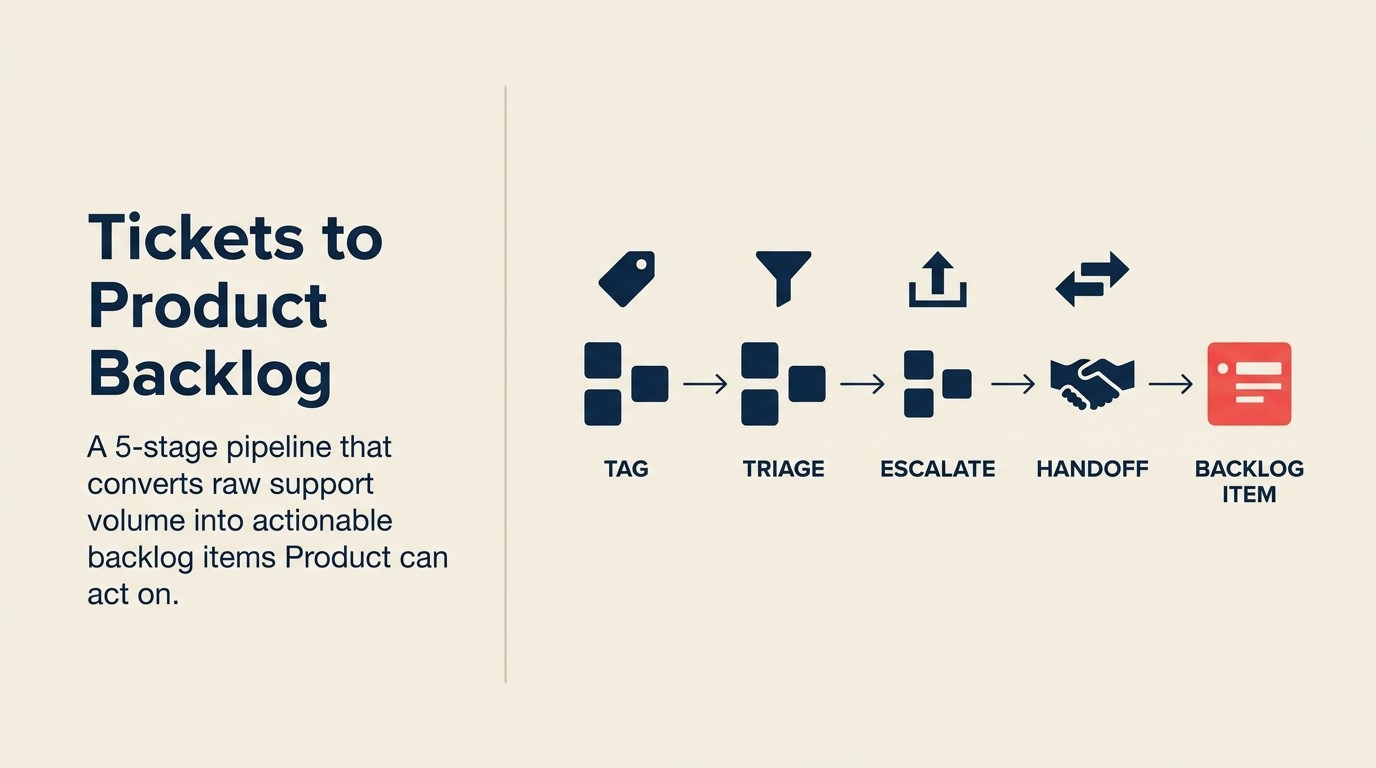
A solução não é uma reunião geral semanal. É um pipeline operacional com cinco etapas definidas e responsáveis claros em cada transferência. O glossário de alinhamento CS-Produto define com precisão o que significam "escalamento", "item do backlog" e "fechamento do ciclo". Isso importa quando suporte, CS e produto estão cada um usando essas palavras de forma diferente.
O Pipeline de Suporte para Backlog em 5 Etapas estrutura essa jornada: Etiquetagem na Entrada → Portão de Triagem → Ponte CS → Transferência para o Backlog → Fechamento do Ciclo. Cada etapa tem um responsável definido, um SLA com prazo e uma saída específica da qual a etapa seguinte depende. Pule qualquer etapa e o sinal se degrada ou desaparece completamente.
Por que os Chamados de Suporte São o Sinal de Produto Mais Subutilizado
Os chamados de suporte têm três propriedades que nenhum outro canal de feedback combina: volume, frequência e linguagem literal do cliente.
Um conselho consultivo de clientes oferece profundidade. Um QBR oferece contexto estratégico. Mas os chamados de suporte oferecem o que os clientes realmente dizem quando estão frustrados e não estão se apresentando para uma audiência. A linguagem que um cliente usa para descrever um bug ou uma solicitação de solução alternativa é frequentemente mais diagnosticamente útil do que qualquer coisa que diria em uma entrevista estruturada.
Mas nenhum desses sinais vive em uma ferramenta de planejamento de roadmap. Ele vive no Zendesk, Intercom ou Freshdesk, fechado e arquivado após a resolução, invisível para a equipe de PM construindo o sprint do próximo trimestre. A pesquisa da McKinsey sobre operações de customer success confirma que a experiência com o produto é um dos dois principais fatores dos resultados de customer success. No entanto, menos de 10% das empresas atribuíram a algum Product Manager responsabilidade formal por agir sobre sinais derivados do suporte.
O pipeline abaixo conecta esses dois mundos. Não requer novas ferramentas. Requer novos hábitos em cinco pontos definidos.
Fatos Relevantes: A Lacuna de Sinal entre Suporte e Produto
- Apenas 23% dos chamados de suporte de clientes que contêm feedback de produto são formalmente escalados para as equipes de produto (relatório de Tendências de Experiência do Cliente do Zendesk). Os 77% restantes são resolvidos e arquivados sem chegar ao backlog.
- Empresas com um pipeline formal de feedback de suporte para produto resolvem problemas recorrentes de nível de produto 40% mais rápido do que aquelas sem um (Gainsight, 2024).
- 61% dos líderes de CS relatam que sua equipe de suporte e equipe de produto usam linguagens diferentes para descrever os mesmos problemas dos clientes, tornando a análise em nível de chamado não confiável sem uma taxonomia compartilhada (Customer Success Collective, 2024).
Etapa 1: Etiquetagem na Entrada
A taxonomia é a base. Sem ela, todas as etapas seguintes ou não acontecem ou produzem ruído.

As quatro categorias de chamado:
- Bug: o produto não está se comportando conforme documentado. O comportamento esperado existe e está errado. Encaminhamento: triagem de engenharia.
- Solicitação de solução alternativa: o cliente está fazendo algo manualmente que deveria ser automatizado. O produto funciona conforme projetado, mas o design cria atrito. Encaminhamento: equipe de plataforma CS ou PM, dependendo da gravidade e frequência.
- Lacuna de funcionalidade: o cliente precisa de funcionalidade que não existe e não pode ser aproximada com os recursos existentes. Encaminhamento: caminho de escalamento CS-PM.
- Problema de treinamento: o produto já consegue fazer o que o cliente está pedindo. A lacuna é de documentação ou integração, não do produto. Encaminhamento: enablement de CS, não PM.
A distinção treinamento/lacuna de funcionalidade é a que os agentes de suporte mais erram. Um chamado que parece "não conseguimos fazer exportações em massa" às vezes é "não conseguimos descobrir como fazer exportações em massa." Errar aqui significa que as caixas de entrada dos PMs se enchem de solicitações de treinamento que deveriam ter ido para a equipe de base de conhecimento.
Estrutura de etiqueta: [Área do produto] + [Categoria do chamado] + [Nível da conta]
Exemplo: CRM > Lacuna de Funcionalidade > Enterprise
Essa estrutura de etiqueta torna o chamado consultável em três dimensões. Você pode perguntar "quantos chamados de lacuna de funcionalidade de nível enterprise atingiram o módulo CRM este mês?" em menos de 30 segundos.
O que acontece quando os chamados ficam sem etiqueta: o sinal desaparece. Chamados sem etiqueta são individualmente pesquisáveis, mas coletivamente invisíveis. Nenhuma agregação é possível. A etapa de detecção de padrões nunca é acionada. Os PMs tomam decisões com base nas vozes mais altas, não nos padrões mais comuns. Quando a etiquetagem é consistente, a próxima pergunta é quais chamados etiquetados realmente saem da fila de suporte.
Nota sobre ferramentas: esta taxonomia funciona no Zendesk, Intercom, Freshdesk e em qualquer outra ferramenta de suporte que suporte etiquetas ou campos personalizados. A implementação específica varia; a estrutura da taxonomia não varia. O stack alinhado de CS e plataforma CRM cobre como suas ferramentas upstream (o CRM e a plataforma CS) precisam estar conectadas antes que a etiquetagem em nível de chamado possa fluir de forma limpa para o backlog de produto sem reentrada manual.
Etapa 2: Portão de Triagem: Problema de Suporte ou Problema de Produto?
Nem todo chamado etiquetado precisa prosseguir. O portão de triagem decide quais chamados saem do sistema de suporte e quais fecham nele.

Critérios de decisão:
O problema pode ser resolvido usando a funcionalidade existente do produto? Se sim, fica no suporte. Se não, ou se a resposta exige uma solução alternativa que não deveria ser necessária, ele avança para o caminho de escalamento de produto.
Quem decide:
Para chamados de bug e lacuna de funcionalidade, o líder da equipe de suporte toma a decisão inicial. Para qualquer chamado onde a decisão é ambígua, a validação do CSM é o próximo passo (Etapa 3). Não encaminhe chamados ambíguos diretamente para o PM. Isso cria o modo de falha de "escalamento ruidoso" onde as caixas de entrada dos PMs se enchem de problemas semitriados.
SLA de escalamento:
Chamados sinalizados como problema de produto devem ser revisados pela equipe de CS dentro de 48 horas da etiquetagem. Se um chamado ficar etiquetado como problema de produto por mais de 48 horas sem revisão do CSM, está efetivamente perdido. O contexto do cliente está obsoleto e o agente de suporte não pode adicionar mais detalhes sem reengajar o cliente.
Modos de falha da triagem:
Excesso de escalamento: o suporte sinaliza tudo para o produto porque "é melhor prevenir do que remediar." A caixa de entrada do PM enche. Os PMs começam a ignorar o canal de escalamento. Sinais reais ficam enterrados em ruído.
Falta de escalamento: o suporte resolve tudo localmente porque "é o nosso trabalho." Bugs conhecidos ficam ocultos por meses. Lacunas de funcionalidade nunca aparecem. Os PMs acreditam que o produto está funcionando melhor do que está.
O portão de triagem só funciona quando os líderes de suporte são treinados nos critérios de decisão e responsabilizados pelo SLA de 48 horas. Nenhuma dessas coisas acontece automaticamente.
Etapa 3: Escalamento para CS: A Etapa de Ponte
Quando o suporte sinaliza um chamado como problema de produto, o CS é a ponte entre a realidade voltada ao cliente e o vocabulário de trabalho da equipe de produto.

O que o CSM faz:
Primeiro, valida se o problema é específico de uma conta ou de múltiplas contas. Um problema específico de uma conta pode ser um problema de configuração ou uma lacuna de treinamento disfarçada de solicitação de funcionalidade. Um problema de múltiplas contas é um sinal de produto. O CSM tem o contexto da conta para fazer essa distinção.
Segundo, enriquece o chamado com as informações que os PMs realmente precisam: o ARR das contas afetadas, o cronograma de renovação para a conta de maior risco que reporta o problema, a pontuação de saúde de cada conta e qualquer contexto de importância estratégica (contas nomeadas, conversas de expansão em andamento).
Terceiro, cria o chamado de ponte: o escalamento formatado que a equipe de PM recebe. Não é um chamado de suporte encaminhado. É um sinal de produto sintetizado.
Formato do chamado de ponte:
Resumo do problema: [1-2 frases em linguagem simples]
Área do produto: [da taxonomia de etiquetas]
Categoria do chamado: [Bug / Solicitação de Solução Alternativa / Lacuna de Funcionalidade]
Contas afetadas: [lista por nome]
ARR total afetado: R$[X]
Conta de maior risco: [Nome, ARR, data de renovação, pontuação de saúde]
Frequência: [N contas únicas, N chamados totais nos últimos 90 dias]
Linguagem literal do cliente: "[citação do chamado: isso é valioso para UX]"
Passos de reprodução (apenas bugs): [passos numerados]
Comportamento esperado vs. comportamento real (apenas bugs): [descrição clara]
Classificação de prioridade do CSM: P1 / P2 / P3 [com breve justificativa]
Esse formato recebe a atenção do PM porque responde às perguntas que os PMs fazem antes de triar qualquer coisa: quantos clientes, quanto ARR, quão reproduzível, quão urgente.
Etapa 4: Transferência para o Backlog de Produto
O chamado de ponte faz o PM olhar. O formato de transferência para o backlog determina se o PM age.

Como um item de backlog bem formado se parece:
Título: [Exportação em massa: clientes não conseguem exportar mais de 500 linhas sem truncamento de dados]
Declaração de impacto no cliente: 14 contas (ARR total R$1,2M) relataram isso nos últimos 90 dias.
  Três contas sinalizaram isso como risco de renovação. Duas estão em conversas ativas de expansão
  onde essa limitação é um bloqueador.
Passos de reprodução: [numerados, verificados pelo suporte]
Comportamento esperado: O usuário pode exportar o conjunto de dados completo independentemente da contagem de linhas
Comportamento real: A exportação trunca em 500 linhas sem mensagem de erro
Linguagem literal do cliente: "Temos que fazer quatro exportações e juntá-las no Excel.
  Isso é constrangedor para mostrar à equipe."
ARR afetado: R$1,2M em 14 contas
Contas com risco de rotatividade: 3 (sinalizadas pelos CSMs como em risco)
Frequência: 22 chamados nos últimos 90 dias, 14 contas únicas
Recomendação de prioridade: P2 (impacto significativo no ARR, sem solução alternativa atual sem manipulação de dados)
Como um item de backlog mal formado se parece:
Título: [Problema de exportação em massa]
Descrição: Vários clientes reclamaram sobre exportação. Podemos corrigir isso?
A versão mal formada é desprioritizada não porque os PMs são irresponsivos, mas porque não conseguem avaliá-la. Sem impacto no ARR, sem passos de reprodução, sem dados de frequência, sem linguagem do cliente. Cada PM na equipe está olhando para 30 itens parecidos com isso. Eles priorizam os que entendem.
Quem é responsável pela transferência:
Em equipes com menos de 10 CSMs, o CSM que escalou o chamado é responsável pela transferência. Em equipes maiores, CS Ops ou um CSM designado como liaison de produto é responsável pela síntese e transferência de todos os problemas de múltiplas contas.
Higiene do backlog:
Distingue três estados: chamados fechados (resolvidos no suporte, sem ação adicional), itens de feedback abertos (reconhecidos pelo PM, em avaliação) e itens de backlog aceitos (comprometidos com um sprint ou trimestre de roadmap). Se você não mantiver essas distinções, "enviado para o produto" perde o sentido. Tudo enviado parece igual a tudo que foi executado.
Etapa 5: Fechamento do Ciclo para o Suporte e o Cliente
Esta é a etapa que a maioria das equipes pula. É também a etapa que determina se o pipeline continuará funcionando daqui a seis meses.

Notifique o suporte quando um chamado se torna um item do backlog:
O agente de suporte que tratou o chamado original deve saber que seu escalamento importou. Não como exercício motivacional, mas como sinal operacional. Se os agentes de suporte nunca souberem o que acontece com os chamados que sinalizam, eles param de sinalizar. O pipeline se degrada pelo desuso.
Uma mensagem simples no Slack ou um comentário no chamado é suficiente: "O problema de exportação em massa que você escalou (Chamado #12847) foi registrado como item do backlog. Prioridade atual: P2. Revisão esperada no próximo planejamento de sprint."
Notifique o cliente quando o chamado influenciou uma decisão de produto:
É aqui que a maioria das equipes hesita porque não quer se comprometer com um cronograma. Mas existe uma linguagem que fecha o ciclo sem fazer promessas. O conteúdo de educação do cliente aborda como transformar essas atualizações em documentação proativa, para que o próximo cliente que tiver o mesmo problema encontre um artigo de ajuda antes de abrir um chamado.
"Queríamos informá-lo de que o problema que você relatou em [mês] foi registrado como item do backlog de produto. Não podemos nos comprometer com um cronograma específico, mas seu relato contribuiu para a equipe priorizar isso. Entraremos em contato quando houver uma atualização de status."
O que não dizer: "Vamos corrigir isso no 3T." Isso é uma promessa. A mensagem de fechamento do ciclo é uma notificação, não um compromisso.
O framework da HBR sobre construção de ciclos de feedback em produtos recomenda tratar o fechamento do ciclo como uma funcionalidade do produto, não como uma etapa do processo. Clientes que recebem retorno após levantar um problema têm significativamente mais probabilidade de reportar o próximo sinal.
O que dizer quando o chamado NÃO será tratado:
"Revisamos o problema que você relatou. Com base nas prioridades atuais e no número de contas afetadas, isso não entrou no backlog ativo. Estamos mantendo o registro e vamos reavaliar no próximo ciclo de planejamento. Obrigado pelos detalhes. Ajudam mesmo quando a resposta imediata é não."
Esta é a mensagem mais difícil de enviar. É também a que constrói mais confiança ao longo do tempo.
Métricas para Acompanhar a Saúde do Pipeline
A orientação de voz do cliente do Gartner observa que o insight de VoC das interações de serviço é um dos ativos estratégicos menos utilizados na maioria das organizações. As equipes o coletam, mas raramente criam um processo contínuo para agir sobre ele no nível de produto.
| Métrica | Meta | O que um não-atingimento sinaliza |
|---|---|---|
| % de chamados etiquetados na entrada | 90%+ | Lacuna de treinamento na taxonomia ou problema de configuração da ferramenta |
| % de chamados sinalizados como produto revisados dentro do SLA de 48h | 85%+ | Problema de capacidade do CSM ou falha no canal de escalamento |
| Taxa de conversão de chamado para backlog | 25-40% | Excesso de escalamento (chamados demais chegando ao PM) ou falta de ação (PM não triando) |
| Taxa de notificação do cliente quando chamados são executados | 100% | Etapa de fechamento do ciclo está sendo pulada |
| Tempo médio do primeiro chamado à triagem do PM | menos de 10 dias úteis | Gargalo de triagem, geralmente na Etapa 2 ou 3 |
Acompanhe mensalmente. Se a taxa de etiquetagem cair abaixo de 80%, o restante do pipeline produz resultados não confiáveis independentemente de quão bem as outras etapas funcionem.
Modos de Falha Comuns
O buraco negro: os chamados são etiquetados e escalados. Nada volta. Os CSMs param de escalar porque não há evidências de que importa. O pipeline se esvazia pelo topo.
Solução: estabeleça um SLA obrigatório de reconhecimento pelo PM. Dentro de cinco dias úteis do recebimento de um chamado de ponte, o PM reconhece o recebimento e fornece uma avaliação preliminar de prioridade. Mesmo "não priorizando este trimestre" fecha o ciclo. As melhores práticas de chamadas de troubleshooting de CS aborda como os CSMs podem estruturar o momento na ligação quando uma lacuna de produto conhecida aparece, ganhando tempo sem fazer promessas enquanto o item do backlog está em avaliação.
O escalamento ruidoso: o excesso de escalamento enche a caixa de entrada do PM. Os PMs criam um filtro mental que desprioritiza qualquer coisa do CS porque a relação sinal-ruído é muito baixa.
Solução: ajuste os critérios da Etapa 2. Apenas problemas de múltiplas contas com impacto no ARR acima de um limite definido escalem para o PM. Problemas de conta única são resolvidos na Etapa 3, a menos que atendam a critérios específicos de conta estratégica.
Promessas que extrapolam: um agente de suporte ou CSM diz ao cliente "vou garantir que o produto saiba disso" de um jeito que o cliente interpreta como compromisso. Expectativas são criadas que o pipeline não consegue cumprir.
Solução: treine suporte e CS na linguagem exata para cada etapa: o que "vou escalar isso" significa (entra no pipeline, não é uma ação direta do PM), o que "foi registrado" significa (existe no backlog, não que vai ser lançado) e o que "vamos mantê-lo atualizado" significa (você vai ouvir do CS quando o status mudar, não diariamente).
Como Isso se Conecta ao Reconhecimento de Padrões
O pipeline de chamados de suporte captura sinais individuais. O reconhecimento de padrões entre CSMs é o que acontece quando você agrega esses sinais em todo o portfólio de contas e busca temas que nenhum chamado individual revela. Os dois processos são sequenciais: os chamados individuais precisam ser etiquetados e estruturados (este pipeline) antes que padrões de múltiplas contas possam ser detectados. E uma vez que os padrões surgem, a pontuação de impacto para o cliente é o que dá ao produto a visão ponderada por ARR e ajustada ao risco de rotatividade que transforma um padrão em uma recomendação de prioridade defensável.
O pipeline de VoC de CS para Produto fornece o contexto mais amplo de como o escalamento de chamados de suporte se encaixa no espectro completo de canais de voz do cliente. A captura sistemática de feedback das notas de CSM para o backlog aborda o canal paralelo onde o feedback se origina em conversas de CSM em vez de interações de suporte. E a integração da plataforma CS com o backlog de produto aborda a camada de ferramentas que automatiza as etapas de transferência descritas aqui.
Análise Rework: Empresas que executam o Pipeline de Suporte para Backlog em 5 Etapas com todas as etapas providas de responsáveis e governadas por SLA atingem uma taxa de conversão de chamado para backlog de 25 a 40%, em comparação com menos de 5% em organizações sem um pipeline formal. O investimento de maior alavancagem é a Etapa 1 (taxonomia) porque determina se todas as etapas seguintes podem funcionar. Equipes que pulam o design da taxonomia e vão direto para os caminhos de escalamento descobrem que as caixas de entrada dos PMs se enchem de ruído sem rótulo em 60 dias, e o canal de escalamento é informalmente abandonado. Nossa recomendação de framework: construa primeiro a taxonomia de quatro categorias, faça um piloto por um mês antes de ativar o portão de triagem e não conecte às caixas de entrada dos PMs até que a taxa de etiquetagem exceda consistentemente 80%.
Saiba Mais
- Reconhecimento de Padrões entre CSMs: O Problema Sistêmico
- O Pipeline de VoC: Como o CS Alimenta o Produto
- Captura Sistemática de Feedback: Notas de CSM para Backlog
- Fechamento do Ciclo de Feedback com Clientes
- Integração da Plataforma CS com o Backlog de Produto
Perguntas Frequentes sobre o Caminho do Chamado de Suporte ao Item de Backlog
O que é o Pipeline de Suporte para Backlog em 5 Etapas?
O Pipeline de Suporte para Backlog em 5 Etapas é um processo operacional estruturado que move chamados de suporte de clientes de reclamação bruta para item acionável do backlog de produto. As cinco etapas são: Etiquetagem na Entrada (classificação baseada em taxonomia), Portão de Triagem (decisão sobre problema de suporte vs. problema de produto), Ponte CS (enriquecimento e escalamento pelo CSM), Transferência para o Backlog (formato pronto para PM) e Fechamento do Ciclo (notificação de volta ao agente de suporte e ao cliente). Cada etapa tem um responsável definido e um SLA com prazo.
Por que apenas 23% dos chamados de suporte com feedback de produto chegam à equipe de produto?
A maioria das organizações não tem um caminho formal de escalamento conectando suporte e produto. Segundo o relatório de Tendências de Experiência do Cliente do Zendesk, 77% dos chamados com feedback de produto são resolvidos e arquivados sem chegar ao backlog. Não porque o feedback não seja valioso, mas porque os agentes de suporte não têm um mecanismo estruturado para encaminhá-lo. Os três elementos ausentes são uma taxonomia compartilhada (para que os chamados sejam classificáveis), um portão de triagem com critérios de decisão claros e um formato de ponte que traduz a linguagem do chamado em dados prontos para o PM.
O que é um chamado de ponte e o que deve incluir?
Um chamado de ponte é o escalamento formatado que um CSM cria quando um problema de suporte é confirmado como um sinal de nível de produto. Não é um chamado de suporte encaminhado. É um documento sintetizado que inclui: resumo do problema em linguagem simples, área do produto e categoria do chamado, nomes das contas afetadas e ARR total, conta de maior risco com data de renovação e pontuação de saúde, dados de frequência (contas únicas e chamados totais em 90 dias), linguagem literal do cliente, passos de reprodução para bugs e uma classificação de prioridade do CSM com justificativa. Esse formato recebe a atenção do PM porque responde às quatro perguntas que os PMs fazem antes de triar qualquer coisa: quantos clientes, quanto ARR, quão reproduzível e quão urgente.
Como é um item de backlog bem formado versus um mal formado?
Um item de backlog bem formado tem um título específico (por exemplo, "Exportação em massa: clientes não conseguem exportar mais de 500 linhas sem truncamento de dados"), uma declaração de impacto no cliente com ARR e contas com risco de rotatividade nomeadas, passos de reprodução verificados pelo suporte, comportamento esperado versus comportamento real, linguagem literal do cliente, dados de frequência por contas únicas e uma recomendação de prioridade com justificativa. Um item mal formado diz "problema de exportação em massa: vários clientes reclamaram, podemos corrigir?" O mal formado é desprioritizado não porque os PMs são irresponsivos, mas porque não conseguem avaliá-lo em relação aos outros 30 itens à sua frente.
O que é o portão de triagem e quem é responsável por ele?
O portão de triagem é a Etapa 2 do Pipeline de Suporte para Backlog em 5 Etapas. É o ponto de decisão onde um líder da equipe de suporte determina se um chamado etiquetado é um problema de suporte (pode ser resolvido com a funcionalidade existente do produto) ou um problema de produto (requer uma solução alternativa que não deveria ser necessária, ou funcionalidade que não existe). Para bugs e chamados de lacuna de funcionalidade com classificação ambígua, o chamado vai para validação do CSM em vez de diretamente para o PM. O SLA de 48 horas para revisão do CSM é o mecanismo de aplicação do portão. Chamados que ficam etiquetados como problemas de produto por mais de 48 horas perdem o contexto do cliente e se tornam efetivamente sinais fechados.
Como fechar o ciclo de feedback sem fazer compromissos?
A linguagem recomendada quando um chamado é executado: "Queríamos informá-lo de que o problema que você relatou em [mês] foi registrado como item do backlog de produto. Não podemos nos comprometer com um cronograma específico, mas seu relato contribuiu para a equipe priorizar isso. Entraremos em contato quando houver uma atualização de status." Quando um chamado não será executado: "Revisamos o problema que você relatou. Com base nas prioridades atuais e no número de contas afetadas, isso não entrou no backlog ativo. Estamos mantendo o registro e vamos reavaliar no próximo ciclo de planejamento. Obrigado pelos detalhes." Ambas as mensagens fecham o ciclo sem fazer promessas.
Que métricas indicam que o pipeline de suporte para backlog está saudável?
Cinco métricas: taxa de etiquetagem na entrada (meta 90%+), revisão de chamado sinalizado como produto dentro do SLA de 48h (meta 85%+), taxa de conversão de chamado para backlog (meta 25-40%), taxa de notificação do cliente quando chamados são executados (meta 100%) e tempo médio do primeiro chamado à triagem do PM (meta abaixo de 10 dias úteis). Se a taxa de etiquetagem cair abaixo de 80%, o restante do pipeline produz dados não confiáveis independentemente de quão bem as outras etapas funcionem. Acompanhe mensalmente; uma queda na taxa de etiquetagem é sempre o primeiro sintoma de uma falha no pipeline.

Principal Solution Architect
On this page
- Por que os Chamados de Suporte São o Sinal de Produto Mais Subutilizado
- Etapa 1: Etiquetagem na Entrada
- Etapa 2: Portão de Triagem: Problema de Suporte ou Problema de Produto?
- Etapa 3: Escalamento para CS: A Etapa de Ponte
- Etapa 4: Transferência para o Backlog de Produto
- Etapa 5: Fechamento do Ciclo para o Suporte e o Cliente
- Métricas para Acompanhar a Saúde do Pipeline
- Modos de Falha Comuns
- Como Isso se Conecta ao Reconhecimento de Padrões
- Saiba Mais