Work Breakdown Structure (WBS): Definition and Examples
Turn this article into takeaways for your work.


Each assistant summarizes the article only for you and suggests best practices for your work.
Most projects fail not because the team lacked skill, but because the scope was never clearly broken down into pieces people could actually own. A work breakdown structure (WBS) fixes that by decomposing every project into a hierarchy of deliverables, giving each work package a clear owner, estimate, and definition of done.
This guide explains what a WBS is, the rules that make it work, the three formats you can use, and how to build one from scratch, with real examples across multiple industries.
What is a work breakdown structure?
A work breakdown structure is a hierarchical, deliverable-oriented decomposition of the total scope of work into smaller, manageable pieces. Every level of the hierarchy represents a more granular definition of the project's output, down to the smallest unit you can realistically estimate and assign.
The WBS was formalized by the U.S. Department of Defense in 1962 through MIL-STD-881, originally to manage the complexity of defense programs like Polaris and Apollo. The Project Management Institute later codified it as a foundational tool in the PMBOK guide, and it's now standard practice across industries from construction to software.
The key distinction: a WBS describes deliverables, not activities. You're answering "what do we produce?" not "what do we do?" That shift prevents scope creep, because once you define every required deliverable, anything not in the WBS is explicitly out of scope. Project deliverables covers the types, how each one is described, and what formal acceptance actually requires.
A WBS integrates naturally with a project plan, a RACI matrix for ownership, and a Gantt chart for scheduling. It's also the basis for cost estimation, risk identification, and resource allocation.
Key Facts
- PMI lists the WBS as a foundational deliverable of project scope management in the PMBOK 7th edition, describing it as essential for defining and controlling what is and is not included in a project.
- The U.S. DoD MIL-STD-881, first issued in 1962 and updated to version 881F in 2025, remains the canonical WBS standard for defense acquisition programs.
- A 2024 Wellingtone State of Project Management report found that only 46% of organizations consistently use a WBS across their projects, pointing to a significant gap between best practice and reality.
The 100% rule and the 8/80 rule
The 100% rule
The 100% rule is the most important principle in WBS design: the WBS must capture 100% of the work defined in the project scope. That means every deliverable, sub-deliverable, and work package rolls up to 100% of the parent level, with no gaps and no overlap.

If a deliverable isn't in the WBS, the team won't plan for it, estimate it, or deliver it. If work appears in two places, the team will duplicate effort or argue about ownership. The 100% rule prevents both problems by making the scope visible and complete at every level.
Checking for compliance is straightforward: for any parent item, the sum of its children should equal exactly 100% of that parent. If you can point to work that doesn't fit anywhere, or two items that seem to cover the same ground, the structure needs revision.
The 8/80 rule
The 8/80 rule is a practical sizing guideline for work packages: no work package should be smaller than 8 hours or larger than 80 hours of effort. Packages under 8 hours add administrative overhead without meaningful insight. Packages over 80 hours are too large to estimate confidently or track accurately.
The rule is a heuristic, not a law. A two-week project might use a 4/40-hour range, while a multi-year program might allow packages up to 160 hours. The intent is the same: keep work packages small enough to estimate, assign to one owner, and track to completion within a single reporting period.
WBS levels and components
The hierarchy moves from one project to major deliverables, sub-deliverables, and finally work packages that a person or team can own.

| Level | Item | Owner | Example |
|---|---|---|---|
| 1 | Project | Project sponsor | Website Redesign |
| 2 | Major deliverable or phase | Project manager | 1.2 Design |
| 3 | Sub-deliverable | Work stream lead | 1.2.1 Wireframes |
| 4+ | Work package | Individual contributor | 1.2.1.1 Mobile wireframes |
Level 1 is the project itself. There's exactly one item at this level.
Level 2 represents major deliverables or phases. In a deliverable-based WBS, these are tangible outputs (Discovery, Design, Build, Launch). In a phase-based WBS, they're project phases. Both are valid; deliverable-based tends to be more durable because phases change but outputs don't.
Level 3 and below are progressively finer decompositions until you reach work packages: the lowest level at which work is planned, estimated, and assigned. A work package should be completable by one person or one team within the 8/80-hour range.
The WBS dictionary is a companion document that defines each element: its description, acceptance criteria, assigned owner, estimated effort, required resources, and predecessor/successor dependencies. Without the dictionary, the WBS is a structure without substance. Think of the WBS as the map and the dictionary as the legend.
3 types of WBS (tree, list, tabular)
Tree (org-chart style)
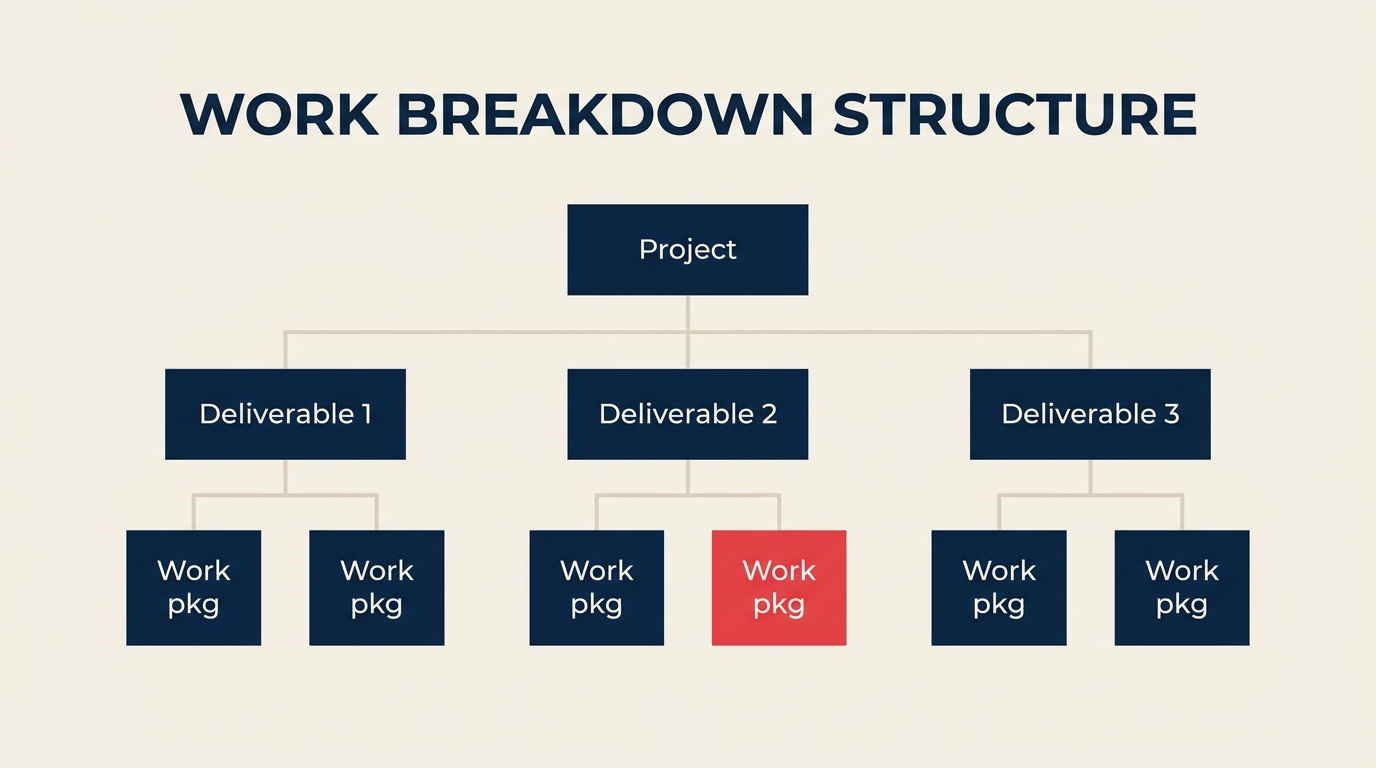
The tree format looks like an organizational chart, with the project at the top and each level branching downward. It's the most visually intuitive format and makes the hierarchy immediately obvious.

Use the tree format for stakeholder presentations, kickoff meetings, and any situation where you need to communicate the full scope structure at a glance. The limitation is space: large projects with many work packages become hard to read in a single diagram.
Example tree: Project at the top, three deliverable boxes in the middle, six work package boxes at the bottom, connected by lines.
Indented list (outline format)
The indented list formats the WBS as a numbered outline. It's compact, easy to produce in any word processor or project tool, and simple to version-control in a plain text file.
1.0 Website Redesign
  1.1 Discovery
    1.1.1 Stakeholder interviews
    1.1.2 Competitive analysis
  1.2 Design
    1.2.1 Wireframes
    1.2.2 Visual design
Use the list format for documentation, detailed planning sessions, and when you need to share the WBS in a text-based tool. It pairs well with standard operating procedures that reference specific deliverables by WBS code.
Tabular
The tabular format presents the WBS as a spreadsheet or table. Each row is a WBS element with columns for code, deliverable name, owner, estimated hours, and status.
| WBS Code | Deliverable | Owner | Hours |
|---|---|---|---|
| 1.0 | Website Redesign | PM | |
| 1.1 | Discovery | UX Lead | |
| 1.1.1 | Stakeholder interviews | UX Lead | 16 |
| 1.1.2 | Competitive analysis | UX Lead | 8 |
Use the tabular format when the WBS feeds directly into resource planning, cost estimation, or project tracking. It integrates cleanly with spreadsheets and most project management tools.
How to create a WBS in 6 steps
The six-step method turns a project objective into a complete, approved scope baseline that teams can estimate and assign.

Step 1: Define the project objective
Start with the project charter or scope statement. You need one sentence that defines the project's final deliverable: "Launch a redesigned company website by Q4 2026." Without a clear objective, the WBS will drift as stakeholders add scope.
- Confirm the project objective with the sponsor.
- Identify what success looks like (acceptance criteria).
- Document what is explicitly out of scope.
Step 2: Identify major deliverables (phases)
Break the project into 4-8 major deliverables or phases. These become Level 2 in the WBS. For most projects, natural phases emerge from the work: Discovery, Design, Development, Testing, Deployment, and Handoff.
- List every major output the project must produce.
- Group related outputs if there are more than 8 at this level.
- Avoid mixing deliverables and phases in the same WBS unless the project structure demands it.
Step 3: Decompose into work packages
Take each Level 2 deliverable and break it into sub-deliverables until you reach the 8/80-hour threshold. This is the most time-consuming step, and it's where most WBS errors occur.
- Decompose one branch at a time, top to bottom.
- Stop when a deliverable can be assigned to a single owner and estimated with confidence.
- Don't decompose below the level you'll actually track.
Step 4: Apply the 100% rule
Verify that every level sums to 100% of its parent. Walk each branch and ask: "Is there any work required to produce this deliverable that isn't captured here?" If yes, add it. If two items overlap, merge or split them.
- Check for missing deliverables (gaps).
- Check for duplicate deliverables (overlaps).
- Confirm that work not in the WBS is explicitly out of scope.
Step 5: Build the WBS dictionary
For each work package, document: description, owner, estimated effort, required inputs, deliverable criteria, and dependencies. The dictionary turns the WBS from a diagram into a contract.
- Use a consistent template for every entry.
- Assign a unique WBS code to each element (e.g., 1.2.3).
- Link the dictionary to your project plan and schedule.
Step 6: Baseline and update
Once the sponsor approves the WBS and dictionary, you have a scope baseline. Any change to a work package now requires formal change control.
- Save the baseline version with a date stamp.
- Update the WBS when approved scope changes occur.
- Communicate changes to all stakeholders who own affected work packages.
WBS examples by industry
Website redesign
Indented list:
1.0 Website Redesign
  1.1 Discovery
    1.1.1 Stakeholder interviews
    1.1.2 Competitive analysis
  1.2 Design
    1.2.1 Wireframes
    1.2.2 Visual design
    1.2.3 Component library
  1.3 Build
    1.3.1 Front-end development
    1.3.2 CMS configuration
  1.4 Launch
    1.4.1 QA testing
    1.4.2 Go-live deployment
| WBS Code | Deliverable | Work Package |
|---|---|---|
| 1.1.1 | Discovery | Stakeholder interviews |
| 1.2.2 | Design | Visual design |
| 1.3.1 | Build | Front-end development |
Software release
1.0 Software v2.0 Release
  1.1 Requirements
    1.1.1 Feature specifications
    1.1.2 Acceptance criteria
  1.2 Development
    1.2.1 Backend API changes
    1.2.2 Frontend UI updates
    1.2.3 Database migrations
  1.3 Testing
    1.3.1 Unit tests
    1.3.2 Integration tests
    1.3.3 UAT
  1.4 Release
    1.4.1 Release notes
    1.4.2 Production deployment
| WBS Code | Deliverable | Work Package |
|---|---|---|
| 1.1.1 | Requirements | Feature specifications |
| 1.2.2 | Development | Frontend UI updates |
| 1.3.3 | Testing | User acceptance testing |
Office relocation
1.0 Office Relocation
  1.1 Planning
    1.1.1 Floor plan design
    1.1.2 Vendor selection
  1.2 Logistics
    1.2.1 IT infrastructure move
    1.2.2 Furniture transport
  1.3 Setup
    1.3.1 Workstation configuration
    1.3.2 Network testing
  1.4 Closeout
    1.4.1 Old office decommission
    1.4.2 Address change notifications
| WBS Code | Deliverable | Work Package |
|---|---|---|
| 1.1.2 | Planning | Vendor selection |
| 1.2.1 | Logistics | IT infrastructure move |
| 1.3.1 | Setup | Workstation configuration |
WBS vs project schedule vs Gantt chart
These three artifacts are complementary, not interchangeable. Many teams skip the WBS and go straight to a Gantt chart, which means they're scheduling work they haven't fully defined yet.
| Artifact | Question it answers | Output | Common tools |
|---|---|---|---|
| WBS | What must we produce? | Deliverable hierarchy + dictionary | Lucidchart, Miro, Excel |
| Project schedule | In what order and by when? | Timeline with milestones and dates | MS Project, Asana, Jira |
| Gantt chart | Who does what, when? | Bar chart mapping tasks to time | MS Project, Monday.com, TeamGantt |
The WBS feeds the schedule: once you have all work packages, you sequence them, assign durations, and assign resources to produce the schedule. The Gantt chart is the schedule visualized as bars on a timeline.
You can read more about sequencing and visual planning in the guide to Kanban and waterfall methodology.
Best practices and common mistakes
Best practices:
- Deliverables, not activities. The WBS answers "what do we produce?" If an element sounds like a verb (e.g., "conduct interviews"), reframe it as a deliverable (e.g., "interview findings report").
- One owner per work package. If two people share ownership, split the package or assign a primary owner with supporting contributors defined in the dictionary.
- Right level of detail. Stop decomposing when a work package meets the 8/80-hour threshold and has a clear acceptance criterion. Over-decomposing adds bureaucracy without insight.
- WBS dictionary is non-optional. A diagram without a dictionary leaves too much open to interpretation.
- Involve the team. WBS sessions run by the PM alone produce blind spots. The people doing the work know what the work actually requires.
Common mistakes:
- Including activities, not deliverables. Putting "Write code" instead of "Backend API module" leads to a schedule masquerading as a WBS.
- Orphan work. Work that's done but not captured in any WBS element is invisible to planning, estimation, and change control.
- Overlap between work packages. Two packages that cover the same output cause confusion and double-counting in estimates.
- Skipping the 100% check. Most scope gaps are found only after the project starts, when the missing deliverable becomes a crisis.
- Never updating the baseline. A WBS that doesn't reflect approved scope changes becomes inaccurate, and the team stops trusting it.
The WBS also complements business process management practices: when you document your processes and your project scope together, you can see exactly where project deliverables must align with ongoing operations.

Senior Operations & Growth Strategist
On this page
- What is a work breakdown structure?
- Key Facts
- The 100% rule and the 8/80 rule
- The 100% rule
- The 8/80 rule
- WBS levels and components
- 3 types of WBS (tree, list, tabular)
- Tree (org-chart style)
- Indented list (outline format)
- Tabular
- How to create a WBS in 6 steps
- Step 1: Define the project objective
- Step 2: Identify major deliverables (phases)
- Step 3: Decompose into work packages
- Step 4: Apply the 100% rule
- Step 5: Build the WBS dictionary
- Step 6: Baseline and update
- WBS examples by industry
- Website redesign
- Software release
- Office relocation
- WBS vs project schedule vs Gantt chart
- Best practices and common mistakes