Risk Matrix: 5x5 Template, Examples & How to Score Risk
Turn this article into takeaways for your work.


Each assistant summarizes the article only for you and suggests best practices for your work.
A risk matrix is a grid that scores each risk by how likely it is to happen (probability) and how badly it would hurt if it did (impact), then multiplies the two into one priority score. A 5x5 matrix gives scores from 1 to 25, so you can rank risks, assign owners, and decide what to fix first.
Project managers, risk officers, and executives use it before anything consequential, from a product launch to a supplier change. This guide covers how it works, how it differs from a risk register, heat map, and FMEA, when to pick 3x3, 4x4, or 5x5, a template to copy, and worked examples by function.
What Is a Risk Matrix?
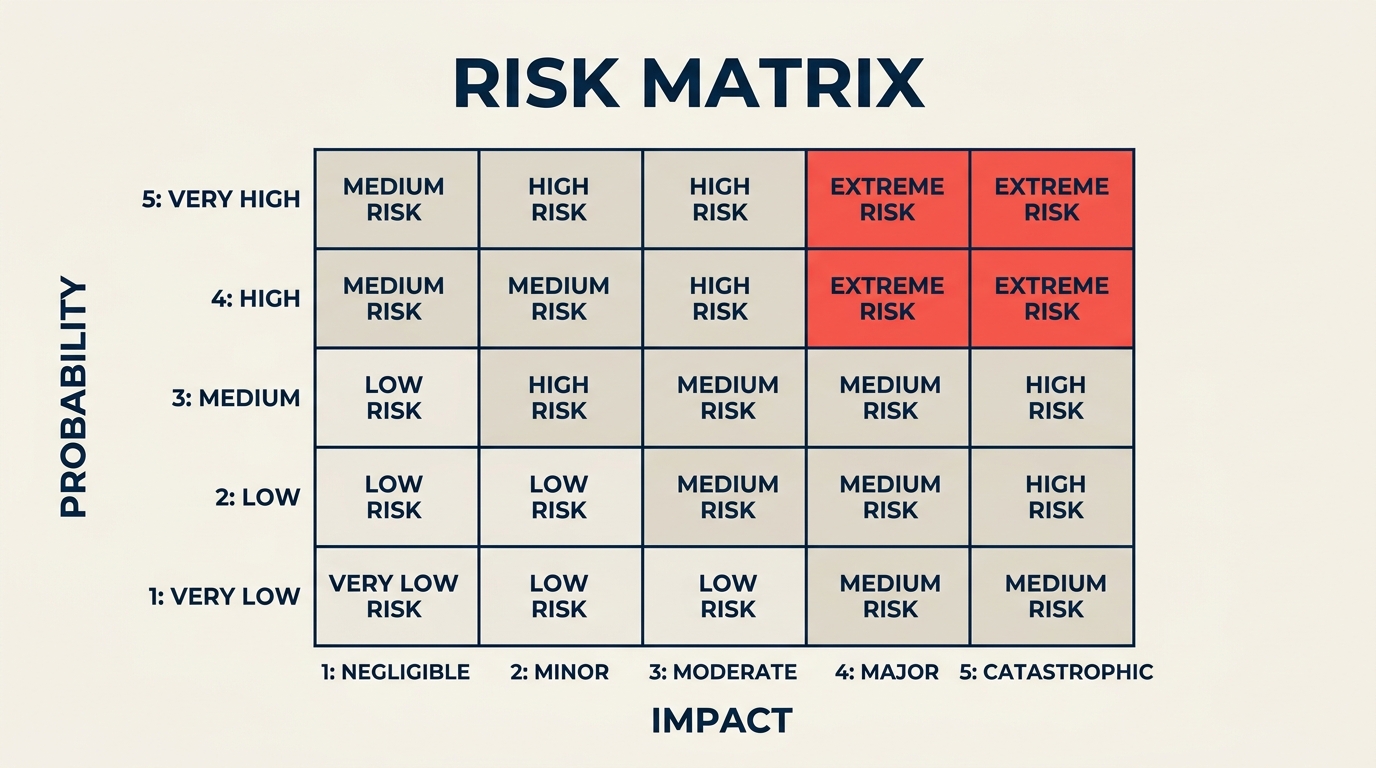
A risk matrix (also called a probability and impact matrix or risk assessment matrix) is a two-dimensional grid that plots risks by their likelihood of occurrence on one axis and their severity of impact on the other. Each cell in the grid represents a combined risk score. The higher the score, the more urgent the response.
The core formula is short:
Risk Score = Probability x Impact
The power comes from applying it the same way to every risk, so a supply-chain delay and a data breach both become numbers you can sort, color-code, and assign owners to. The general standard for this discipline, ISO 31000, treats risk management as a process of identifying, analysing, evaluating, and treating risk, and it leaves the choice of scoring technique to each organization. That's why matrix scales vary so much from one company to the next.
The matrix doesn't replace judgment. It structures it. The grid tells you where to look first; your team decides what to do about it.
Key Facts
- The UK Health and Safety Executive describes assessing a risk as deciding how likely it is that someone could be harmed and how serious it could be. Those two questions are exactly the two axes of a risk matrix.
- HSE frames risk management as five steps: identify hazards, assess the risks, control the risks, record your findings, and review the controls. A matrix lives in step two and feeds step three.
- HSE says employers with five or more people must record their significant findings, which is why a dated, versioned matrix doubles as an audit trail.
- Score zones are a convention, not a law. The 1-4 / 5-9 / 10-16 / 17-25 bands used in this guide are a practical default for a 5x5 grid. Adjust them to your own appetite for risk, then keep them fixed.
Risk Matrix vs Risk Register vs Risk Heat Map vs FMEA
These four terms get used interchangeably, and they shouldn't be. They answer different questions and work best as a set.
| Risk matrix | Risk register | Risk heat map | FMEA | |
|---|---|---|---|---|
| What it is | A scoring grid (probability x impact) | A running log of every identified risk | A color-coded picture of the matrix, often showing how many risks sit in each cell | A structured worksheet that scores failure modes |
| Main output | A ranked priority score per risk | Owner, status, response, and history per risk | A one-page visual for steering committees | A Risk Priority Number (RPN) per failure mode |
| Scoring | 2 factors: probability and impact | None by itself (it stores the matrix scores) | Uses the matrix scores | 3 factors: severity, occurrence, and detection |
| Best for | Ranking risks fast in a workshop | Tracking risks over the life of a project | Communicating risk to executives | Engineering, manufacturing, and process failures |
| Weakness | Coarse; ties are common | Becomes a graveyard if nobody reviews it | Hides the detail behind the colors | Heavier to run; needs subject experts |
In practice the risk register holds the list, the matrix scores each entry, the heat map shows leadership the result, and FMEA goes deeper on technical failure modes. FMEA adds a third factor, detection (how likely you are to catch the problem before it causes harm), which a probability-and-impact matrix ignores. If your risk is "something might break and we won't notice," use FMEA. If it's "something might happen to the project," start with the matrix.
How a Risk Matrix Works
The matrix has two axes. Probability (or likelihood) runs along one axis, typically vertical. Impact (or consequence) runs along the other, typically horizontal. Each axis is divided into rating levels: three levels for a 3x3 matrix, five for a 5x5.

Probability scale
These percentage bands are a typical starting point. Calibrate them to your own projects.
| Level | Label | Definition |
|---|---|---|
| 1 | Rare | Less than 10% chance; has not happened on similar projects |
| 2 | Unlikely | 10-30% chance; has happened occasionally |
| 3 | Possible | 30-50% chance; would not be surprising |
| 4 | Likely | 50-75% chance; has happened on most similar projects |
| 5 | Almost Certain | Over 75% chance; expected to occur |
Impact scale
| Level | Label | Definition |
|---|---|---|
| 1 | Negligible | Minor inconvenience; no effect on schedule, cost, or quality |
| 2 | Minor | Small delay or cost overrun; resolved internally |
| 3 | Moderate | Noticeable impact on scope, budget, or timeline; requires management attention |
| 4 | Major | Significant cost overrun or schedule slip; affects project objectives |
| 5 | Catastrophic | Project failure, severe financial loss, regulatory breach, or safety incident |
Risk score zones (5x5 grid)
Multiply probability by impact to get the risk score (1 to 25). Each cell below shows the score and its zone (L = Low, M = Medium, H = High, C = Critical).
| Probability / Impact | 1 Negligible | 2 Minor | 3 Moderate | 4 Major | 5 Catastrophic |
|---|---|---|---|---|---|
| 5 Almost Certain | 5 (M) | 10 (H) | 15 (H) | 20 (C) | 25 (C) |
| 4 Likely | 4 (L) | 8 (M) | 12 (H) | 16 (H) | 20 (C) |
| 3 Possible | 3 (L) | 6 (M) | 9 (M) | 12 (H) | 15 (H) |
| 2 Unlikely | 2 (L) | 4 (L) | 6 (M) | 8 (M) | 10 (H) |
| 1 Rare | 1 (L) | 2 (L) | 3 (L) | 4 (L) | 5 (M) |
Score zones:
- 1-4 (Low): Monitor; no immediate action required
- 5-9 (Medium): Assign an owner; plan a response but may accept
- 10-16 (High): Actively manage; mitigation required before the project proceeds
- 17-25 (Critical): Escalate immediately; may require stopping or redesigning the project
One known weakness of multiplying two ordinal scales: different risks can land on the same number. A rare catastrophic risk (1 x 5 = 5) scores the same as a near-certain trivial one (5 x 1 = 5). Add an override rule so the math doesn't hide the dangerous one: any risk with an impact of 5 gets reviewed by a senior owner no matter what its score says.
3x3 vs 4x4 vs 5x5 Risk Matrix
The most common question is how many levels to use per axis. All three sizes work. The right pick depends on your project's complexity and how much scoring detail your team can sustain without arguing about whether something is a 3 or a 4.

| Dimension | 3x3 Matrix | 4x4 Matrix | 5x5 Matrix |
|---|---|---|---|
| Score range | 1-9 | 1-16 | 1-25 |
| Best for | Simple projects, early scoping, executive overviews | Teams that default to "3 out of 5" for everything | Complex projects, regulated industries, formal risk registers |
| Granularity | Low (coarse buckets) | Medium | High (finer distinctions) |
| Tie scores | Most common | Fewer | Fewest |
| Calibration effort | Low | Medium | Higher (five levels need sharper definitions) |
| Common use | Small teams, rapid risk workshops | Mid-size programs, operations reviews | PMO-led programs, construction, pharma, IT transformation |
How to choose:
- Pick 3x3 for a first-pass scan, a non-specialist audience, or fewer than about 15 risks.
- Pick 4x4 when your team keeps scoring everything as the middle value. An even number of levels has no middle, so people have to take a side.
- Pick 5x5 when you need to separate a 20% probability from a 40% one, when an auditor or regulator will read the output, or when the project is large enough that dozens of risks compete for the same mitigation budget.
Whatever you choose, don't change size mid-project, or trend lines become meaningless.
How to Build a Risk Matrix
Building the matrix is a five-part discipline: calibrate both scales, identify the risks, score them consistently, set action thresholds, and assign ownership.

Step 1: Define your probability levels
Write down what each probability rating actually means for your project. "Likely" means different things on a two-week sprint versus a three-year infrastructure program. Tie each level to a percentage range and, where possible, a historical reference point your team recognizes.
Step 2: Define your impact levels
Do the same for impact. Map each level to real consequences: how many days of schedule slip, what cost overrun threshold, what quality or regulatory outcome. Concrete anchors reduce subjective drift when different people score the same risk.
Step 3: Identify and list your risks
Gather risks through a structured brainstorm, expert interviews, lessons-learned logs, or a pre-mortem exercise. Your project charter often holds the first list of assumptions and constraints worth checking. Log each risk in a risk register before scoring. The matrix ranks risks; the register tracks them over time.
Step 4: Score each risk
For each risk, assign a probability rating and an impact rating independently. Do this as a group when you can. Outlier scores surface hidden assumptions worth discussing. Multiply the two ratings to get the risk score, then plot the risk on your grid.
Step 5: Set response thresholds and assign owners
Decide in advance what each score zone requires. Critical risks need a named owner, a mitigation plan, and a review date before work continues. High risks need a response plan within the week. Medium risks go on the watch list. Low risks get noted and monitored. Without predefined thresholds, the matrix becomes a decoration rather than a decision tool. A RACI matrix is a quick way to make sure each risk has one accountable owner rather than three people who each assume someone else has it.
Free 5x5 Risk Matrix Template (Copy and Paste)
Copy the blocks below into Excel, Google Sheets, or Notion, and replace the sample text with your own definitions.
Template 1: The blank 5x5 grid
Fill each cell with the IDs of the risks that land there (R1, R4, and so on).
| Probability / Impact | 1 Negligible | 2 Minor | 3 Moderate | 4 Major | 5 Catastrophic |
|---|---|---|---|---|---|
| 5 Almost Certain | |||||
| 4 Likely | |||||
| 3 Possible | |||||
| 2 Unlikely | |||||
| 1 Rare |
Template 2: The scoring log
This is the working sheet behind the grid. One row per risk.
| ID | Risk description | Category | Probability (1-5) | Impact (1-5) | Score | Zone | Owner | Response | Next review |
|---|---|---|---|---|---|---|---|---|---|
| R1 | |||||||||
| R2 | |||||||||
| R3 |
If you build the log in a spreadsheet, put probability in column D and impact in column E, then use two formulas in row 2 and fill them down:
- Score (column F):
=D2*E2 - Zone (column G):
=IF(F2>=17,"Critical",IF(F2>=10,"High",IF(F2>=5,"Medium","Low")))
Template 3: The response rules
Paste the zone rules from the score zones section above (Critical, High, Medium, Low, and the action each one triggers) next to the grid so nobody has to guess what a color means.
Don't copy the sample cutoffs without thinking about them. The UK Health and Safety Executive, which publishes example risk assessments for offices, shops, warehouses, and factories, warns against simply putting your company name on an example, because it won't reflect the hazards and controls your business actually has. The same goes for a template. Treat it as scaffolding.
Risk Matrix Example: IT Project (Cloud Migration)
A SaaS company is migrating its customer database to a new cloud provider. The project manager runs a risk workshop and surfaces five key risks.

| Risk | Probability | Impact | Score | Zone |
|---|---|---|---|---|
| Data loss during migration | 2 (Unlikely) | 5 (Catastrophic) | 10 | High |
| Third-party vendor delay | 4 (Likely) | 3 (Moderate) | 12 | High |
| Team availability conflict (vacation overlap) | 3 (Possible) | 2 (Minor) | 6 | Medium |
| Regulatory review takes longer than planned | 2 (Unlikely) | 4 (Major) | 8 | Medium |
| Performance degradation post-migration | 3 (Possible) | 3 (Moderate) | 9 | Medium |
The data loss risk scores 10 despite a low probability because the impact would be catastrophic. It gets a named owner (the engineering lead), a rollback plan documented before migration starts, and a daily status check during the cutover window. The vendor delay risk scores 12 and gets a contract clause and a backup vendor identified. The other three go on the watch list with bi-weekly check-ins.
More Risk Matrix Examples by Function
The same grid works outside IT. These three examples use the scales and zones above. The scores are illustrative, so re-score them against your own definitions.
Product launch
A product team is two months from releasing a new pricing plan.
| Risk | P | I | Score | Zone | First response |
|---|---|---|---|---|---|
| Late QA defects push the launch date | 4 | 3 | 12 | High | Freeze scope two weeks earlier; daily bug triage |
| Support team isn't trained before go-live | 3 | 4 | 12 | High | Schedule training in week 6; ship a one-page FAQ |
| Privacy review blocks launch in one market | 2 | 5 | 10 | High | Start legal review now; prepare a phased rollout |
| Competitor announces a similar feature first | 3 | 3 | 9 | Medium | Prepare a positioning note; no schedule change |
| Billing error appears on the new plan at go-live | 2 | 4 | 8 | Medium | Test invoices end to end before release |
Nothing here is "Critical," and that's fine. If the legal review risk moved to probability 4, it would score 20 and the launch plan would change.
Vendor and supplier risk
A manufacturer relies on a single supplier for a key component.
| Risk | P | I | Score | Zone | First response |
|---|---|---|---|---|---|
| Sole-source supplier misses a delivery | 3 | 5 | 15 | High | Qualify a second source; hold four weeks of buffer stock |
| Supplier suffers a data breach exposing our designs | 2 | 5 | 10 | High | Require security attestation; limit shared files |
| Supplier raises prices above the contract cap | 4 | 2 | 8 | Medium | Add a price-review clause; benchmark alternatives |
| Quality drifts on incoming shipments | 3 | 3 | 9 | Medium | Add incoming inspection sampling |
| Supplier goes out of business | 1 | 5 | 5 | Medium | Apply the impact-5 override: senior owner reviews it |
The last row shows why the override rule exists: on score alone, supplier failure looks medium, but the impact is catastrophic.
Health and safety
A distribution business reviews its warehouse and the office next to it. The UK Health and Safety Executive publishes example risk assessments for settings like these, and advises looking back at accident and ill-health records and talking to workers to find hazards. The matrix ranks what you find.
| Hazard | P | I | Score | Zone | First response |
|---|---|---|---|---|---|
| Manual handling injury while lifting stock | 4 | 4 | 16 | High | Lifting aids; handling training; rotate tasks |
| Fire exit blocked by stored boxes | 3 | 5 | 15 | High | Floor markings; daily walk-through checklist |
| Slips and trips on wet or cluttered aisles | 4 | 3 | 12 | High | Spill kits; keep aisles clear; inspect daily |
| Forklift and pedestrian collision | 2 | 5 | 10 | High | Separate walkways; speed limits; spotters |
| Display screen strain in the office | 4 | 2 | 8 | Medium | Workstation assessments; break reminders |
In safety work the matrix is a prioritization aid, not a legal defense. HSE expects you to do what is "reasonably practicable," balancing the level of risk against the money, time, or trouble needed to control it. The score tells you where to spend that effort first.
Benefits of a Risk Matrix
- Shared vocabulary. A developer, a finance lead, and an executive can look at the same cell and agree on what it means.
- Prioritization at scale. With 30 or 40 identified risks, you cannot act on all of them equally. The matrix forces a ranking.
- Stakeholder communication. Color-coded zones are far more legible in a steering committee deck than a table of raw numbers.
- Audit trail. A dated, versioned matrix shows regulators and sponsors that risks were formally assessed. In pharmaceuticals, construction, and finance, that trail is often mandatory.
Risk Matrix Do's and Don'ts
Do
- Define every level in writing. Attach a percentage range or concrete example to each probability level, and a days, dollars, or outcome anchor to each impact level.
- Score independently, then compare. Have each person write down numbers before the discussion. The gaps are where the useful conversations are.
- Name one owner per risk. A risk without a person's name on it has no owner, whatever the register says.
- Predefine what each zone triggers. Decide the response before you see the scores, so nobody negotiates a red cell down to orange.
- Calibrate with history. Use the actual frequency of past risks to anchor probability. Gut feel drifts; incident logs do not.
Don't
Don't score without anchors. If levels are just "low," "medium," and "high," five people will give five scores to the same risk.
Don't ignore the zone thresholds. A beautiful, correctly colored matrix is worthless if a Critical risk goes on a watch list instead of escalating.
Don't treat it as a one-time deliverable. A risk that was low-probability at kickoff can become almost certain by month three. Re-score after requirements freeze, after procurement, and after go-live. HSE's guidance on reviewing controls points to the same triggers: changes in staff, process, or equipment, plus accidents and near misses.
Don't blend impact categories. A two-week delay might cost almost nothing for an internal team and be catastrophic on a fixed-price contract with penalties. For high-stakes programs, keep separate columns (cost, schedule, safety, reputation) and score the worst one.
Don't let every risk drift to the middle. If everything lands in the medium zone, your definitions are too loose. The top-right cells should be sparsely populated.
Best Practices
- Separate inherent and residual risk. Score before controls (inherent) and after (residual). If the residual score is still High, you need stronger mitigation.
- Pair it with a RAID log. The matrix ranks risks; the RAID log tracks them alongside assumptions, issues, and dependencies.
- Tie it to a project risk management plan. The plan defines how often you re-score, who attends reviews, and how risks escalate. Without it, the matrix floats free.
- Feed bigger calls. For choices like which market to enter or which vendor to retire, use the score as one input to risk-based decision-making.
- Add a quantitative layer when it matters. A matrix can't model several risks firing at once. For large schedule or budget exposure, use Monte Carlo simulation.
- Know who needs to hear about each risk. A stakeholder analysis matrix shows who cares about which risk and who can approve mitigations. When you have more High risks than capacity, rank the responses with MoSCoW prioritization.
- Keep it where the work happens. A grid in a slide deck is stale within a week. If your team already plans work in a project tool such as Rework's Work Ops, store the risk log next to the tasks so owners see their mitigation items with everything else they've committed to.
A risk matrix gives you a structured way to stop treating every risk as equally urgent. Score it once, assign the right response to each zone, and revisit it as the project evolves. Combined with a solid risk register and a clear escalation path, it becomes one of the most practical tools in any project manager's kit.

Senior Operations & Growth Strategist
On this page
- What Is a Risk Matrix?
- Risk Matrix vs Risk Register vs Risk Heat Map vs FMEA
- How a Risk Matrix Works
- Probability scale
- Impact scale
- Risk score zones (5x5 grid)
- 3x3 vs 4x4 vs 5x5 Risk Matrix
- How to Build a Risk Matrix
- Step 1: Define your probability levels
- Step 2: Define your impact levels
- Step 3: Identify and list your risks
- Step 4: Score each risk
- Step 5: Set response thresholds and assign owners
- Free 5x5 Risk Matrix Template (Copy and Paste)
- Template 1: The blank 5x5 grid
- Template 2: The scoring log
- Template 3: The response rules
- Risk Matrix Example: IT Project (Cloud Migration)
- More Risk Matrix Examples by Function
- Product launch
- Vendor and supplier risk
- Health and safety
- Benefits of a Risk Matrix
- Risk Matrix Do's and Don'ts
- Do
- Don't
- Best Practices