Best Nutshell Alternatives in 2026: 10 Simple CRMs for Small and Mid-Size Sales Teams
Turn this article into takeaways for your work.


Each assistant summarizes the article only for you and suggests best practices for your work.
Nutshell built its reputation on a straightforward promise: a CRM that small sales teams can actually use without a consultant. The pipeline views are clean, onboarding is fast, and the price is reasonable. For teams that just needed a place to track deals and send a few drip campaigns, Nutshell delivered.
But as those teams grow (or as their sales motion gets more complex), the cracks start showing. Automation rules stay shallow. Reports cover the basics but not much more. The integration library is thin compared to what most modern sales stacks need. And if you're trying to run true multi-channel outreach (email, chat, calls, LinkedIn), Nutshell's toolset runs out of runway fast. If you're in that position (needing more without wanting to jump to something overwhelming), this guide is for you. For a direct comparison between Rework and Nutshell, read Rework vs Nutshell.
Key Facts: CRM Switching in 2026
- 91% of companies with 11+ employees now use CRM software, making the choice of platform (not just whether to adopt) the critical decision. (Zippia, 2026)
- CRM applications can increase sales by up to 29%, sales productivity by up to 34%, and forecast accuracy by 42% when properly utilized. (Salesforce Research)
- 63% of CRM initiatives fail, with poor user adoption cited as the leading cause, making ease-of-use the most important selection criterion for SMBs. (Merkle Group)
- A typical 15-person sales team should budget $40,000–$90,000 for a full CRM migration when accounting for productivity loss, training, and parallel subscription costs. (Dench, 2025)
- SMBs adopt CRM software at a 9.54% CAGR (faster than large enterprises) because digital-first sales motions demand a single source of customer truth from day one. (Mordor Intelligence)
Fewer than 40% of CRM customers achieve end-user adoption rates above 90%, according to research compiled by CRM.org. The most common reason a CRM switch fails is the same reason the last one failed: the team doesn't use it. The alternatives below are ranked with that reality in mind.
Quick Comparison Table
Use this table as the first pass filter. The goal is not to crown a universal winner; it is to separate lightweight pipeline tools, broader go-to-market platforms, and CRMs built for a specific sales motion.
| Tool | Best For | Starting Price | Key Strength | Key Limitation |
|---|---|---|---|---|
| Rework | Small-to-mid teams needing CRM + multi-channel inbox | From $69/mo billed yearly for 5 seats; $159/mo with inbox and lead capture (Revenue Engine) (rework.com/pricing) | Unified inbox + pipeline + lead management | Newer brand, smaller third-party ecosystem |
| HubSpot CRM | Teams wanting a free start with room to scale | Free; paid from $20/user/mo | Massive ecosystem, best-in-class marketing tools | Gets expensive fast as you add features |
| Pipedrive | Sales teams that live in their pipeline | From $14/user/mo | Deal-focused UX, visual pipeline | Weak native marketing tools |
| Close | Inside sales teams doing high-volume calling/emailing | From $49/user/mo | Built-in calling, SMS, sequences | Too specialized for non-inside-sales teams |
| Freshsales | Growing teams needing AI-assisted selling | Free tier; paid from $9/user/mo | Built-in phone, AI lead scoring | UI can feel cluttered at scale |
| Copper | Google Workspace-first teams | From $9/user/mo | Deep Gmail/Google Drive integration | Only viable if your team lives in Google |
| Folk | Relationship-led sales (agencies, consultants, VCs) | From $20/user/mo | Flexible relationship database | Not built for pipeline-heavy sales ops |
| Attio | Teams wanting a fully customizable data model | Free tier; paid from $34/user/mo | Spreadsheet-flexible CRM objects | Requires setup time to configure properly |
| Monday Sales CRM | Teams already using Monday.com | From $12/user/mo | Familiar Monday interface, visual boards | CRM depth is secondary to project management |
| Keap | Solo operators and micro-teams needing automation | From $249/mo (up to 2 users) | Deep automation + e-commerce for solopreneurs | High cost per seat for pure sales teams |
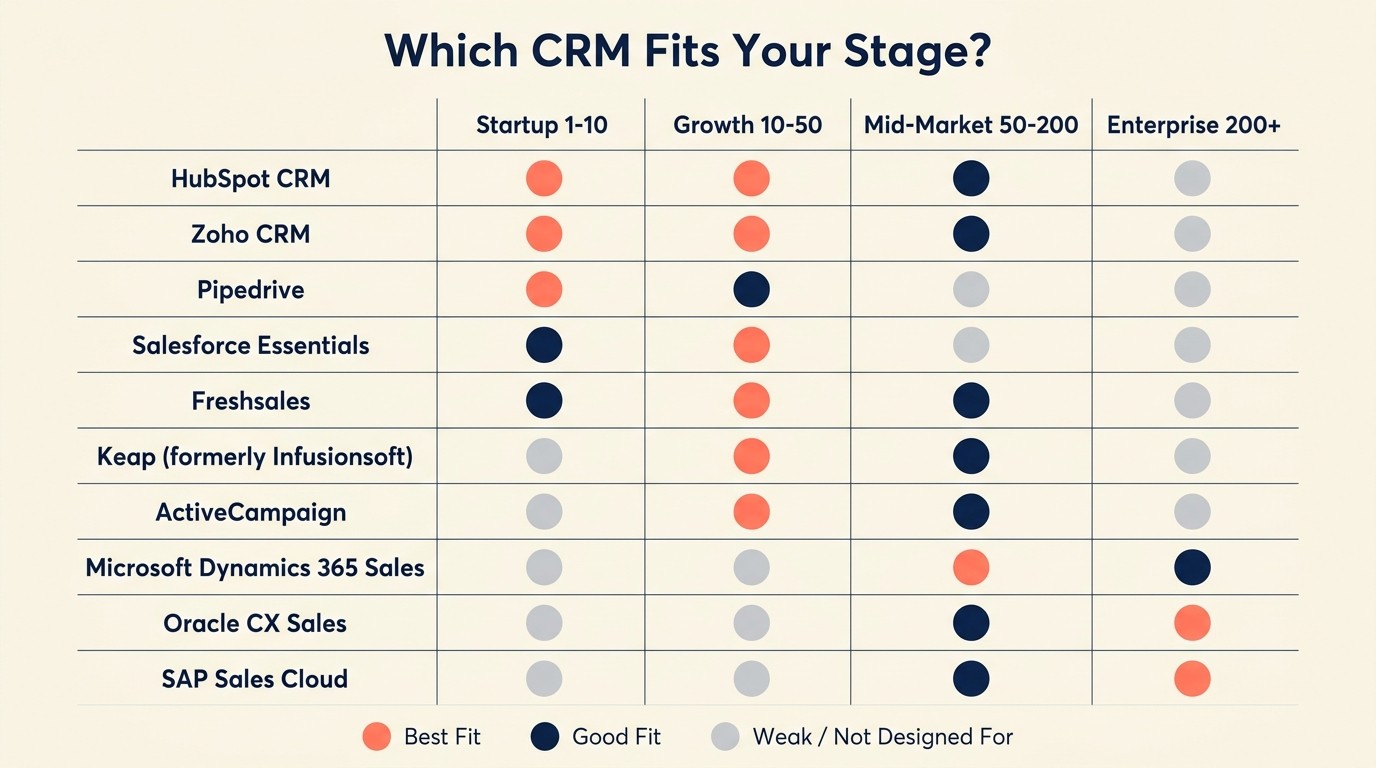
Stage Fit Matrix
| Tool | Startup (1-10) | Growth (10-50) | Mid-Market (50-200) | Enterprise (200+) |
|---|---|---|---|---|
| Rework | Good | Best fit | Good | Limited |
| HubSpot CRM | Good (free) | Good | Good | Good (expensive) |
| Pipedrive | Good | Good | Good | Weak |
| Close | Weak | Good | Good | Weak |
| Freshsales | Good | Good | Good | Limited |
| Copper | Good | Good | Weak | Not designed for |
| Folk | Good | Good | Weak | Not designed for |
| Attio | Good | Good | Good | Possible |
| Monday Sales CRM | Weak | Good | Good | Possible |
| Keap | Good | Weak | Not designed for | Not designed for |
Sizing and Persona Table
| Tool | Team Size Sweet Spot | Typical Buyer | Industry Fit |
|---|---|---|---|
| Rework | 5-100 | Sales Ops, RevOps, CRO | B2B SaaS, services, agencies |
| HubSpot CRM | 5-500+ | Marketing Manager, Sales Director | Any B2B |
| Pipedrive | 3-200 | Sales Manager, Founder | Field sales, B2B services |
| Close | 5-150 | VP Sales, Sales Manager | Inside sales, SaaS |
| Freshsales | 5-300 | Sales Manager, IT buyer | SMB to mid-market |
| Copper | 2-100 | Founder, Sales rep | Professional services, agencies |
| Folk | 1-50 | Founder, BD lead | Agencies, VCs, consultants |
| Attio | 3-200 | RevOps, Founder | B2B SaaS, networks |
| Monday Sales CRM | 10-250 | Operations Manager | Any team already on Monday |
| Keap | 1-10 | Solo founder, small agency | E-commerce, coaching, consulting |
1. Rework: Unified CRM + multi-channel inbox built for growing sales teams
Rework's approach to CRM is different from Nutshell's in one foundational way: it doesn't treat email as the only sales channel. The product is built around a unified inbox that pulls chat channels (WhatsApp, Messenger, Instagram, live chat and more) and contact activity into a single working surface, with deal emails logged on the same record, so sales reps aren't toggling between tools to piece together a conversation history. Before you reconfigure your pipeline in a new tool, it's worth reading about pipeline stages that match your selling motion to get the structure right from the start.
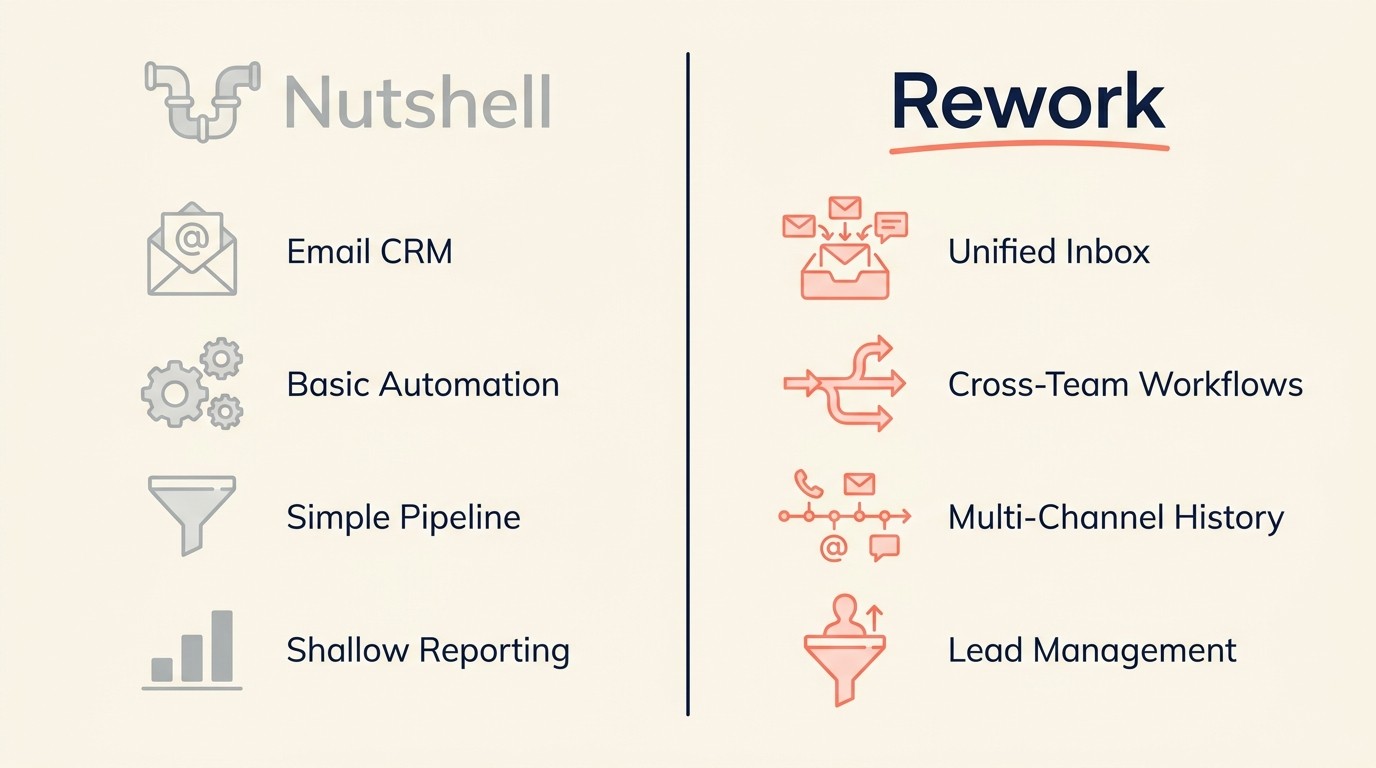
The pipeline management is clean and visual without being over-engineered. Lead management sits at the core, with workflows that let you define stages, assign owners, and trigger automations without writing logic trees. For teams that tried Nutshell and hit the ceiling on automation depth, Rework is the natural next step. It's still opinionated enough to onboard in a day, but flexible enough to handle multi-rep handoffs, role-based views, and cross-functional workflows.
It's also built for teams at the 10-100 person stage who need their CRM to be a coordination layer, not just a place to log calls. If you're comparing options head-to-head, Rework vs HubSpot CRM and Rework vs Pipedrive walk through the tradeoffs in detail.
| What you get | What you don't |
|---|---|
| Unified chat inbox (WhatsApp, Messenger, live chat and more) + leads | Massive third-party app marketplace |
| Visual pipeline + lead management | SSO and audit logs on the Standard edition (they start at Advanced) |
| Cross-team workflow automation | Built-in dialer |
| Clean onboarding, no consultant needed | Deep marketing automation (email sequences, segmentation) |
| Multi-channel conversation history | Native LinkedIn integration |
Pricing: The Sales Engine (CRM) is $69/month billed yearly, or $80 month to month, with 5 sales seats included; extra seats come in blocks of 5 ($21/month per block on yearly billing). The Revenue Engine ($159/month billed yearly) adds the multi-channel inbox and lead capture. See rework.com/pricing.
Best for: B2B sales teams of 10-100 people who need CRM + multi-channel inbox without the complexity of HubSpot or Salesforce. Not ideal for: Solo operators, or teams that need a built-in dialer and outbound calling sequences.
2. HubSpot CRM: The ecosystem play for teams planning to scale marketing alongside sales
HubSpot's free CRM has been the default "Nutshell alternative" recommendation for years, and there's a reason. The free tier is genuinely useful, the UI is clean, and if you ever need to bolt on email marketing, ad management, or a content CMS, it's all there.

The product philosophy is "all your go-to-market under one roof." HubSpot wants to be the system of record for marketing, sales, and service, not just your pipeline tracker. That's a strength when it works. It becomes a problem when you only need 20% of what they offer and discover that the 20% you do need is gated behind a $400/month Marketing Hub upgrade.
For Nutshell users, the CRM core will feel familiar. Contact records, deal stages, activity logging: it's all here and done well. But be honest about whether you're buying HubSpot for the CRM or for the broader platform. If it's the former, you may be paying for a lot you won't use. HubSpot's Sales Hub starts at $20/user/month and scales steeply: a 10-seat team that adds Marketing Hub Professional crosses $800/month before add-ons. For a deeper look at how HubSpot stacks up against purpose-built alternatives, the best HubSpot alternatives roundup covers the full field.
| What you get | What you don't |
|---|---|
| Best-in-class email marketing and automation | Simple pricing (it compounds fast) |
| Huge integration marketplace (1,000+ apps) | A lightweight, focused CRM experience |
| Free CRM that actually works | Flexibility without feature bloat |
| World-class onboarding content and academy |
Pricing: Free CRM. Sales Hub starts at $20/user/month. Full suites scale quickly.
Best for: Teams that want email marketing + CRM in one tool and plan to grow into HubSpot's broader platform over time. Not ideal for: Teams that want a focused sales CRM without marketing complexity.
3. Pipedrive: The sales-first CRM for teams that live in their pipeline
Pipedrive was built by salespeople who were frustrated with CRMs that felt designed by engineers rather than reps. The result is a tool where the pipeline view is the product, not a tab you visit occasionally.
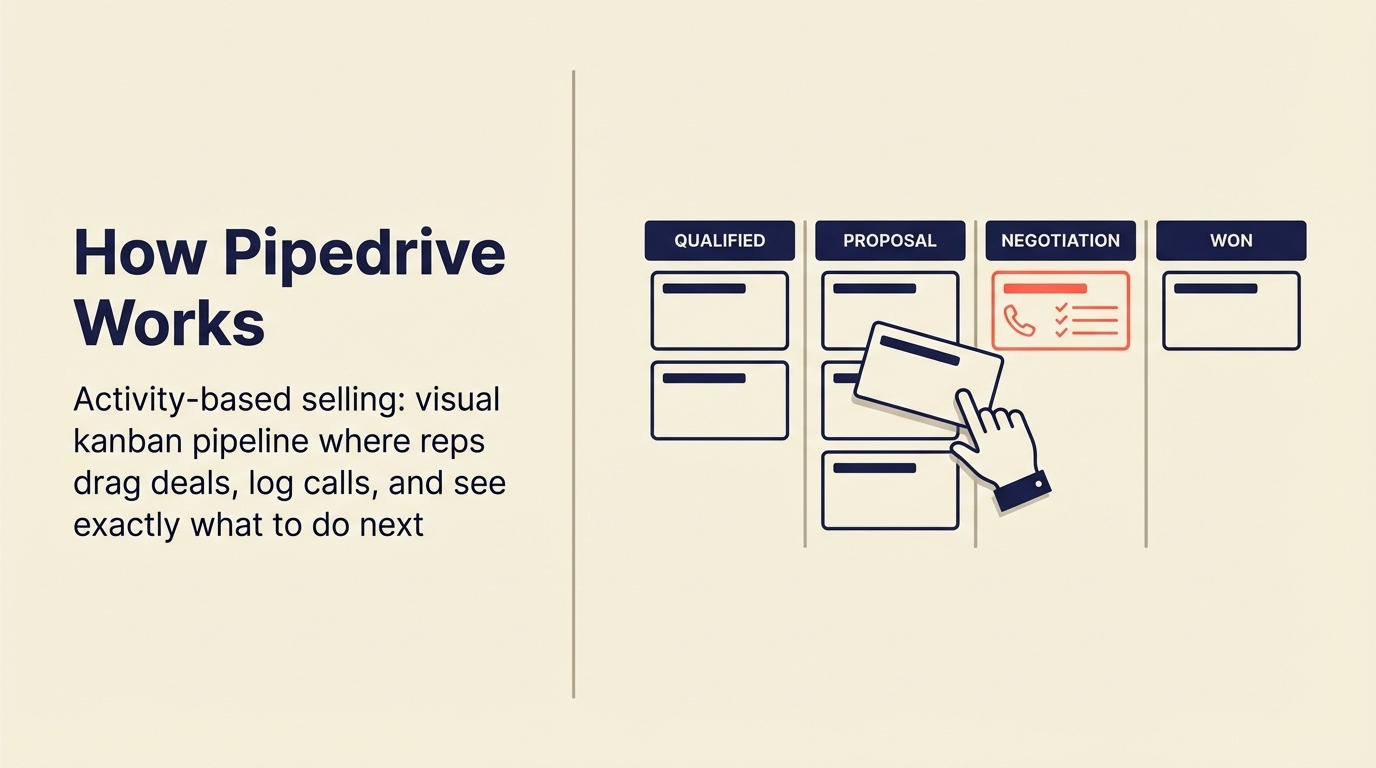
Every workflow in Pipedrive flows outward from the deal. You add contacts, link them to deals, move cards through stages, and log activity. The philosophy is "sales simplicity first": don't make me think about the data model, just let me close deals.
For a Nutshell user leaving because Nutshell feels too basic on reporting or automation, Pipedrive is a lateral move in some areas. Where Pipedrive wins is pipeline customization, activity-based selling reminders, and a cleaner rep experience for teams doing high-volume B2B. Where it falls short is anything beyond the pipeline: native email marketing is thin, and if you're trying to run coordinated multi-channel outreach, you'll be stitching together Zapier integrations. Teams that find Pipedrive too narrow should look at the best Pipedrive alternatives for options with more coverage.
| What you get | What you don't |
|---|---|
| Best visual pipeline UI on the market | Strong native email marketing |
| Activity-based selling prompts and reminders | Multi-channel inbox |
| Clean mobile app for field sales | Deep reporting without add-ons |
| Good automation for pipeline actions | Company-wide workflow automation |
Pricing: Starts at $14/user/month (Essential). Advanced at $39, Professional at $64.
Best for: B2B sales teams of 3-100 who want a deal-focused CRM with minimal ops overhead. Not ideal for: Teams that need email marketing or are running inbound + outbound simultaneously.
4. Close: Built for inside sales teams doing high-volume outreach
Close was designed for one thing: inside sales teams that live on the phone and in their inbox. The product embeds calling, SMS, and email sequences directly into the CRM, so a rep can run their entire outbound motion without leaving the tool.

The methodology is "speed is the advantage." Close assumes your team is doing high-rep, high-velocity outreach, and it removes every click between a rep and their next dial. Power dialer, auto-dialing from lists, built-in voicemail drop, and email sequences all live natively.
For Nutshell users, the gap is philosophy. Nutshell is a general CRM with email marketing. Close is a sales execution engine. Sales teams using purpose-built inside-sales CRMs with built-in dialers report 8–14% shorter sales cycles compared to teams stitching together a CRM and a separate VoIP tool, according to CRM.org's 2025 benchmark analysis. If your team is doing 50+ outbound touchpoints per day, Close is sharper. If your motion is more relationship-based or inbound-heavy, it's overkill. And if you've already tried Close and found it too specialized, the best Close alternatives covers the next tier of options worth evaluating.
| What you get | What you don't |
|---|---|
| Built-in power dialer and VoIP | A CRM for non-inside-sales motions |
| Native SMS and email sequences | Lightweight pricing at small scale |
| Fast, keyboard-driven rep experience | Marketing automation |
| Strong reporting on outbound activity |
Pricing: Starts at $49/user/month (Startup). Professional at $99.
Best for: Inside sales teams of 5-150 doing high-volume phone + email outreach, especially in SaaS sales. Not ideal for: Relationship-based or inbound-first teams, or anyone needing marketing automation.
5. Freshsales: AI-assisted CRM with built-in phone for growing mid-size teams
Freshsales (part of the Freshworks suite) positions itself as the mid-market option that punches above its price point. You get AI lead scoring, a built-in phone system, email sequences, and a contact timeline all in one product, for less than what HubSpot charges for its sales tools alone.
The product vision is "sell smarter with AI." Freddy AI, Freshworks' AI layer, surfaces deal health signals, suggests next actions, and scores leads based on behavior. For a Nutshell user frustrated by basic reporting, this is a meaningful upgrade.
Where Freshsales gets complicated is UI density. The product has grown fast, and the interface reflects that. New users often report feeling like there's "too much to configure before you can just sell." The sweet spot is teams with someone in a sales ops or RevOps role who can handle initial setup. If Freshsales sounds right but you want to see how it compares to the field, the best Freshsales alternatives rounds up the closest options.
| What you get | What you don't |
|---|---|
| Built-in phone and SMS | Clean, minimal UI |
| AI lead scoring and deal health signals | Easy DIY onboarding for non-ops teams |
| Email sequences and templates | Deep marketing automation |
| Multi-pipeline support | Seamless Google Workspace integration |
Pricing: Free plan available. Growth tier at $9/user/month. Pro at $39.
Best for: Sales teams of 10-200 who want AI-assisted selling and built-in calling without enterprise pricing. Not ideal for: Small teams without a sales ops person to configure the platform.
6. Copper: The CRM for teams that run their business inside Google Workspace
Copper's entire product is built around one insight: sales teams that live in Gmail and Google Calendar shouldn't have to leave to update their CRM. The tool sits inside Gmail as a sidebar, auto-captures emails, syncs with Google Calendar, and attaches files from Google Drive to contact records.
The philosophy is "zero data entry if you use Google." If your team already runs in Workspace, Copper does legitimately save hours of manual logging. Contact records update automatically. Meeting notes sync. Deal stages track from inside Gmail threads.
The limitation is obvious: Copper only makes sense if Google is your work OS. If even half your team uses Outlook, or if you're on Slack-first workflows with limited Google dependency, Copper's core value disappears. Teams that want something more flexible should check the best Copper alternatives for options that aren't tied to a single productivity stack.
| What you get | What you don't |
|---|---|
| Deep Gmail sidebar CRM experience | Any value outside Google Workspace |
| Auto-capture of emails and meetings | Multi-channel inbox (chat, calls) |
| Google Drive file attachment to deals | Strong reporting or forecasting |
| Clean, minimal pipeline UI | Standalone usability |
Pricing: Starts at $9/user/month (Basic). Professional at $29, Business at $99.
Best for: Small professional services teams of 2-50 that are 100% in Google Workspace. Not ideal for: Teams using Outlook, hybrid setups, or anyone needing built-in phone or marketing automation.
7. Folk: Relationship-first CRM for agencies, consultants, and partnership teams
Folk is the new generation of "personal CRM meets team collaboration." The product thinks about contacts and relationships as a flexible database rather than a traditional sales pipeline. You can build custom views, tag people across contexts (investor, customer, partner, speaker), and pull in LinkedIn data to keep contact records fresh.
The philosophy is "your network is your asset." Folk is popular with agencies running account-based outreach, VC firms tracking founder relationships, and BD teams managing partnerships, in use cases where a deal stage model oversimplifies the actual work.
For a Nutshell user leaving because the tool is too rigid, Folk offers a different kind of flexibility. But it's lateral in the wrong direction for pure pipeline-focused sales teams. There's no built-in sequencing, no calling, and the automation is limited compared to traditional CRMs. If your team does need structured CRM workflow automation, Folk probably isn't the answer.
| What you get | What you don't |
|---|---|
| Flexible contact database with custom views | Pipeline-first deal management |
| LinkedIn enrichment and contact sync | Email sequences or automation depth |
| Clean, modern UI that feels like a productivity tool | Built-in calling or multi-channel features |
| Good for managing many relationship types at once | Strong reporting |
Pricing: Starts at $20/user/month (Standard). Premium at $40.
Best for: Agencies, consultants, and BD/partnerships teams managing relationship networks rather than deal pipelines. Not ideal for: Teams with a structured sales motion that depends on deal stage tracking and sequencing.
8. Attio: The flexible, data-model-first CRM for technical and RevOps-led teams
Attio is what CRM looks like when product designers take the "CRM should be as flexible as a spreadsheet" idea seriously. Every object (contacts, companies, deals, even custom objects) is configurable. You define what fields exist, how they relate to each other, and what your pipeline stages mean.

The product philosophy is "your data model, not ours." Attio doesn't impose a contact-account-opportunity hierarchy. If your go-to-market motion doesn't fit that model (and many modern SaaS companies' motions don't), Attio lets you build the structure that actually reflects how you sell.
The trade-off is setup time. Attio out of the box is a blank canvas. Teams without a RevOps or technical operator to configure it often find themselves with a powerful but underutilized tool. For Nutshell users leaving because the tool is too opinionated, Attio is the opposite extreme. A solid CRM rollout and adoption plan matters more with Attio than with almost any other tool on this list.
| What you get | What you don't |
|---|---|
| Fully customizable data model and objects | A pre-configured CRM you can use day one |
| Flexible pipeline and relationship tracking | Built-in phone, SMS, or email sequences |
| Native enrichment (Clearbit data) | A large ecosystem of native integrations |
| Strong API for custom workflows | Shallow automation without custom builds |
Pricing: Free tier available. Plus at $34/user/month. Pro at $69.
Best for: B2B SaaS teams of 5-150 with a RevOps function who want to build a CRM that fits their exact motion. Not ideal for: Teams that want to start selling immediately without setup time.
9. Monday Sales CRM: Pipeline management for teams already in the Monday.com ecosystem
Monday Sales CRM is a layer built on top of Monday.com's work management platform. If your company already uses Monday for projects, sprints, or operations, the Sales CRM adds pipeline tracking, contact management, and lead capture without introducing a new tool to your stack.

The philosophy is "sales is just another workflow." Monday's thesis is that the same visual board model that works for project management works for deal management. For some teams (especially those where sales, delivery, and ops share context across deals) that's actually true.
The limitation is depth. Monday Sales CRM is a competent pipeline tool, but it's not a specialized sales product. You won't find built-in dialing, advanced email sequencing, or AI lead scoring here. It's best thought of as "pipeline tracking done in Monday" rather than a true CRM replacement. Before committing, reading How to Pick a CRM in 2026 will help you spot whether the feature gaps matter for your specific motion.
| What you get | What you don't |
|---|---|
| Familiar Monday UI if your team already uses it | CRM-native features (dialing, sequencing) |
| Visual deal boards with color coding | Deep reporting and forecasting |
| Integration with Monday projects and ops | Strong mobile sales experience |
| Lead capture forms and automations | Purpose-built sales rep experience |
Pricing: Starts at $12/user/month (Basic). Standard at $17, Pro at $28.
Best for: Teams of 10-200 already using Monday.com who want to avoid adding a separate CRM to the stack. Not ideal for: Teams buying Monday solely for CRM, or teams doing high-volume outbound that need specialized sales tooling.
10. Keap: Deep automation and e-commerce for solo operators and micro-teams
Keap (formerly Infusionsoft) has been in the small business automation space longer than most tools on this list. The product is built for solo founders, coaches, consultants, and very small agencies who need to automate their entire customer lifecycle (from lead capture to purchase to follow-up) without hiring a marketing team.
The philosophy is "one person, full automation." Keap combines CRM, email marketing, SMS, landing pages, invoicing, and e-commerce into a single tool aimed at one-person-to-five-person operations.
For Nutshell users leaving because they want more automation depth, Keap delivers it, but in a direction that's more marketing automation than sales CRM. And the pricing model is unusual: it's charged by the contact database size rather than per seat, which makes it affordable for small user counts but can get expensive as your list grows.
| What you get | What you don't |
|---|---|
| Deep automation builder for full customer journey | Per-seat affordability at scale |
| Built-in invoicing and payments | A clean, modern UI (it shows its age) |
| SMS and email in one tool | Pipeline depth for multi-rep sales teams |
| E-commerce workflows | Easy onboarding without a learning curve |
Pricing: Starts at $249/month for up to 2 users and 1,500 contacts. Scales with contact count.
Best for: Solo operators and micro-teams (1-5 people) running automated lead nurture, coaching businesses, or light e-commerce. Not ideal for: Growing sales teams with multiple reps who need a pipeline-first CRM without a steep per-contact cost.
The Stack-Fit Selection Framework
Rework Analysis: After mapping 10 CRM platforms against the three variables that most predict post-migration satisfaction (channel coverage, automation depth, and onboarding time) a clear pattern emerges: teams that switch CRMs primarily for automation depth see the highest ROI improvement (up to 34% productivity gain), while teams that switch for UI preferences alone rarely recoup migration costs within 12 months. The Stack-Fit Selection Framework below reduces this to three qualifying questions: What channels does your team actually sell through? What is your ops maturity (can you configure a blank-canvas tool)? And what is your realistic migration budget? Answering those three questions eliminates at least 6 of the 10 tools on this list before you run a single demo.
How to Choose: Decision Framework
Use the decision framework after you know why Nutshell is no longer enough. A team leaving for automation depth should not evaluate the same shortlist as a team leaving for reporting, multi-channel selling, or a more customizable data model.
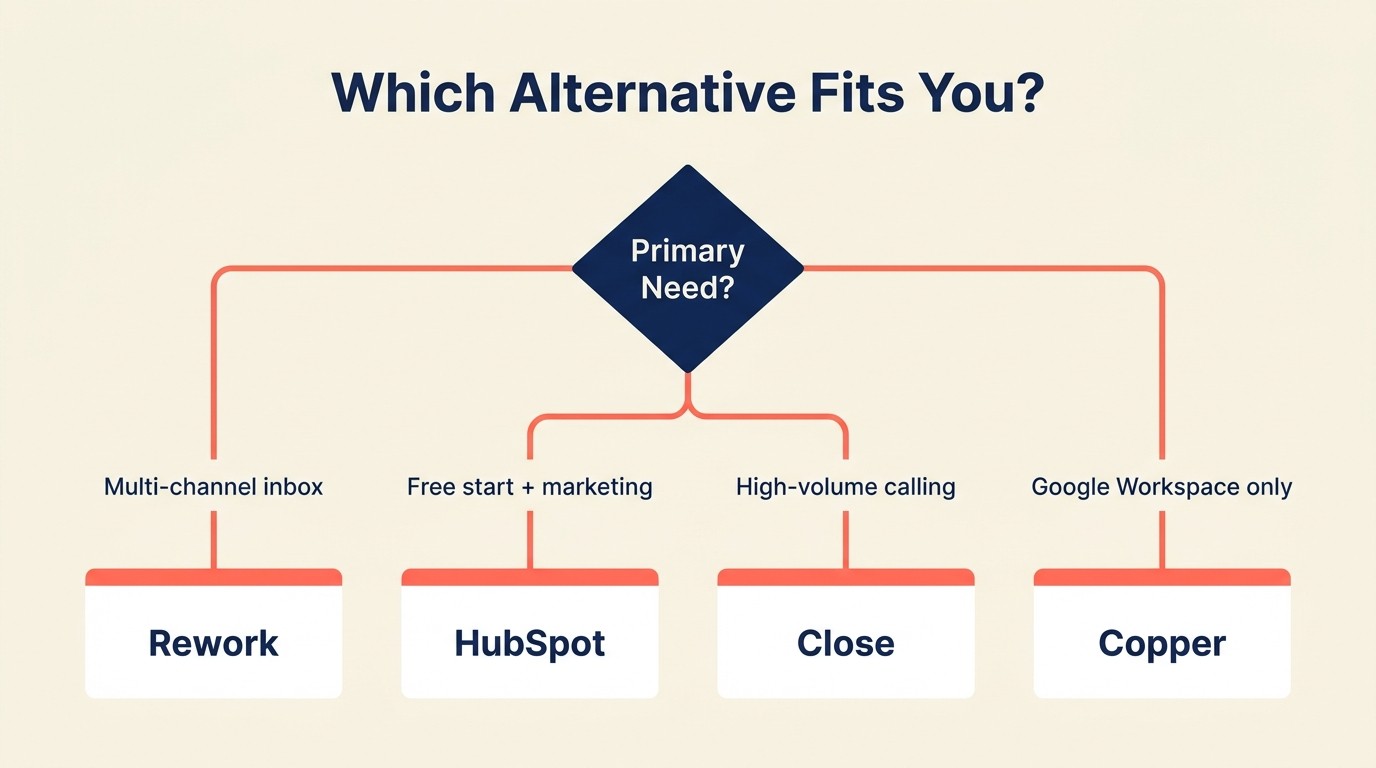
| If you need... | Pick this |
|---|---|
| CRM + multi-channel chat inbox for a growing team | Rework |
| Free CRM to start + option to scale into marketing automation | HubSpot CRM |
| The cleanest visual pipeline for deal-focused reps | Pipedrive |
| Built-in calling and email sequences for inside sales | Close |
| AI lead scoring + built-in phone at mid-market price | Freshsales |
| Zero data entry because your team lives in Gmail | Copper |
| Relationship network management for agencies or BD | Folk |
| A fully custom data model built to your exact sales motion | Attio |
| Pipeline tracking inside a tool your team already uses | Monday Sales CRM |
| Full lifecycle automation for a solo operator or micro-team | Keap |
Why Teams Leave Nutshell (And What to Look For Instead)
The cleanest replacement criteria usually come from the moment Nutshell starts creating workarounds. Map the pain point first, then choose the product class that removes that constraint without adding unnecessary platform weight.
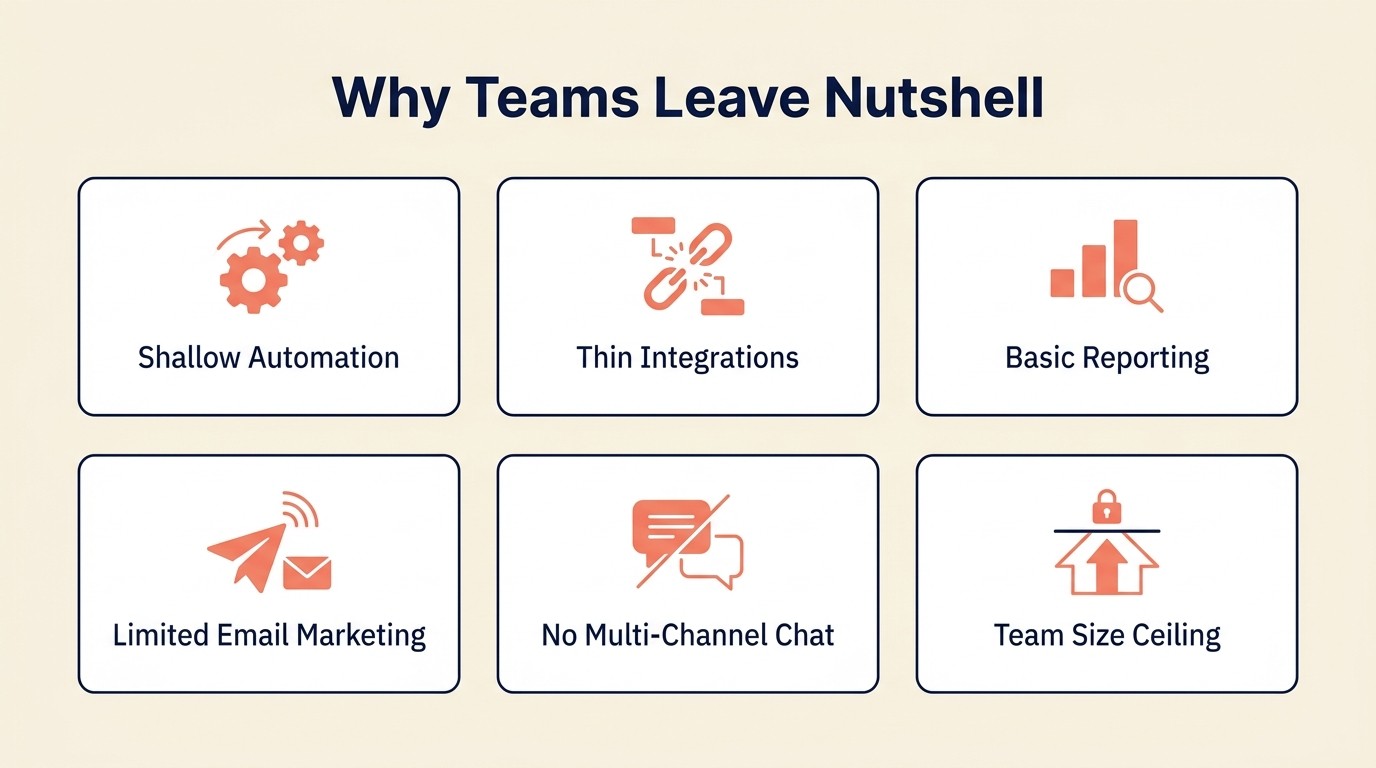
| Nutshell pain point | What to prioritize in a replacement |
|---|---|
| Automation rules are too shallow | Rework, Freshsales, Close, HubSpot |
| Reports don't go deep enough | HubSpot, Freshsales, Close, Attio |
| Integration library is too small | HubSpot, Pipedrive, Freshsales |
| Email marketing still maturing | HubSpot, Keap, Freshsales |
| No multi-channel chat | Rework, Freshsales |
| Outgrowing the team size fit | Rework, HubSpot, Freshsales, Close |
Pricing Comparison at 10 Users
| Tool | Estimated Monthly Cost (10 users) | Notes |
|---|---|---|
| Rework | ~$90 | Sales Engine, 10 seats, billed yearly ($69 plus one 5-seat block at $21) |
| HubSpot CRM | $200 (Sales Hub Starter) | Free tier available |
| Pipedrive | $140-$390 | Depends on tier |
| Close | $490-$990 | Startup to Professional |
| Freshsales | $90-$390 | Growth to Pro |
| Copper | $90-$990 | Basic to Business |
| Folk | $200-$400 | Standard to Premium |
| Attio | $340-$690 | Plus to Pro |
| Monday Sales CRM | $120-$280 | Basic to Pro |
| Keap | $249+ | Flat base, then scales with contacts |
Integration Ecosystem Depth
| Tool | Native Integrations | Zapier Support | API Quality |
|---|---|---|---|
| Rework | Growing | Yes | Good |
| HubSpot | 1,000+ | Yes | Excellent |
| Pipedrive | 400+ | Yes | Good |
| Close | 100+ | Yes | Good |
| Freshsales | 200+ | Yes | Good |
| Copper | 70+ (Google-focused) | Yes | Moderate |
| Folk | 50+ | Yes | Good |
| Attio | 50+ | Yes | Excellent |
| Monday Sales CRM | 200+ | Yes | Good |
| Keap | 200+ | Yes | Moderate |
Onboarding Complexity
| Tool | Time to First Deal Tracked | DIY or Guided Setup Needed |
|---|---|---|
| Rework | Less than 1 day | DIY |
| HubSpot CRM | Less than 1 day (free tier) | DIY |
| Pipedrive | Less than 1 day | DIY |
| Close | 1-2 days | Guided recommended |
| Freshsales | 2-3 days | Guided for full setup |
| Copper | Less than 1 day (if Google-native) | DIY |
| Folk | Less than 1 day | DIY |
| Attio | 3-5 days | Guided or ops-led |
| Monday Sales CRM | 1-2 days | DIY if already on Monday |
| Keap | 1-2 weeks | Guided strongly recommended |
Frequently Asked Questions
What is the best Nutshell CRM alternative for small sales teams?
Rework is the strongest Nutshell alternative for teams of 10–100 that need more than email-only outreach. It combines a visual pipeline, unified chat inbox (WhatsApp, Messenger, web chat and more), and workflow automation in a single platform, with the Revenue Engine at $159/month billed yearly (the CRM-only Sales Engine starts at $69/month billed yearly), with onboarding under one day, comparable to Nutshell's setup experience.
Why do teams leave Nutshell CRM?
The most common reasons teams leave Nutshell are automation depth, reporting limits, and a thin integration library. Teams running multi-channel outreach (email, chat, LinkedIn) hit Nutshell's ceiling fastest. 63% of CRM switches are triggered by a tool failing to scale with the team's process rather than outright failure (Merkle Group).
Is Nutshell CRM good for growing sales teams?
Nutshell works well for teams of 5–30 doing primarily email-based selling. Beyond that size, most teams find the automation rules too shallow and the reporting too basic to support multi-rep coordination, forecasting, or role-based pipeline views.
How much does it cost to switch CRMs?
A 15-person sales team should budget $40,000–$90,000 for a full CRM migration, including parallel subscription overlap, data migration, training, and the 2–6 weeks of reduced productivity that come with any platform change. (Dench, 2025). Choosing a tool with DIY onboarding and fast time-to-first-deal reduces that cost significantly.
What CRM has the best ROI for small businesses?
CRM systems deliver an average ROI of $8.71 for every dollar spent when properly implemented (Salesforce Research). Tools with high user adoption rates consistently outperform feature-rich tools with low adoption. That's why ease-of-use rankings (not feature counts) are the most reliable predictor of actual ROI for SMBs.
What is the easiest CRM to switch to from Nutshell?
Rework, HubSpot CRM (free tier), and Pipedrive all offer under-one-day onboarding with DIY setup, no consultant required. Attio and Keap require guided onboarding: Attio because of its blank-canvas data model, Keap because of its complex automation builder.
How do I evaluate a CRM replacement without wasting time on demos?
Run a two-week pilot with live deals and real reps. Measure three things: how many reps updated the CRM without a reminder, how many activities were logged per deal, and whether pipeline visibility improved for managers. A CRM that passes those three tests in two weeks is the right fit, regardless of the feature checklist.
What to Do Next
Pick your top two from this list based on your team's primary pain point. Run a two-week pilot with real deals and real reps. Don't evaluate a CRM in a demo. Evaluate it with live data and the actual workflow your team runs every day.
If you're leaving Nutshell because automation and reporting feel like they've hit a ceiling, start with Rework or Freshsales. If you're leaving because the integration ecosystem is too thin, HubSpot is the obvious bridge. And if your team is doing high-volume calling, don't waste time on anything except Close.
The best CRM is the one your reps actually update. Make the choice based on fit, not features.
Related reading:

Head of Enterprise Solutions
On this page
- Quick Comparison Table
- Stage Fit Matrix
- Sizing and Persona Table
- 1. Rework: Unified CRM + multi-channel inbox built for growing sales teams
- 2. HubSpot CRM: The ecosystem play for teams planning to scale marketing alongside sales
- 3. Pipedrive: The sales-first CRM for teams that live in their pipeline
- 4. Close: Built for inside sales teams doing high-volume outreach
- 5. Freshsales: AI-assisted CRM with built-in phone for growing mid-size teams
- 6. Copper: The CRM for teams that run their business inside Google Workspace
- 7. Folk: Relationship-first CRM for agencies, consultants, and partnership teams
- 8. Attio: The flexible, data-model-first CRM for technical and RevOps-led teams
- 9. Monday Sales CRM: Pipeline management for teams already in the Monday.com ecosystem
- 10. Keap: Deep automation and e-commerce for solo operators and micro-teams
- The Stack-Fit Selection Framework
- How to Choose: Decision Framework
- Why Teams Leave Nutshell (And What to Look For Instead)
- Pricing Comparison at 10 Users
- Integration Ecosystem Depth
- Onboarding Complexity
- Frequently Asked Questions
- What is the best Nutshell CRM alternative for small sales teams?
- Why do teams leave Nutshell CRM?
- Is Nutshell CRM good for growing sales teams?
- How much does it cost to switch CRMs?
- What CRM has the best ROI for small businesses?
- What is the easiest CRM to switch to from Nutshell?
- How do I evaluate a CRM replacement without wasting time on demos?
- What to Do Next