Best Folk CRM Alternatives in 2026: 10 Lightweight CRMs for Relationship-Driven Teams
Turn this article into takeaways for your work.


Each assistant summarizes the article only for you and suggests best practices for your work.
The best CRM for a team that has outgrown Folk depends on your motion: Attio suits data-driven RevOps, Copper or Streak cover Google and Gmail shops, Rework fits growth-stage teams wanting CRM plus a shared inbox, and Pipedrive wins for pipeline-first sales. This guide compares 10 options on price, depth, and team fit.
Folk is a genuinely beautiful product. The Chrome extension is slick, the mail merge works, and for a founder managing 50 contacts it feels effortless. But relationship management doesn't stay simple for long. Teams that grow past 20 people start hitting Folk's ceiling: no multi-channel inbox, no structured lead management, basic pipeline views, and an integration ecosystem that's thin compared to what sales and ops teams actually need. When your go-to-market motion gets more complex than "email a few warm contacts," Folk starts to feel like a tool you've outgrown.
This guide is for relationship-driven teams (founders, partnerships leads, sales reps, and RevOps managers) who want Folk's simplicity but need more depth. We cover 10 alternatives with honest assessments of where each one fits, what it costs, and who should actually buy it. For a direct head-to-head comparison between Rework and Folk, see Rework vs Folk. If Attio is also on your list, see best Attio alternatives.
Not sure what to look for in a replacement? How to Pick a CRM in 2026 walks through the full evaluation framework before you start demoing tools.
Key Facts: CRM Selection for Relationship-Driven Teams
- Companies that use a CRM are 86% more likely to surpass their sales targets than those that don't, according to Salesmate (2026)
- Sales productivity increases by an average of 34% after CRM adoption, as teams eliminate manual data entry and centralize customer data (Salesmate, 2026)
- 91% of companies with 10 or more employees use a CRM system. The adoption gap hits hardest at the 10-20 person stage, exactly when teams outgrow lightweight tools like Folk (CRM.org, 2026)
- A typical 15-person sales team should budget $40,000-$90,000 for a CRM migration, including productivity costs, making the right first "grown-up CRM" choice critical (Dench, 2026)
- The small business CRM market was valued at $10.85 billion in 2025 and is projected to reach $25.54 billion by 2035, reflecting how many teams are making this exact transition (Business Research Insights, 2025)
Quick Comparison Table
Sales teams using a CRM matched to their growth stage are 86% more likely to exceed their sales targets than teams on mismatched tools, according to Salesmate (2026). The table below maps each alternative to the specific team profile where it delivers that advantage.
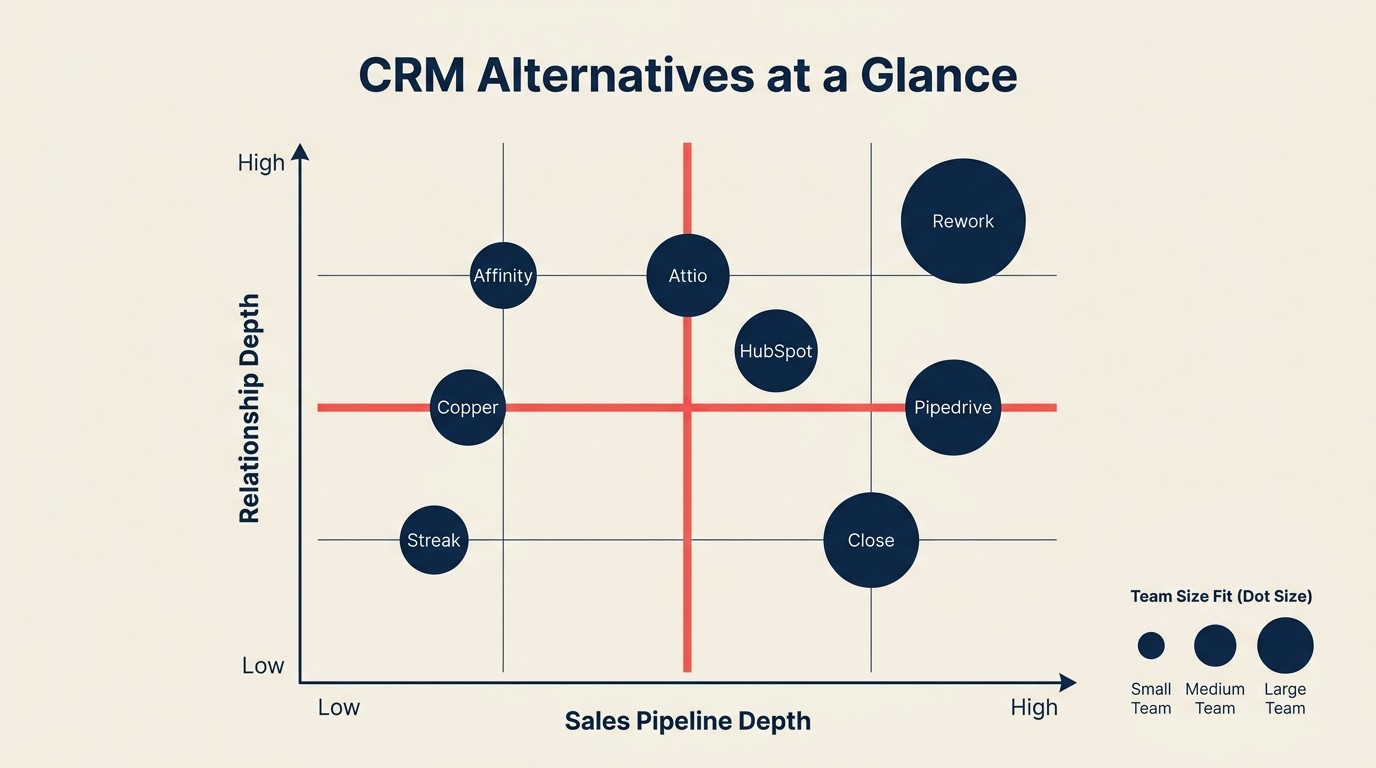
| Tool | Best For | Starting Price | Key Strength | Key Limitation |
|---|---|---|---|---|
| Attio | Data-driven teams that want spreadsheet-like flexibility | Free (up to 3 seats) | Fully configurable data model, powerful filtering | Steep learning curve, no mobile app |
| Copper | Google Workspace teams wanting zero-friction CRM | $9/user/month | Deep Google integration, automatic data entry | Locked to Google ecosystem |
| Rework | Growth-stage teams wanting CRM + ops in one platform | From $69/mo billed yearly for 5 seats (Sales Engine); $159/mo with inbox and lead capture (Revenue Engine) (rework.com/pricing) | Unified inbox, lead management, cross-team workflows | Not as lightweight as Folk for pure contact tracking |
| HubSpot CRM | Teams that want to grow into full marketing + sales suite | Free CRM | Massive feature set, great free tier | Complexity grows fast, upsell pressure |
| Pipedrive | Sales teams that live in their pipeline | $14/user/month | Best-in-class visual pipeline | Weak relationship/networking use cases |
| Streak | Gmail-first teams that don't want to leave their inbox | Free (personal) | Lives inside Gmail, shareable pipelines | Gmail-only, no standalone app |
| Nutshell | Small sales teams wanting sales + marketing together | $16/user/month | Email marketing built in, easy setup | Integrations limited vs bigger platforms |
| Close | Inside sales teams with high call and email volume | $49/user/month | Built-in calling, power dialer, SMS | Expensive, overkill for relationship CRM use cases |
| Monday Sales CRM | Teams already on Monday.com wanting CRM added on | $15/user/month | Visual, flexible, no-code automations | Not purpose-built for CRM, weak sales depth |
| Affinity | VC, PE, and dealflow relationship management | Custom pricing | Relationship intelligence, automatic contact enrichment | Very expensive, built for investment firms |
Stage Fit Matrix
| Tool | Startup (1-30) | Growth (30-150) | Mid-Market (150-500) | Enterprise (500+) |
|---|---|---|---|---|
| Attio | Strong | Strong | Good | Limited |
| Copper | Strong | Good | Limited | No |
| Rework | Strong | Strong | Strong | Good |
| HubSpot CRM | Strong | Strong | Strong | Good |
| Pipedrive | Strong | Strong | Good | Limited |
| Streak | Strong | Good | Limited | No |
| Nutshell | Strong | Good | Limited | No |
| Close | Good | Strong | Strong | Limited |
| Monday Sales CRM | Strong | Strong | Good | Limited |
| Affinity | Strong | Strong | Good | Good |
Sizing and Persona Table
| Tool | Ideal Team Size | Who Buys It |
|---|---|---|
| Attio | 1-100 | Founder, Sales Lead, RevOps |
| Copper | 1-50 | Founder, Office Manager, Sales Rep |
| Rework | 10-200 | Founder, CRO, Sales Ops, RevOps |
| HubSpot CRM | 5-500+ | Marketing Manager, Sales Director, RevOps |
| Pipedrive | 5-200 | Sales Manager, VP Sales, Founder |
| Streak | 1-20 | Solo founder, SDR, partnerships rep |
| Nutshell | 5-75 | Sales Manager, Small Business Owner |
| Close | 10-200 | VP Sales, Inside Sales Manager, CRO |
| Monday Sales CRM | 10-500 | Ops Manager, Sales Director, COO |
| Affinity | 5-100 | Partner, Investment Manager, BD Lead |
1. Attio: Spreadsheet-flexible CRM for data-driven teams
Attio's product philosophy is that a CRM should be as configurable as a spreadsheet without being as rigid as Salesforce. You define your own data model: create any object (company, contact, deal, investor, partner), add any attribute, and filter across everything. It's the closest thing to "build your own CRM" without writing code.

That flexibility attracts technical founders, revenue teams with unusual workflows, and anyone who's ever been frustrated by CRM fields that don't match their business. Attio's filtering and views are genuinely impressive. You can slice contacts by any combination of attributes, see relationships graphed across objects, and build automations that fire based on data changes.
The learning curve is real. Attio is not a "log in and start emailing contacts" experience. You need to invest time upfront designing your data model, or you'll end up with a blank canvas that doesn't do much. There's no mobile app yet, which is a notable gap for teams that log calls and meetings on the go.
Attio is best suited for growth-stage startups (10-100 people) with a technical ops or RevOps person who wants full control over the CRM schema. It's overkill for a 5-person team that just needs pipeline tracking. And for a direct comparison with Rework, Rework vs Attio covers how the two products diverge on data modeling and automation.
| What you get | What you don't |
|---|---|
| Fully configurable data model (any object, any field) | No mobile app |
| Powerful filtering and relationship graphing | Steep learning curve |
| Native automations triggered by data changes | Smaller integration ecosystem than HubSpot or Pipedrive |
| Generous free tier (up to 3 seats) | AI features still maturing |
Pricing: Free up to 3 seats. Plus plan at $34/month/seat, Pro at $119/month/seat. See Attio's pricing page for the latest tiers.
Best for: Technical founders and RevOps teams who want a fully configurable CRM without a rigid schema.
2. Copper: Google Workspace CRM that lives where your team already works
Copper's entire product philosophy is "your CRM should not require behavior change." If your team lives in Gmail and Google Calendar, Copper captures every email, meeting, and contact automatically, with no manual data entry. It surfaces contact history right inside Gmail, logs activities without asking anyone to log in to a separate tool, and syncs with Google Drive natively.
That zero-friction approach works extremely well for professional services firms, agencies, and small sales teams that are deeply embedded in Google Workspace. Your team never has to leave Gmail to see deal status, add a note, or move a contact to the next stage.
The flip side is that Copper is essentially useless if you're not a Google Workspace shop. There's no Outlook integration worth speaking of. And as you grow past 50 people, Copper's workflow automation and reporting start to feel thin compared to Pipedrive or HubSpot. It's a tool built for the Google ecosystem at small-to-medium scale, and it's excellent at exactly that. For teams evaluating Copper against other options, best Copper alternatives has a full breakdown.
| What you get | What you don't |
|---|---|
| Automatic data capture from Gmail and Calendar | Locked to Google Workspace |
| CRM sidebar inside Gmail | Weak if you need advanced pipeline automation |
| Clean, simple UI that doesn't intimidate non-salespeople | Reporting is basic vs mid-market CRMs |
| Good Google Drive and Sheets integration | Limited native calling |
Pricing: Starter at $9/user/month, Basic at $23/user/month, Professional at $49/user/month.
Best for: Small teams (1-50) fully on Google Workspace who want automatic contact capture with zero behavior change.
3. Rework: Unified CRM, lead management, and team inbox in one platform
Rework is the clearest comparison when Folk's relationship-first model starts to feel too lightweight for a team-based sales process. The difference is structured lead management and shared workflows, not just contact storage.
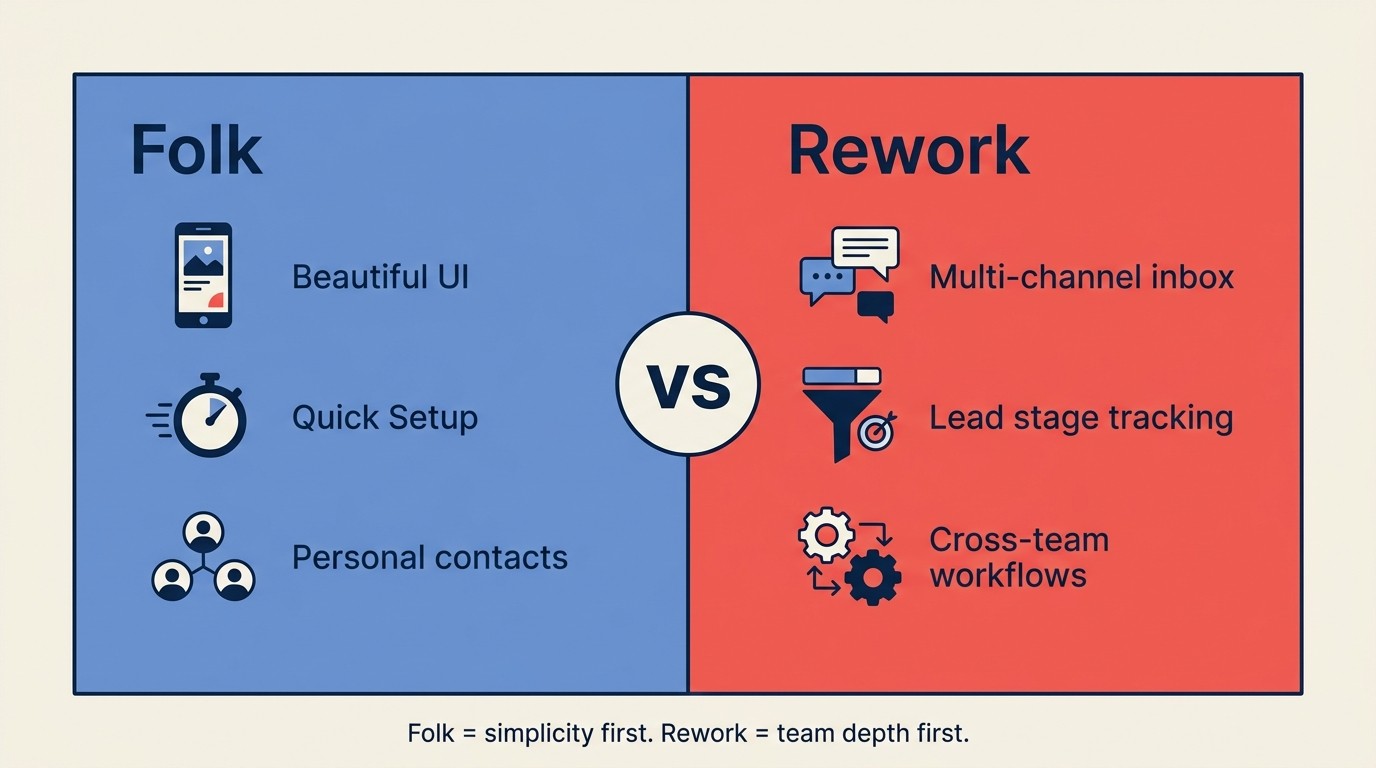
Folk gives you a contact list with a pipeline attached. Rework gives you a CRM that connects to how your whole team works. The core difference: Rework treats lead management as a structured process, not just a list of names with tags. You get a multi-channel inbox (WhatsApp, Messenger, Instagram, Zalo, and live chat in one view), pipeline stages with proper stage management, and workflow automation that crosses team boundaries.
For a relationship-driven team that's outgrown Folk, Rework's biggest advantage is that you don't have to bolt on a separate lead management tool, a separate inbox tool, and a separate automation tool. It comes together. The Chrome extension and contact enrichment that Folk does well: Rework covers those too, with an AI web-capture Chrome extension and prospect enrichment in its Lead app.
It's not the right pick if you're a solo founder managing 40 contacts and want Folk's zero-setup experience. But if you have a sales rep, a partnerships person, and a customer success manager who need to see the same contacts without duplicating data, Rework handles that out of the box. See also Rework vs HubSpot CRM and Rework vs Attio if those are on your short list too.
| What you get | What you don't |
|---|---|
| Multi-channel inbox (WhatsApp, Messenger, live chat) | Not as minimal as Folk for personal contact management |
| Structured lead management with stage tracking | Requires more initial setup than Folk |
| Cross-team workflows and automation | Heavier product (not a "launch in 5 minutes" tool) |
| Internal notes, tasks, and deal context in one view | Sold in 5-seat blocks, so a 2-3 person team pays for seats it won't use |
| 14-day free trial | No free plan |
Pricing: The Sales Engine (CRM) is $69/month billed yearly, or $80 month to month, with 5 sales seats included; extra seats come in blocks of 5 ($21/month per block on yearly billing). The Revenue Engine ($159/month billed yearly) adds the multi-channel inbox and lead capture. See rework.com/pricing.
Best for: Growth-stage teams (10-150 people) that need CRM, lead management, and team inbox without buying three separate tools.
4. HubSpot CRM: Free to start, grows into a full go-to-market platform
HubSpot's product vision is the all-in-one growth platform: CRM, marketing automation, sales sequences, customer service, and operations hub under one roof. The free CRM is genuinely good: unlimited contacts, deal tracking, email templates, meeting scheduling, and a live chat widget, all at no cost. That free tier is one of the best in B2B SaaS.
The catch is how HubSpot monetizes: almost every feature you actually need at scale sits behind a paid tier, and those tiers escalate quickly. Teams that start free often find themselves facing a $500-2,000/month bill by the time they're using marketing automation, sequences, and reporting. The upsell architecture is intentional and aggressive.
For relationship-driven teams coming from Folk, HubSpot makes sense if you know you'll need marketing automation eventually. The CRM is solid, the contact management is deep, and the integration ecosystem (1,000+ native integrations) is unmatched at this price point. But if you just want better relationship management without building out a full marketing stack, HubSpot's complexity and upsell pressure can be exhausting. See best HubSpot alternatives if you've looked at HubSpot and aren't sold.
| What you get | What you don't |
|---|---|
| Free CRM with unlimited contacts | Feature gating pushes costs up fast |
| 1,000+ native integrations | Complex to configure properly |
| Marketing, sales, and service under one login | Heavy for teams that don't need the full stack |
| Strong reporting at paid tiers | Support quality drops at lower tiers |
Pricing: Free CRM. Starter at $15/user/month, Professional at $90/user/month (significant jump).
Best for: Growing teams (5-500+) that plan to use CRM, marketing automation, and sales tools together on one platform.
5. Pipedrive: Visual pipeline CRM for sales teams that close deals
Pipedrive's design principle is "sales-first simplicity." The product is built around one core interaction: moving deals through a visual pipeline. Everything (emails, calls, activities, notes) is organized around deals, not contacts. That framing works exceptionally well for transactional sales teams with defined stages and predictable deal cycles.
The visual pipeline view is genuinely best-in-class. Drag a deal to the next stage, set a follow-up activity, see your close rate by stage. It's intuitive in a way that matters for sales reps who resist CRM adoption. Pipedrive's activity-based selling methodology (always have a next action on every deal) keeps pipelines healthy without requiring manager intervention.
Where Pipedrive falls short for Folk migrants is on the relationship side. Folk is built for managing networks of relationships, not just active deals. Pipedrive is awkward for contacts that aren't in an active sales cycle, partnership conversations, or investor relationship management. If your use case is "track conversations with warm contacts who may become customers someday," Pipedrive's deal-centric model creates friction. See Rework vs Pipedrive for a direct comparison, or best Pipedrive alternatives if you've already ruled it out.
| What you get | What you don't |
|---|---|
| Best-in-class visual deal pipeline | Weak for relationship/network management outside active deals |
| Activity-based selling prompts | Reporting requires higher tiers |
| Good email integration and templates | No native marketing automation |
| Clean mobile app | AI features still catching up to competitors |
Pricing: Essential at $14/user/month, Advanced at $24/user/month, Professional at $49/user/month.
Best for: Sales teams (5-200) with a defined pipeline and predictable deal stages that want to maximize rep adoption.
6. Streak: Gmail-native pipeline management for inbox-first teams
Streak's philosophy is radical simplicity: your CRM lives inside Gmail, and you never leave. Pipelines are built as layers on top of your email threads. A deal is a thread. A stage is a box label. Notes, collaborators, and status are added directly inside Gmail without switching to another application.
For a solo founder or a two-person partnerships team, Streak removes all the friction of "remembering to log things." Your email is your CRM. Every thread becomes a record automatically. The free personal plan is genuinely useful for individuals managing deals, job searches, or investor outreach.
Streak breaks down quickly for teams. The collaborative features work, but the "Gmail as interface" constraint means you can't build proper views, segment contacts outside of email context, or run automations that touch non-Gmail channels. If even one person on your team uses Outlook, or if you need to manage contacts who haven't emailed you yet, Streak doesn't cover it.
| What you get | What you don't |
|---|---|
| Truly zero-switching (lives inside Gmail) | Gmail-only, no standalone interface |
| Automatic pipeline tracking from email threads | Not designed for team-wide CRM use |
| Good for personal deal/relationship tracking | Weak reporting and automation |
| Free personal plan worth using | Limited if team has mixed email setups |
Pricing: Free (personal). Solo at $15/month, Pro at $49/user/month.
Best for: Solo founders, SDRs, and partnerships reps who live in Gmail and want pipeline tracking without leaving their inbox.
7. Nutshell: Simple CRM with email marketing built in for small sales teams
Nutshell positions itself as the CRM for small businesses that want sales and marketing without a complex stack. The product bundles a contact and pipeline CRM with email marketing (newsletters, drip campaigns, broadcast emails) at a price point that competes with tools that don't include marketing. For a 10-30 person company running both sales outreach and marketing emails, that bundling is genuinely valuable.
Setup is straightforward. Nutshell doesn't require a RevOps specialist to configure. The pipeline views are flexible (Kanban, list, map), the email integration is solid, and the reporting covers the basics: revenue by rep, pipeline velocity, win rates. For a small business that has outgrown Folk but doesn't need HubSpot's complexity, Nutshell sits in a useful middle ground.
The limitations show up in the integration layer. Nutshell's native integrations are solid for common tools (Slack, QuickBooks, Intercom) but thinner than Pipedrive or HubSpot. Teams with complex tech stacks may find they need Zapier to connect everything. And above 75-100 users, Nutshell's permissions and territory management start to feel constrained.
| What you get | What you don't |
|---|---|
| CRM + email marketing bundled | Integration ecosystem thinner than Pipedrive/HubSpot |
| Easy setup, no RevOps required | Permissions and territory management limited at scale |
| Flexible pipeline views (Kanban, list, map) | Reporting stops short of advanced analytics |
| Competitive pricing for SMB | Mobile app functional but not polished |
Pricing: Foundation at $16/user/month, Pro at $42/user/month, Pro+ at $52/user/month. Email marketing add-on available.
Best for: Small sales teams (5-75) that want CRM and email marketing without buying two separate tools.
8. Close: Inside sales platform for high-volume calling and email teams
Close is built for inside sales teams that make a lot of calls and send a lot of emails. The product vision is "built for speed": built-in power dialer, predictive dialer, two-way SMS, email sequences, and call recording all in one interface. Reps can call, leave voicemails, send follow-up emails, and log everything without switching applications.
The calling infrastructure alone justifies Close for certain teams. Most CRMs treat calling as an integration (Pipedrive + Aircall, HubSpot + Dialpad). Close treats it as a native feature. Power dialers, local presence dialing, and call analytics are built in, not bolted on. For a 10-30 person inside sales team making 50-100 calls per day, that matters enormously.
Folk migrants who were using Folk for relationship management (not transactional sales) will find Close a jarring mismatch. Close is built for deal volume, not relationship depth. It's expensive for what you get if you're not using the calling features. And there's no free tier. The $49/user/month starting price rules it out for small teams on a tight budget. If Close feels like a lot, best Close alternatives covers lighter-weight options for inside sales teams.
| What you get | What you don't |
|---|---|
| Native power dialer, predictive dialer, and SMS | Expensive ($49/user/month to start) |
| Built-in email sequences and tracking | Not designed for relationship/network CRM use |
| Fast, keyboard-driven UI built for rep productivity | No free tier |
| Strong call analytics and recording | Overkill if your team doesn't do high-volume calling |
Pricing: Startup at $49/user/month, Professional at $99/user/month, Enterprise at $139/user/month.
Best for: Inside sales teams (10-200) doing high-volume calling and email outreach that want native dialer without third-party integrations.
9. Monday Sales CRM: Visual, no-code sales management for teams on Monday.com
Monday Sales CRM's philosophy is "work OS first, CRM second." It's built as a CRM layer on top of Monday.com's flexible work management platform. If your company already uses Monday.com for project management, adding the Sales CRM product means your sales pipeline lives in the same environment as your marketing campaigns, onboarding checklists, and hiring workflows.

The no-code automation builder is strong. Drag-and-drop automations, custom views, and integration with 200+ apps through Monday's native connectors cover most workflow needs without developer involvement. The visual boards are flexible enough to build deal pipelines, contact databases, and activity logs that actually match how your team works.
The tradeoff is depth. Monday Sales CRM is a general-purpose work tool with CRM features added on, not a purpose-built CRM with deep sales intelligence. Email tracking is basic, there's no native calling, and the reporting requires more configuration effort than Pipedrive or HubSpot. Teams that live in Monday.com will love it. Teams evaluating a standalone CRM will find it feels lightweight compared to purpose-built options. Getting data into any new CRM cleanly matters too. CRM data model design covers how to structure your schema before you migrate.
| What you get | What you don't |
|---|---|
| Native integration with Monday.com ecosystem | Not purpose-built for CRM; depth is limited |
| Strong no-code automation builder | Weak email tracking and calling compared to Close/Pipedrive |
| Visual, flexible pipeline views | Reporting requires effort to configure properly |
| Easy adoption for existing Monday.com users | Pricing adds up with required Monday.com subscription |
Pricing: Basic at $15/user/month, Standard at $20/user/month, Pro at $33/user/month (requires Monday.com base plan).
Best for: Teams (10-500) already using Monday.com that want their sales pipeline in the same environment as their broader operations.
10. Affinity: Relationship intelligence CRM for investment and dealflow teams
Affinity is built for a very specific use case: venture capital, private equity, investment banking, and strategic partnerships where relationship context (who knows who, how strong is the connection, what's the history) matters more than pipeline conversion. The product vision is "relationship intelligence," meaning Affinity automatically captures communication data, maps relationship strength, and surfaces who in your network has the strongest connection to a target company.

The automatic enrichment is genuinely impressive. Affinity ingests your email, calendar, and LinkedIn data to build a relationship graph without manual input. It shows you which partners have the strongest connection to a founder you're courting, how recently the relationship was active, and what topics have come up in past conversations. For VCs doing 500 warm introductions a year, that context is invaluable.
Custom pricing and a significant investment requirement (most teams spend $50,000+ annually) means Affinity isn't a consideration for most Folk users. But if you're running a fund, a corporate development team, or a strategic partnerships function where relationship intelligence is the core use case, Affinity has no real competitor at this level of specialization. G2's CRM category has peer reviews across all of these tools if you want user perspectives beyond vendor marketing.
| What you get | What you don't |
|---|---|
| Automatic relationship graph from email and calendar | Very expensive (built for investment firms) |
| Relationship strength scoring and warm intro paths | Complex to set up and administer |
| Deep contact enrichment and history | Overkill for standard sales or marketing CRM use |
| Purpose-built for dealflow and investment contexts | Custom pricing with significant minimum commitment |
Pricing: Custom pricing. Most teams spend $50,000-$150,000+ annually.
Best for: VC funds, PE firms, corporate development teams, and strategic partnership functions (5-100 people) where relationship intelligence and warm intro mapping is the core workflow.
How to Choose: Decision Framework
Start with the limitation forcing change, then shortlist by team size, sales motion, channel needs, and operating depth.

| If you need this... | Pick this |
|---|---|
| Full control over data model, spreadsheet-like flexibility | Attio |
| Zero-friction CRM inside Gmail and Google Workspace | Copper |
| CRM + lead management + multi-channel inbox in one platform | Rework |
| Free CRM with room to grow into marketing automation | HubSpot CRM |
| Best-in-class visual deal pipeline for a sales team | Pipedrive |
| Personal relationship tracking inside Gmail, no extra tool | Streak |
| CRM + email marketing bundled for a small sales team | Nutshell |
| High-volume inside sales with native calling and dialing | Close |
| CRM layer on top of an existing Monday.com workspace | Monday Sales CRM |
| Relationship intelligence for investment and dealflow | Affinity |
Pricing Comparison Table
| Tool | Free Tier | Entry Paid Tier | Mid Tier |
|---|---|---|---|
| Attio | Yes (3 seats) | $34/user/month | $119/user/month |
| Copper | No | $9/user/month | $49/user/month |
| Rework | No | From $69/mo billed yearly (5 seats) | rework.com/pricing |
| HubSpot CRM | Yes (unlimited contacts) | $15/user/month | $90/user/month |
| Pipedrive | No (14-day trial) | $14/user/month | $49/user/month |
| Streak | Yes (personal) | $15/month | $49/user/month |
| Nutshell | No (14-day trial) | $16/user/month | $52/user/month |
| Close | No | $49/user/month | $99/user/month |
| Monday Sales CRM | No | $15/user/month | $33/user/month |
| Affinity | No | Custom | Custom |
Integration Ecosystem Comparison
| Tool | Native Integrations | Google Workspace | Slack | Zapier/Make |
|---|---|---|---|---|
| Attio | Growing (200+) | Yes | Yes | Yes |
| Copper | Deep Google-first | Native (deep) | Yes | Yes |
| Rework | Strong | Yes | Via HTTP/webhook automation | Yes |
| HubSpot CRM | 1,000+ | Yes | Yes | Yes |
| Pipedrive | 400+ | Yes | Yes | Yes |
| Streak | Gmail-native | Native (deep) | Limited | Yes |
| Nutshell | 50+ | Yes | Yes | Yes |
| Close | 50+ | Yes | Yes | Yes |
| Monday Sales CRM | 200+ | Yes | Yes | Yes |
| Affinity | 20+ (focused) | Yes | Yes | Yes |
Mobile App Availability
| Tool | iOS | Android | Quality |
|---|---|---|---|
| Attio | No | No | Web only |
| Copper | Yes | Yes | Good |
| Rework | Yes | Yes | Full-featured |
| HubSpot CRM | Yes | Yes | Full-featured |
| Pipedrive | Yes | Yes | Full-featured |
| Streak | Limited | Limited | Gmail mobile only |
| Nutshell | Yes | Yes | Functional |
| Close | Yes | Yes | Good |
| Monday Sales CRM | Yes | Yes | Good |
| Affinity | Yes | Yes | Good |
Why Teams Leave Folk
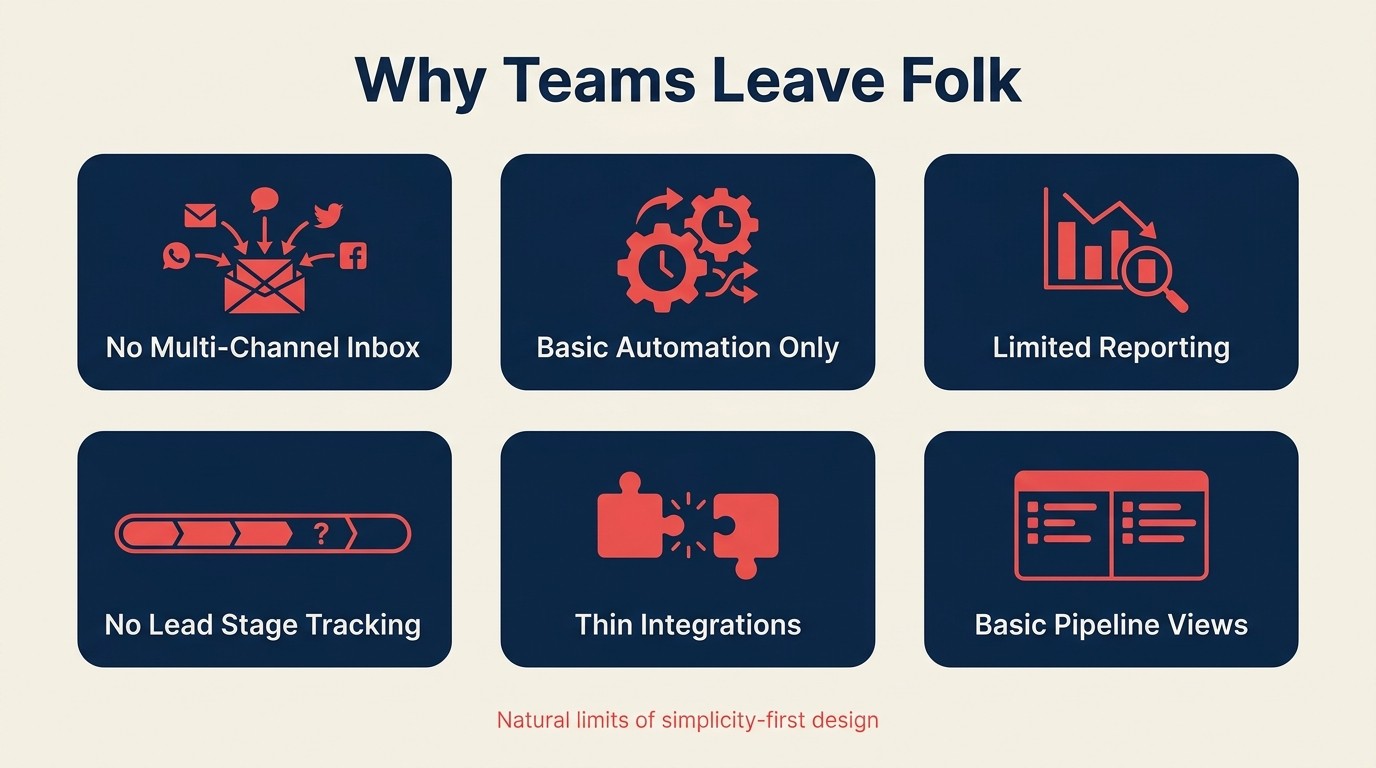
Folk is excellent when relationship tracking is the main job. The reasons teams leave usually appear only after the sales motion needs more process, reporting, and team coordination than a lightweight CRM can provide.
Before switching, it's worth naming what Folk actually does well. The Chrome extension that pulls contact data from LinkedIn is slick and saves real time. The mail merge is simple and works. The interface is genuinely beautiful, and onboarding takes minutes. For a founder managing 30-50 relationships, Folk is hard to beat on simplicity.
Teams leave Folk for predictable reasons:
| Pain Point | What Teams Need Instead |
|---|---|
| No multi-channel inbox (email only) | A tool with unified SMS, email, and messaging |
| Automation limited to basic sequences | Workflow automation with conditional logic and cross-team triggers |
| Reporting covers only basic metrics | Pipeline analytics, conversion rates, activity reporting by rep |
| No structured lead management | Stage-based lead tracking with qualification criteria |
| Small integration ecosystem | Native connections to the tools the team already uses |
| Pipeline views are basic | Full pipeline management with deal probability and forecasting |
These aren't criticisms of Folk's design choices. They're natural consequences of building a tool optimized for simplicity. Folk made tradeoffs. As teams grow, those tradeoffs stop working in their favor.
Rework Analysis: The Folk Ceiling Framework: Based on our review of Folk user feedback and CRM switching patterns, teams hit the Folk ceiling at three predictable thresholds: (1) headcount crosses 15-20 people and contact ownership becomes ambiguous, (2) the team adds a second revenue channel (e.g., partnerships alongside direct sales), or (3) a manager needs rep-level activity reporting. At any of these three triggers, the cost of staying on Folk (in lost pipeline visibility and duplicated tooling) exceeds the cost of migrating to a purpose-built CRM. Sales teams that switch to a CRM better matched to their motion see an average 29% increase in sales revenue within the first year, according to Salesmate (2026).
Frequently Asked Questions
What is Folk CRM best used for?
Folk CRM is best suited for individual founders and small teams (under 15 people) managing warm relationship networks rather than transactional sales pipelines. Its Chrome extension, mail merge, and clean interface make it fast to set up, but Folk lacks a multi-channel inbox, structured lead management, and deep reporting, which are features teams typically need as they scale past 20 people.
When should a team switch from Folk to a more powerful CRM?
Teams should evaluate replacing Folk when they cross any of three thresholds: headcount grows past 15-20 people (contact ownership becomes ambiguous), a second revenue channel is added alongside direct sales, or a manager needs rep-level activity reporting. These are the moments when Folk's simplicity becomes a constraint rather than an advantage.
How much does it cost to switch CRMs from Folk?
A typical 15-person sales team should budget $40,000-$90,000 for a full CRM migration, including training time and the 20-40% productivity reduction during a 4-12 week transition period, according to Dench (2026). Choosing the right CRM the first time, and piloting with real contacts before committing, significantly reduces these costs.
What is the cheapest Folk CRM alternative?
Copper starts at $9/user/month and is the most affordable alternative for teams deeply embedded in Google Workspace. HubSpot CRM offers a genuinely useful free tier with unlimited contacts. Rework's Sales Engine starts at $69/month billed yearly (5 seats), and the Revenue Engine ($159/month billed yearly) covers CRM, multi-channel inbox, and lead management without requiring separate add-on tools.
Which Folk alternative is best for a 10-50 person sales team?
Attio is the strongest fit when a RevOps manager wants full control over the CRM data model without Salesforce complexity. Rework suits growth-stage teams (10-150 people) that need CRM, lead management, and a multi-channel inbox in one platform. Pipedrive suits teams with a defined deal pipeline and high rep adoption as a priority.
Does Folk CRM have a mobile app?
As of 2026, Folk does not have a native iOS or Android mobile app. The web interface is mobile-responsive, but the experience is desktop-optimized. This is a meaningful gap: sales reps using mobile CRM are 150% more likely to exceed their sales quotas compared to reps without mobile access, according to Salesmate (2026).
How does Rework compare to Folk on pricing?
Rework's Revenue Engine is $159/month billed yearly (5 marketing and 5 sales seats) and includes CRM, multi-channel inbox, lead management, and workflow automation; the CRM alone (Sales Engine) starts at $69/month billed yearly for 5 seats. Folk's Standard plan starts at $20/user/month for comparable team functionality. For teams that would otherwise buy Folk plus a separate inbox tool and automation platform, Rework typically costs less in total than the equivalent Folk stack.
What to Do Next
Don't buy a replacement CRM based on a comparison article. Run a two-week pilot with your top two picks. Import 50 real contacts, run a real outreach sequence, and track whether your team actually uses it. The best CRM is the one your team logs into every day, not the one with the most features on a checklist. CRM rollout and adoption has a practical checklist for making that pilot actually count.
If you're coming from Folk and manage a team of 10 or more with sales, partnerships, and customer success touching the same contacts, pilot Attio and Rework side by side: Attio if you want Folk's flexibility with a deeper data model, Rework if the gaps pushing you off Folk are a shared multi-channel inbox and structured lead management. If you're a solo founder or two-person team not ready to leave Gmail, Streak or Copper are the honest next step.
Related reading:

Head of Enterprise Solutions
On this page
- Quick Comparison Table
- Stage Fit Matrix
- Sizing and Persona Table
- 1. Attio: Spreadsheet-flexible CRM for data-driven teams
- 2. Copper: Google Workspace CRM that lives where your team already works
- 3. Rework: Unified CRM, lead management, and team inbox in one platform
- 4. HubSpot CRM: Free to start, grows into a full go-to-market platform
- 5. Pipedrive: Visual pipeline CRM for sales teams that close deals
- 6. Streak: Gmail-native pipeline management for inbox-first teams
- 7. Nutshell: Simple CRM with email marketing built in for small sales teams
- 8. Close: Inside sales platform for high-volume calling and email teams
- 9. Monday Sales CRM: Visual, no-code sales management for teams on Monday.com
- 10. Affinity: Relationship intelligence CRM for investment and dealflow teams
- How to Choose: Decision Framework
- Pricing Comparison Table
- Integration Ecosystem Comparison
- Mobile App Availability
- Why Teams Leave Folk
- Frequently Asked Questions
- What is Folk CRM best used for?
- When should a team switch from Folk to a more powerful CRM?
- How much does it cost to switch CRMs from Folk?
- What is the cheapest Folk CRM alternative?
- Which Folk alternative is best for a 10-50 person sales team?
- Does Folk CRM have a mobile app?
- How does Rework compare to Folk on pricing?
- What to Do Next