More in
Playbook do Processo de Vendas
O Handoff SDR para AE: Como Documentá-lo Para que Funcione de Verdade
abr 18, 2026
Fundamentos do Deal Desk: Como Equipes de Vendas Menores Podem Aprovar e Fechar Mais Rápido
abr 18, 2026
Commit, Best Case, Pipeline: Definindo Termos de Forecast que Toda a Equipe Usa da Mesma Forma
abr 18, 2026
Análise de Win/Loss Sem Viés: Um Processo Repetível para Equipes de Vendas
abr 18, 2026
Construindo um Processo de Vendas um Tipo de Negócio por Vez
abr 18, 2026
Multi-Threading em Negócios Sem Irritar o Seu Champion
abr 18, 2026
A Estagnação no Meio do Pipeline: Como Diagnosticar e Resolver Negócios Parados
abr 18, 2026
Planos de Ação Mútua: Quando Ajudam e Quando Atrapalham
abr 18, 2026 · Currently reading
Cadência Operacional de Vendas: Do Daily Stand-Up ao QBR Trimestral
abr 18, 2026
Cadência de Forecast: Semanal, Mensal ou Contínua — O que Funciona e Quando
abr 6, 2026
Planos de Ação Mútuo: Quando Ajudam e Quando Prejudicam
Turn this article into takeaways for your work.


Each assistant summarizes the article only for you and suggests best practices for your work.
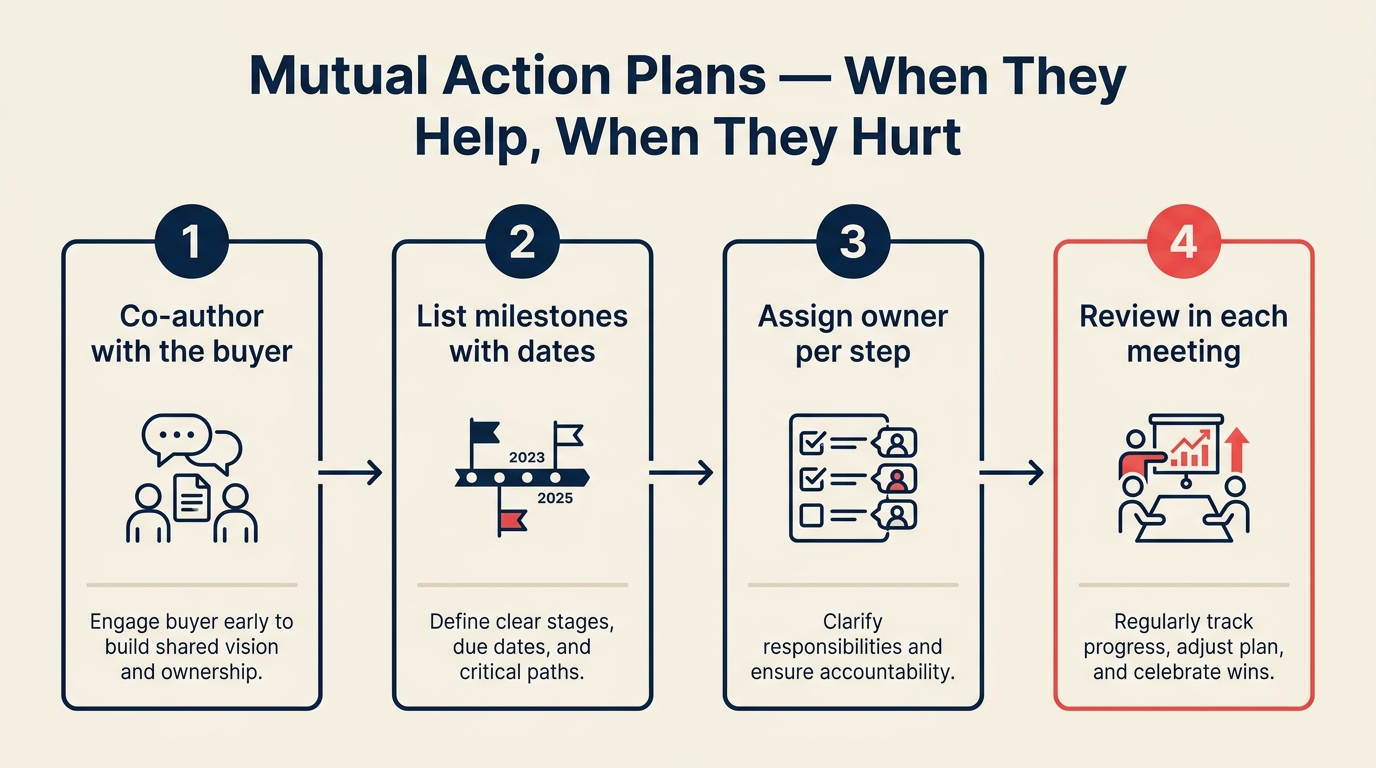
Os planos de ação mútuo se tornaram um conselho padrão em vendas B2B. Apareça em qualquer treinamento de metodologia de vendas e os MAPs vão aparecer em algum lugar do deck. Construa um cronograma compartilhado com o comprador. Crie responsabilidade dos dois lados. Reduza o risco de deals escorregarem no final.
Tudo isso é verdade, quando um MAP é usado corretamente. O problema é que os MAPs frequentemente são mal utilizados: introduzidos cedo demais, antes de o comprador ter qualquer motivo para se comprometer com um cronograma conjunto; carregados com marcos orientados pelo vendedor que servem ao trimestre do vendedor em vez do cronograma do comprador; ou usados como tática de fechamento disfarçada de linguagem colaborativa. Os MAPs funcionam melhor quando você já fez um multi-threading real, porque o comprador só consegue nomear todos os stakeholders e etapas corretos se essas pessoas já estiverem na conversa.
Quando um comprador se sente gerenciado em vez de apoiado, o MAP cria atrito em vez de removê-lo. Uma pesquisa do Gartner sobre buyer enablement constatou que compradores B2B que recebem suporte estruturado e colaborativo para a compra, incluindo cronogramas co-criados, têm 2,8 vezes mais probabilidade de concluir um deal de alta qualidade e baixo arrependimento do que aqueles que navegam pelo processo sozinhos. Este guia cobre a diferença: quando usar MAPs, como introduzi-los, o que deve estar neles e quando pular completamente.
O Que um MAP É e o Que Não É
Um plano de ação mútuo é um documento compartilhado que descreve as etapas que tanto o comprador quanto o vendedor precisam executar para um deal avançar e fechar. É mútuo porque ambos os lados têm marcos. É um plano de ação porque atribui responsáveis e datas a tarefas específicas.
O que um MAP é:
- Um roteiro co-criado para as etapas restantes de avaliação e compra
- Uma forma de revelar dependências e stakeholders que o comprador não mencionou
- Um ponto de referência compartilhado para os dois lados sobre o que foi acordado
O que um MAP não é:
- Uma técnica de fechamento
- Um compromisso legal
- Um plano de projeto para implementação (isso vem depois)
- Algo que você envia ao comprador e pede para assinar
A distinção importa porque a forma como você o introduz sinaliza o que ele é. "Aqui está um plano que montei para nos levar à sua data de fechamento" parece uma técnica de fechamento. "Podemos passar 20 minutos mapeando o que precisa acontecer de cada lado antes de você poder tomar uma decisão?" parece parceria.
Etapa 1: Quando Introduzir um MAP
O erro mais comum com MAPs é introduzi-los cedo demais, antes de o comprador ter qualquer motivo para se importar com a co-criação de um cronograma.
Sinais que tornam um MAP apropriado:
- O deal está no meio para o final (além da avaliação inicial, em consideração séria)
- Múltiplos stakeholders estão envolvidos e as etapas deles precisam de coordenação
- O comprador mencionou um processo específico de procurement ou conformidade que cria dependências
- O prazo de fechamento é específico e o comprador reconheceu que isso importa
- Você identificou uma lacuna entre quando o comprador quer terminar e quando ele está realmente se movendo
Esses sinais também se mapeiam na forma como suas etapas de pipeline são projetadas: se seus critérios de saída da Etapa 4 exigem "mapa de stakeholders completo e processo de decisão confirmado", introduzir um MAP nessa etapa se alinha naturalmente com a progressão da etapa.
O que fazer antes desses sinais aparecerem:
Foque na discovery e avaliação. Não introduza um MAP na primeira ou segunda reunião. Um MAP implica momentum em direção a uma decisão. Pedir a um comprador que ainda não decidiu que quer te comprar para se comprometer com um plano de fechamento conjunto é presunçoso e às vezes ofensivo.
O sinal que você está esperando é o comprador dizer, implícita ou explicitamente, "queremos fazer isso, como chegamos lá?" É aí que um MAP ajuda.
Uma pesquisa da Harvard Business Review sobre ciclos de vendas complexos mostra que compradores em deals com múltiplos stakeholders têm mais probabilidade de cumprir marcos que eles mesmos identificaram do que aqueles atribuídos a eles pelo vendedor, reforçando o valor da co-criação em vez da apresentação.
Etapa 2: Construindo o MAP Com o Comprador, Não Para Ele
Enviar um MAP pré-construído quase sempre é o movimento errado.
Quando você envia um MAP completo e pede ao comprador para revisá-lo, você o transformou em um documento do vendedor, algo que você está pedindo a ele para aceitar. Mesmo que cada marco seja razoável, a dinâmica está errada. O comprador sente que está recebendo um cronograma em vez de construindo um.
A conversa de co-criação:
Peça uma sessão de trabalho específica de 20 a 30 minutos: "Gostaria de passar 20 minutos mapeando o que precisa acontecer do seu lado e do nosso lado antes de você poder tomar uma decisão. Tenho uma estrutura básica, mas quero garantir que estamos capturando as etapas reais do seu processo."
Nessa sessão:
- Comece com os marcos do comprador, não com os seus. "O que sua equipe precisa completar antes de apresentar isso ao [tomador de decisão]?"
- Adicione marcos do vendedor como respostas às necessidades do comprador. "Podemos ter a documentação de segurança pronta até [data] para que sua equipe de TI possa concluir a revisão."
- Defina uma data de fechamento com base no último marco do comprador mais um buffer razoável, não com base no final do seu trimestre.
- Documente com linguagem compartilhada, não linguagem de vendas. "Comprador conclui revisão de segurança de TI", não "Cliente avança para a Etapa 5".
O resultado deve parecer algo que o comprador teria construído sozinho se você tivesse pedido a ele para descrever o próprio processo.
Etapa 3: O Que Vai em um MAP
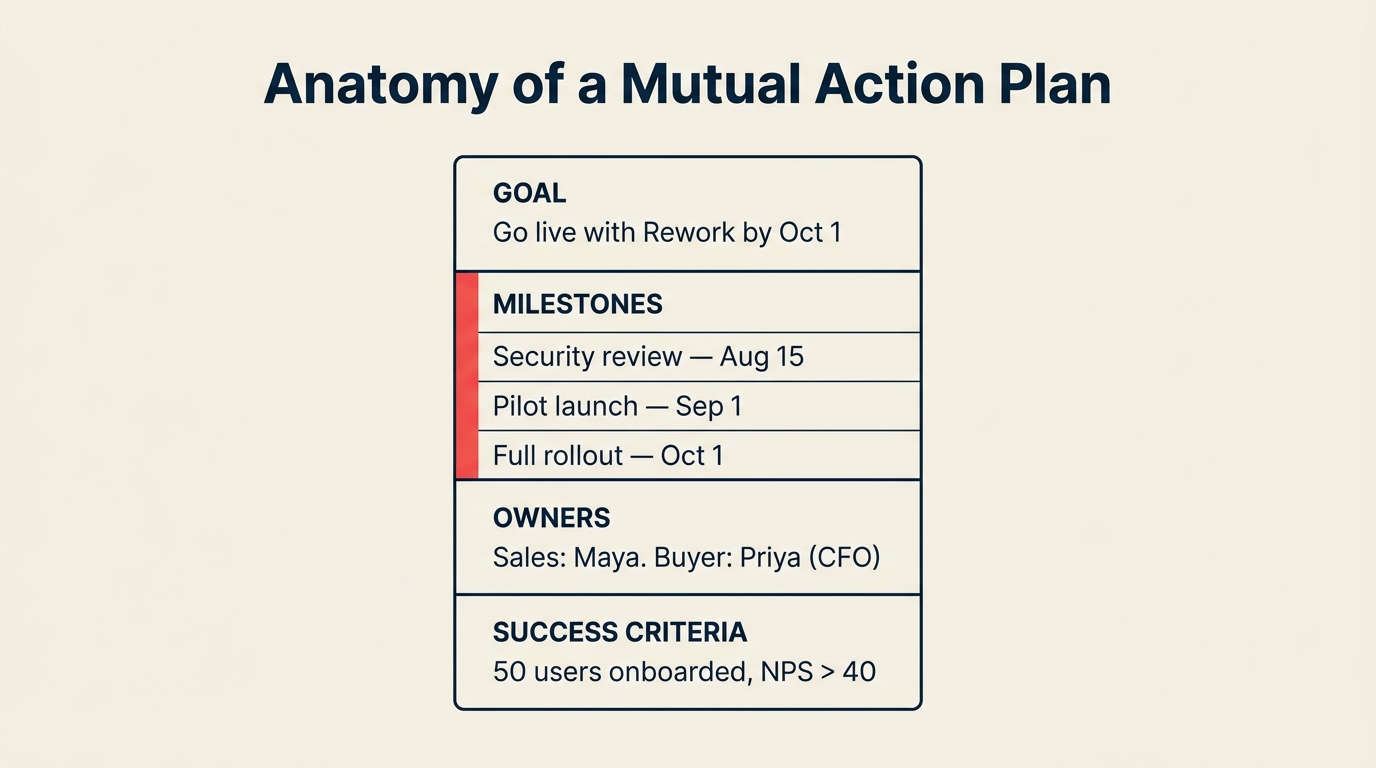
Mantenha enxuto. Um MAP com 20 itens de cada lado é um plano de projeto, não um acelerador de deal. O objetivo é capturar as etapas que realmente estão bloqueando o deal de fechar, não tudo que vai acontecer algum dia.
O que pertence a um MAP:
| Categoria | Exemplos |
|---|---|
| Marcos de avaliação do comprador | Revisão jurídica, revisão de segurança, demo interno, apresentação para o conselho |
| Aprovações do comprador | Aprovação de procurement, alinhamento do sponsor executivo, confirmação de orçamento |
| Marcos de entrega do vendedor | Entrega da proposta, chamadas de referência, documentação de segurança, rascunho do contrato |
| Marcos conjuntos | Reunião de business review, sessão final de Q&A, revisões contratuais completas |
O que não pertence:
- Marcos de implementação (isso é pós-venda)
- Datas aspiracionais que nenhum dos lados confirmou
- Ações apenas do vendedor nas quais o comprador não tem participação (revisão interna de pipeline, atualização no CRM)
Cada item deve ter: uma descrição, um responsável (Comprador ou Vendedor) e uma data-alvo. Só isso.
Etapa 4: Mantendo o MAP Ao Longo do Tempo
Um MAP que é construído uma vez e nunca mais referenciado é um documento, não uma ferramenta. O valor está em usá-lo como ponto de referência compartilhado durante o restante do deal.
Como referenciá-lo sem ser mecânico:
No início de cada reunião: "Rápida verificação de onde estamos. [Marco] estava agendado para a semana passada. Isso foi concluído?" Isso normaliza o MAP como um documento de trabalho, não um checklist que você está percorrendo.
O que fazer quando os marcos atrasam: Não entre em pânico e não deixe passar sem abordar. "Vejo que a revisão de segurança está atrasada em relação ao cronograma original. Precisamos ajustar a data de fechamento, ou há uma forma de acelerar essa etapa?"
Quando o comprador para de atualizar o lado dele:
Isso é um sinal, não apenas um problema administrativo. Um comprador que se engajou entusiasticamente com o MAP inicialmente e parou de atualizá-lo está ou despriorizando o deal, ou encontrou um obstáculo interno, ou está em um período silencioso antes de uma decisão final.
O movimento certo não é enviar um e-mail de "apenas verificando o MAP". É ter uma conversa direta: "Percebi que o MAP ficou em silêncio. Algo mudou do seu lado que devo saber?" Se ele sumir, aplique o diagnóstico de paralisação no meio do pipeline antes de decidir se pressionar mais ou requalificar.
Etapa 5: Quando os MAPs Prejudicam
Há situações em que introduzir um MAP é a decisão errada, e usá-lo de qualquer forma vai prejudicar o deal.
Deals em fase inicial em que o comprador não se comprometeu. Um MAP implica progresso. Se o comprador ainda não decidiu que está avaliando você seriamente, pedir a ele para co-criar um cronograma de fechamento é presunçoso. Ele vai ou concordar educadamente e não se engajar, ou vai se sentir pressionado e recuar.
Deals em que o comprador tem mais influência do que o vendedor. Grandes deals enterprise em que o comprador está conduzindo um processo estruturado de RFP com múltiplos fornecedores: seu MAP é irrelevante. Eles têm o próprio processo. Pedir a eles para trabalhar a partir do seu cronograma compartilhado sinaliza que você não entende a estrutura de procurement deles.
De acordo com a análise da Forrester sobre comportamento de procurement enterprise, avaliações gerenciadas por procurement seguem modelos de processo internos com os quais os cronogramas impostos pelo vendedor rotineiramente conflitam, tornando a co-criação menos eficaz do que o espelhamento do processo nesses cenários.
Deals conduzidos por procurement. Quando a equipe de procurement do comprador está conduzindo o processo, você está trabalhando dentro do cronograma deles, não do seu. Um MAP é redundante. Eles já têm um documento de processo. Nessas situações, peça clareza sobre o processo deles e espelhe-o em vez de introduzir um paralelo.
Deals em que o champion é resistente. Se o seu champion hesita quando você propõe construir um MAP, mesmo quando enquadrado de forma colaborativa, preste atenção. Pode significar que ele não está tão comprometido quanto indicou. Pode significar que há um processo interno que você desconhece. Ou pode significar que ele fez isso com outros fornecedores e não deu certo. Pergunte: "Qual é a sua hesitação? Quero garantir que não estou criando trabalho extra para você."
Etapa 6: O MAP Como Sinal de Qualificação
Um dos aspectos mais subaproveitados dos MAPs é o que a resposta do comprador à proposta do MAP te diz sobre a saúde do deal.
Sinais positivos de qualificação:
- Comprador se engaja com entusiasmo na conversa de co-criação
- Comprador nomeia stakeholders internos específicos e etapas que você desconhecia
- Comprador sugere ajustar marcos com base no cronograma real dele (mostra propriedade)
- Comprador cumpre os próprios marcos
Sinais negativos de qualificação:
- Comprador concorda na reunião, mas nunca se engaja com o documento
- Comprador adia cada marco para "quando estivermos mais avançados"
- Comprador não nomeia um responsável pela decisão ou um processo de aprovação específico
- Comprador pede a você para construir o MAP sozinho e diz que vai "revisá-lo"
Um comprador que não vai se engajar com um plano de ação mútuo está te dizendo algo importante sobre o quanto realmente está comprometido em avançar. Isso não é motivo para pressionar mais o MAP. É motivo para ter uma conversa direta de qualificação sobre onde o deal realmente está.
Erros Comuns
Uma pesquisa da McKinsey sobre experiência do comprador B2B constatou que compradores que sentem que seu cronograma e suas prioridades são respeitados no processo de vendas têm 33% mais probabilidade de recomendar o fornecedor internamente e menor probabilidade de reabrir licitações competitivas em fase avançada do processo.
Usar datas de fechamento que servem ao seu trimestre, não ao cronograma do comprador. Se o MAP tem "contrato assinado até 30 de junho" do lado do vendedor e o comprador não tem uma razão particular para fechar até 30 de junho, essa data é um sinal para o comprador de que você está gerenciando-o em função dos seus objetivos, não dos dele. Baseie o cronograma nos marcos do comprador.
Tornar cada marco uma ação do vendedor. Um MAP em que o vendedor possui 80% dos marcos não é mútuo. É uma atualização de projeto. Empurre o comprador para nomear as próprias etapas explicitamente.
Tratar o MAP como um SLA. "Você se comprometeu a concluir a revisão de segurança até o dia 15", dito de forma acusatória, vai prejudicar o relacionamento. O MAP é uma ferramenta de planejamento, não um contrato. Se os marcos atrasarem, ajuste-os juntos.
Modelo de MAP
PLANO DE AÇÃO MÚTUO: [Nome da Empresa] x [Nome do Vendedor]
Objetivo: [Para o que estamos trabalhando] | Fechamento-alvo: [Data]

#  | Marco                          | Responsável | Data-alvo   | Status
---|--------------------------------|-------------|-------------|--------
1  | Documentação de segurança enviada | Vendedor | [Data]      | Concluído
2  | Revisão de segurança de TI     | Comprador   | [Data]      | Em andamento
3  | Chamada de referência agendada | Ambos       | [Data]      | Agendado
4  | Proposta comercial final       | Vendedor    | [Data]      |
5  | Revisões contratuais           | Comprador   | [Data]      |
6  | Aprovação do sponsor executivo | Comprador   | [Data]      |
7  | Assinatura do contrato         | Ambos       | [Data]      |

Notas / itens em aberto:
Quando Usar / Quando Pular (Guia de Decisão)
| Use um MAP quando... | Pule um MAP quando... |
|---|---|
| Deal em fase intermediária a avançada | Fase inicial, comprador ainda avaliando |
| Múltiplos stakeholders, procurement complexo | Único tomador de decisão, processo simples |
| Comprador nomeou um cronograma específico | Comprador não tem urgência ou cronograma declarado |
| Ambos os lados têm itens de ação claros | Comprador não tem processo a documentar |
| Deal precisa de coordenação entre equipes | Procurement está conduzindo um RFP estruturado |
Próximos Passos
Escolha um deal que você tem atualmente na etapa de proposta ou negociação. Se você ainda não introduziu um MAP, tente a conversa de co-criação esta semana.
Não envie um documento pré-construído. Peça 20 minutos: "Podemos passar alguns minutos mapeando o que precisa acontecer dos dois lados antes de você poder tomar essa decisão? Quero garantir que não estamos perdendo nada."
Observe se o comprador se engaja ou desvia. Essa resposta em si é um sinal de qualificação. Se ele se engajar e nomear marcos específicos que você desconhecia, o deal está mais saudável do que você pensava. Se ele desviar ou der respostas vagas, você tem uma pergunta de qualificação para abordar antes de investir mais. Nesse ponto, revisite seus critérios do framework de qualificação e seja honesto sobre se esse deal algum dia atendeu ao critério para Commit ou Best Case.
Saiba Mais

Head of Enterprise Solutions
On this page
- O Que um MAP É e o Que Não É
- Etapa 1: Quando Introduzir um MAP
- Etapa 2: Construindo o MAP Com o Comprador, Não Para Ele
- Etapa 3: O Que Vai em um MAP
- Etapa 4: Mantendo o MAP Ao Longo do Tempo
- Etapa 5: Quando os MAPs Prejudicam
- Etapa 6: O MAP Como Sinal de Qualificação
- Erros Comuns
- Modelo de MAP
- Quando Usar / Quando Pular (Guia de Decisão)
- Próximos Passos