Bahasa Indonesia
Software CRM Terbaik 2026: 15 Tools Berdasarkan Ukuran Tim, Tahap, dan Model Penjualan
Turn this article into takeaways for your work.


Each assistant summarizes the article only for you and suggests best practices for your work.
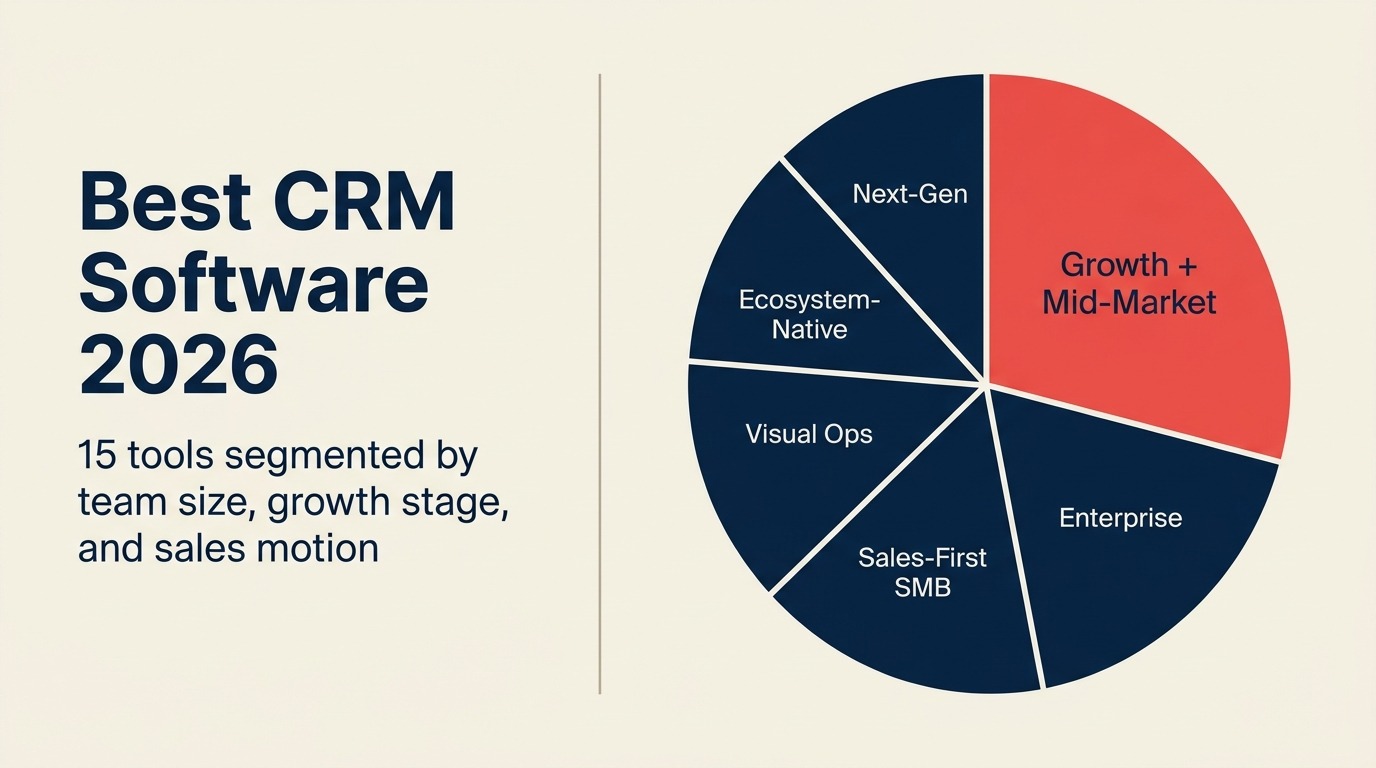
Pasar CRM di 2026 memiliki lebih banyak pilihan dari sebelumnya, namun sebagian besar pembeli masih salah memilih karena mereka mengevaluasi fitur, bukan kesesuaian. Mereka membandingkan dashboard dan integrasi tanpa lebih dulu bertanya: apa model penjualan saya? Seberapa besar tim saya? Di tahap pertumbuhan mana saya berada?
Panduan ini membagi 15 platform CRM bukan berdasarkan jumlah fitur, melainkan berdasarkan kesesuaian. Setiap tool dinilai berdasarkan tahap perusahaan, ukuran tim, model penjualan, dan persona pembeli. Jika Anda baru memasuki kategori CRM untuk pertama kalinya atau sedang mengevaluasi ulang setelah melampaui tool yang ada, panduan ini yang Anda butuhkan.
Tabel Perbandingan Singkat
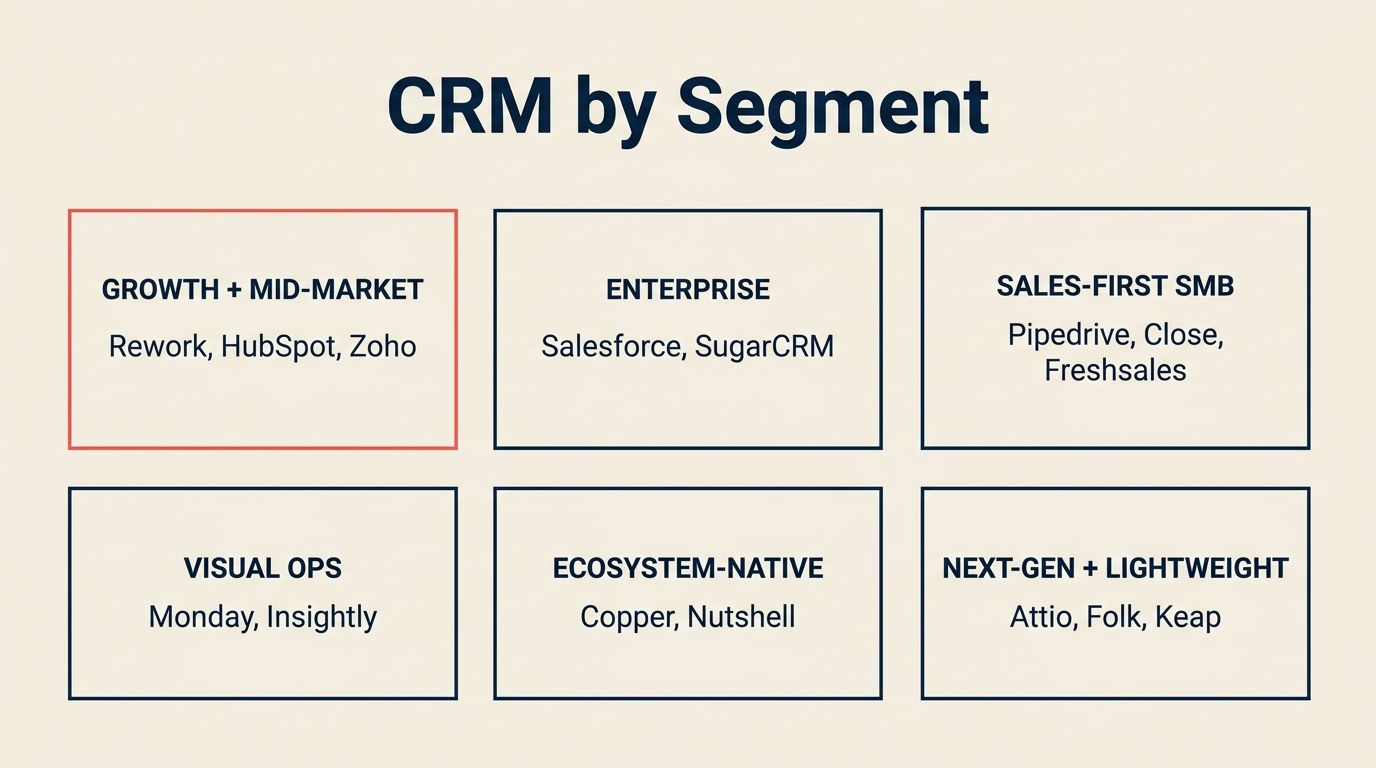
| Segmen | Tool | Paling Cocok Untuk | Harga Awal | Keunggulan Utama | Keterbatasan Utama |
|---|---|---|---|---|---|
| Growth + Mid-Market | HubSpot CRM | Pertumbuhan berbasis marketing, mid-market | Gratis; Sales Hub dari $15/bulan/kursi | Ekosistem terbaik, otomatisasi pemasaran yang kuat | Cepat mahal; pemisahan sales-marketing bisa memecah data |
| Growth + Mid-Market | Rework | Tim operasional lintas fungsi berukuran menengah | Sales Engine dari $69/bulan ditagih tahunan (5 seat); Revenue Engine dengan kotak masuk $159/bulan | CRM terpadu + manajemen lead + kotak masuk multi-saluran | Kurang ideal untuk tim sangat kecil atau F500 |
| Growth + Mid-Market | Zoho CRM | Tim hemat biaya yang butuh skalabilitas | $14/kursi/bulan | Ekosistem 45+ aplikasi, biaya terendah di skala besar | Kompleksitas UI; kualitas bervariasi antar modul |
| Enterprise | Salesforce | Skala enterprise, organisasi kompleks | Starter $25/kursi/bulan | Kustomisasi terdalam, AI Agentforce | Biaya implementasi tinggi dan kurva pembelajaran curam |
| Enterprise | SugarCRM | On-premise, industri terregulasi | $49/kursi/bulan | Opsi self-hosted, kontrol kepatuhan | Overhead implementasi tinggi |
| Sales-First SMB | Pipedrive | Usaha kecil berbasis penjualan dan tim pertumbuhan | $14/kursi/bulan | UX pipeline visual terbaik | Marketing native terbatas; manajemen lead tipis |
| Sales-First SMB | Close | Penjualan internal, panggilan volume tinggi | $49/bulan (dasar) | Power dialer, SMS, urutan email bawaan | Bukan platform CRM penuh; lapisan marketing tipis |
| Sales-First SMB | Freshsales | Tim berkembang yang ingin UX bersih | $9/kursi/bulan | Freddy AI, ekosistem Freshworks | Terbatas untuk model penjualan kompleks |
| Visual + Hybrid Ops | Monday Sales CRM | Tim visual-first dengan operasional hibrida | $12/kursi/bulan | Board fleksibel, kejelasan visual | Kedalaman CRM native yang dangkal |
| Visual + Hybrid Ops | Insightly | Kombinasi CRM + manajemen proyek | $29/kursi/bulan | Integrasi manajemen proyek native | UX kompleks; antarmuka usang |
| Ecosystem-Native | Copper | Tim native Google Workspace | $9/kursi/bulan | Integrasi Gmail + Drive terdalam | Terbatas di luar ekosistem Google |
| Ecosystem-Native | Nutshell | Usaha kecil yang ingin CRM + email marketing | $16/kursi/bulan | Email marketing bundled, onboarding mudah | Kustomisasi terbatas di skala besar |
| Next-Gen / Modern | Attio | Operasional relasi fleksibel, tim modern | $29/kursi/bulan | Model data generasi berikutnya, CRM sebagai platform | Produk masih berkembang; kedalaman enterprise belum matang |
| Lightweight / Personal | Folk | CRM personal ringan, agensi | $20/kursi/bulan | Manajemen relasi sederhana | Tidak dibangun untuk alur kerja sales ops penuh |
| Solopreneur | Keap | Solopreneur, usaha mikro | $249/bulan (hingga 2 pengguna) | Bundel CRM + otomatisasi pemasaran | Harga per kontak tidak efisien saat daftar berkembang |
Cara Memilih CRM di 2026
Sebagian besar kesalahan pembelian CRM terjadi dalam lima menit pertama riset, ketika tim langsung menuju perbandingan fitur tanpa mundur untuk menjawab tiga pertanyaan:
- Berapa ukuran tim dan jalur pertumbuhan Anda? Tim penjualan 5 orang dan organisasi revenue 150 orang memiliki kebutuhan yang sangat berbeda.
- Apa model penjualan Anda? Penjualan internal kecepatan tinggi (banyak panggilan, siklus pendek) membutuhkan tool yang berbeda dari transaksi enterprise kompleks dengan siklus 6 bulan dan 8 pemangku kepentingan.
- Di tahap mana perusahaan Anda? Startup awal butuh kecepatan dan kesederhanaan. Perusahaan tahap pertumbuhan butuh struktur dan handoff. Perusahaan mid-market butuh data terpadu di seluruh tim.
Jawab ketiga pertanyaan itu sebelum membaca satu pun spesifikasi fitur. Menurut Panduan Pasar CRM dari Gartner, implementasi CRM yang dimulai dengan definisi proses sebelum pemilihan tool memiliki tingkat adopsi yang jauh lebih tinggi dibanding yang langsung memilih vendor. Akan sangat membantu juga untuk memikirkan tahap pipeline yang sesuai dengan cara Anda menjual sebelum mulai membandingkan tool.
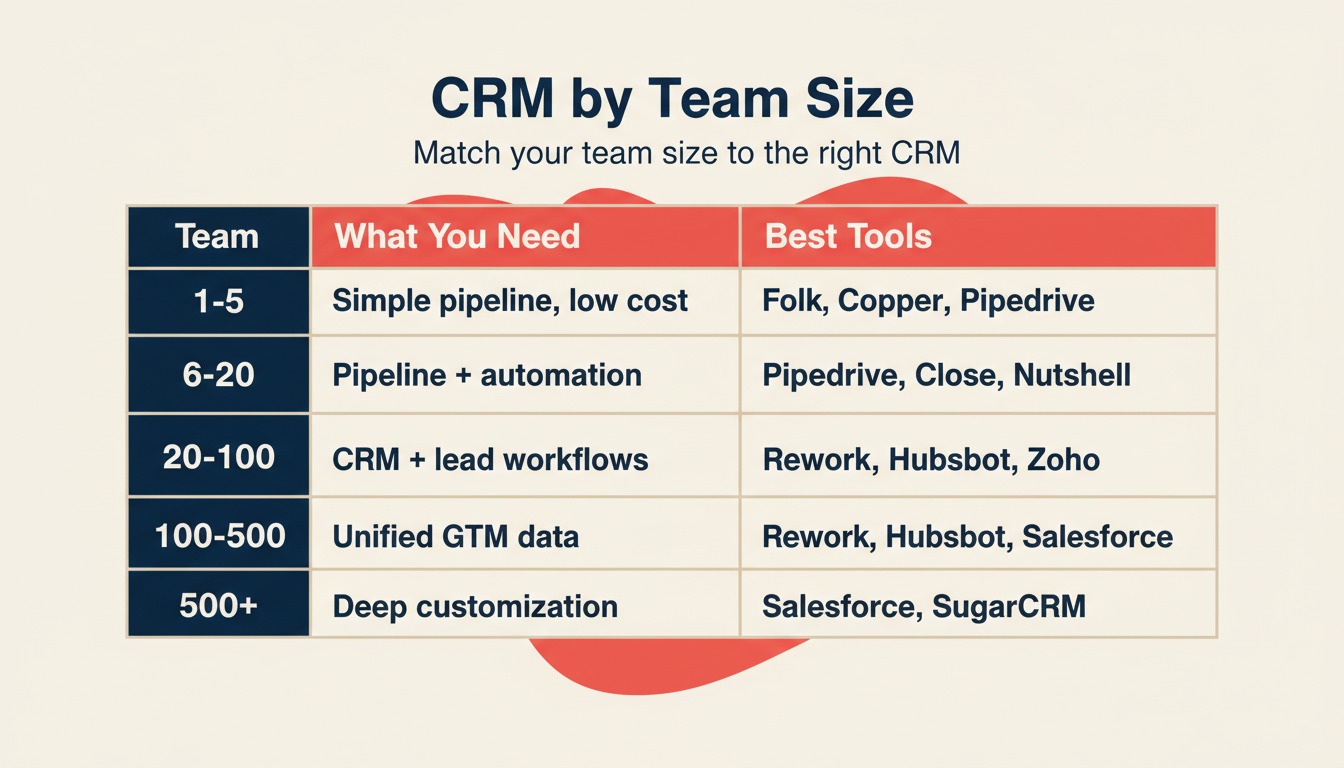
Kerangka: Berdasarkan Ukuran Tim
| Ukuran Tim | Yang Anda Butuhkan | Pilihan Terbaik |
|---|---|---|
| 1-5 orang | Pipeline sederhana, setup cepat, biaya rendah | Folk, Keap, Copper, Pipedrive Essential |
| 6-20 orang | Pipeline terstruktur + otomatisasi dasar | Pipedrive, Nutshell, Close, Freshsales |
| 20-100 orang | CRM penuh + manajemen lead + workflow tim | HubSpot, Rework, Zoho, Monday Sales |
| 100-500 orang | Data terpadu di sales + marketing + CS | HubSpot Enterprise, Salesforce, Rework |
| 500+ orang | Kustomisasi mendalam, tata kelola, ekosistem mitra | Salesforce, SugarCRM |
Kerangka: Berdasarkan Model Penjualan
| Model Penjualan | Yang Paling Penting | Pilihan Terbaik |
|---|---|---|
| Penjualan internal / volume tinggi | Dialer, urutan email, kecepatan | Close, Freshsales, Rework |
| Prospek outbound | Penangkapan lead, penilaian, distribusi | Rework, HubSpot, Salesforce |
| Inbound berbasis marketing | Formulir lead, nurture, atribusi | HubSpot, Zoho, Rework |
| Penjualan lapangan / wilayah | Manajemen wilayah, mobile | Salesforce, Zoho CRM |
| Penjualan saluran / mitra | Portal mitra, pendaftaran transaksi | Salesforce, Zoho |
| Pertumbuhan berbasis produk | Kait data penggunaan, onboarding mandiri | HubSpot, Attio |
| Agensi / relasional | Kedalaman relasi, pipeline ringan | Folk, Copper, Nutshell |
Kerangka: Berdasarkan Tahap Pertumbuhan
| Tahap | Sinyal | Pilihan Terbaik |
|---|---|---|
| Pre-PMF (1-15 karyawan) | Memvalidasi GTM, belum ada sales ops | Folk, Copper, Pipedrive |
| Traksi awal (15-50) | Rep pertama direkrut, butuh pipeline terstruktur | Pipedrive, Close, Freshsales, Nutshell |
| Pertumbuhan (50-200) | Handoff marketing + sales mulai rusak | HubSpot, Rework, Zoho CRM |
| Mid-market (200-500) | RevOps diperlukan, data terpadu di seluruh GTM | HubSpot Enterprise, Salesforce, Rework |
| Enterprise (500+) | Objek kustom, tata kelola, AppExchange | Salesforce, SugarCRM |
Matriks Kesesuaian Tahap
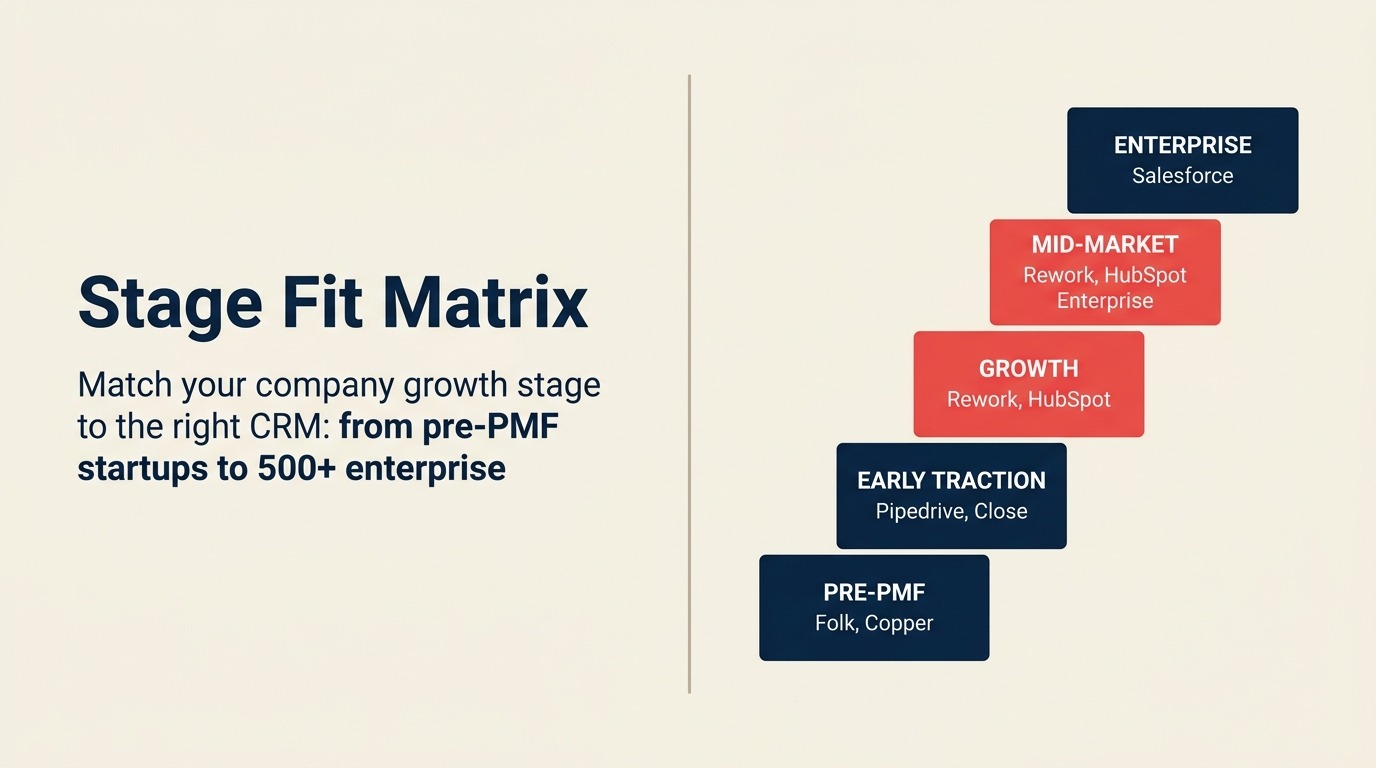
| Tool | Pre-PMF | Traksi Awal | Pertumbuhan | Mid-Market | Enterprise |
|---|---|---|---|---|---|
| HubSpot | Mungkin | Sangat cocok | Sangat cocok | Sangat cocok | Mungkin |
| Salesforce | - | - | Mungkin | Sangat cocok | Sangat cocok |
| Rework | - | Mungkin | Sangat cocok | Sangat cocok | Mungkin |
| Pipedrive | Sangat cocok | Sangat cocok | Mungkin | - | - |
| Zoho CRM | Mungkin | Sangat cocok | Sangat cocok | Sangat cocok | Mungkin |
| Monday Sales | Mungkin | Mungkin | Sangat cocok | Mungkin | - |
| Freshsales | Mungkin | Sangat cocok | Sangat cocok | Mungkin | - |
| Close | - | Sangat cocok | Sangat cocok | Mungkin | - |
| Copper | Sangat cocok | Sangat cocok | Mungkin | - | - |
| Attio | Sangat cocok | Sangat cocok | Sangat cocok | Mungkin | - |
| Folk | Sangat cocok | Mungkin | - | - | - |
| Nutshell | Sangat cocok | Sangat cocok | Mungkin | - | - |
| Insightly | - | Mungkin | Sangat cocok | Mungkin | - |
| Keap | Sangat cocok | Mungkin | - | - | - |
| SugarCRM | - | - | Mungkin | Sangat cocok | Sangat cocok |
Tabel Ukuran dan Persona
| Tool | Ukuran Tim Ideal | Persona Pembeli Utama |
|---|---|---|
| HubSpot | 10-1.000 karyawan | CMO, VP Marketing, VP Sales, Sales Ops |
| Salesforce | 100-10.000+ karyawan | CIO, VP Sales, RevOps, pemimpin IT |
| Rework | 20-500 karyawan | COO, Kepala RevOps, Kepala Revenue, Founder-operator |
| Pipedrive | 5-100 karyawan | Sales Manager, Founder, pemimpin tim BDR |
| Zoho CRM | 10-500 karyawan | IT Manager, pemimpin Ops, Sales Manager |
| Monday Sales CRM | 10-200 karyawan | Operations Manager, PMO, Team Lead |
| Freshsales | 10-300 karyawan | Sales Manager, Kepala Growth |
| Close | 5-100 karyawan | Inside Sales Manager, pemimpin tim SDR |
| Copper | 5-50 karyawan | Account Manager, Founder, pemimpin Customer Success |
| Attio | 5-200 karyawan | Founder, RevOps, Kepala Growth |
| Folk | 1-30 karyawan | Founder, pemimpin Agensi, Konsultan |
| Nutshell | 5-100 karyawan | Sales Manager, pemilik usaha kecil |
| Insightly | 10-200 karyawan | Ops Manager, Account Manager |
| Keap | 1-10 karyawan | Solopreneur, pemilik usaha mikro |
| SugarCRM | 50-1.000 karyawan | IT Director, Sales Ops, petugas kepatuhan |
1. HubSpot CRM: Ekosistem Marketing + Sales Terbaik
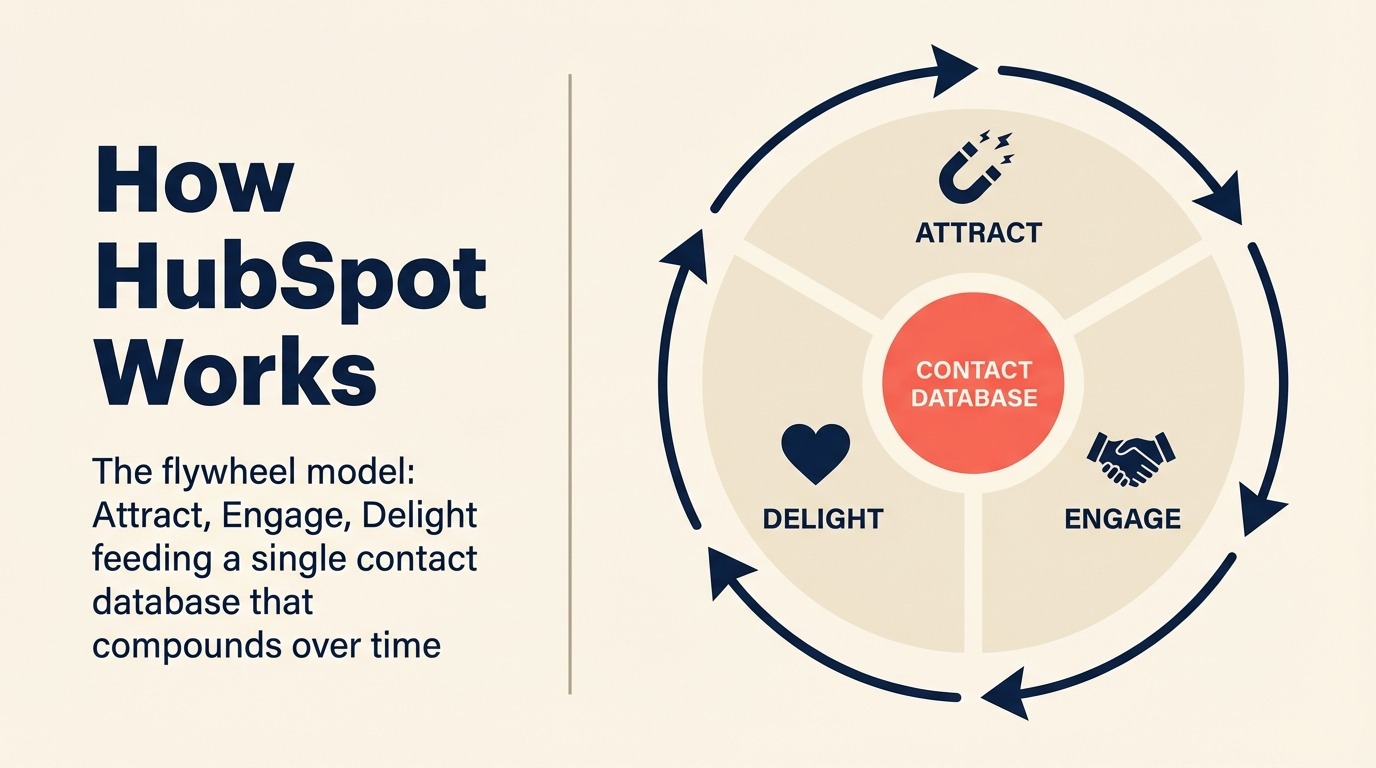
Filosofi produk HubSpot adalah flywheel: attract, engage, delight. Setiap produk (Marketing Hub, Sales Hub, Service Hub, CMS Hub) dirancang untuk mengisi satu database kontak yang terus berkembang dari waktu ke waktu. Taruhan pada database terpadu itulah yang menjadikan HubSpot CRM default untuk tim pertumbuhan berbasis inbound.
Tingkatan gratis cukup baik untuk tim kecil yang baru memulai. Namun nilai nyatanya muncul saat Anda menjalankan model marketing + sales: landing page, nurture email, atribusi iklan, pipeline, dan otomatisasi transaksi semuanya saling terhubung tanpa middleware.
Kendalanya adalah harga. Berpindah dari tingkatan gratis ke konfigurasi Marketing Hub + Sales Hub nyata dengan 50 kursi bisa dengan mudah mencapai $30.000-$50.000 per tahun. Tim yang hanya butuh pipeline penjualan, bukan otomatisasi pemasaran, sering kali membayar untuk fitur yang tidak mereka gunakan. Data kategori CRM G2 secara konsisten menempatkan HubSpot sebagai pemimpin dalam kemudahan penggunaan dan kelengkapan, meski pembeli mid-market sering menyebut biaya sebagai hambatan. Jika biaya menjadi perhatian, lihat alternatif HubSpot terbaik untuk tool yang menjangkau area serupa dengan harga lebih terjangkau. Dan jika Anda memilih antara HubSpot dan Rework secara spesifik, perbandingan Rework vs HubSpot CRM mencakup perbedaan utamanya.
| Yang Anda dapatkan | Yang tidak ada |
|---|---|
| Tool marketing inbound terbaik di kelasnya | Bisa sangat mahal untuk kursi yang banyak |
| Ekosistem besar (App Marketplace, 1.500+ integrasi) | Sales Hub dan Marketing Hub adalah SKU terpisah, tidak benar-benar terpadu |
| Sumber daya onboarding dan komunitas yang kuat | Distribusi lead native lemah tanpa solusi alternatif |
| Tingkatan gratis adalah titik awal yang nyata | Transaksi enterprise kompleks butuh Sales Hub Enterprise ($150/kursi/bulan) |
Harga: Tingkatan gratis tersedia; Sales Hub Starter $15/kursi/bulan; Sales Hub Professional $90/kursi/bulan; Enterprise $150/kursi/bulan (ditagih tahunan)
Paling cocok untuk: Perusahaan pertumbuhan berbasis marketing, tim fokus inbound, perusahaan yang membangun di atas ekosistem HubSpot
2. Salesforce: Kedalaman Enterprise + AI Agentforce
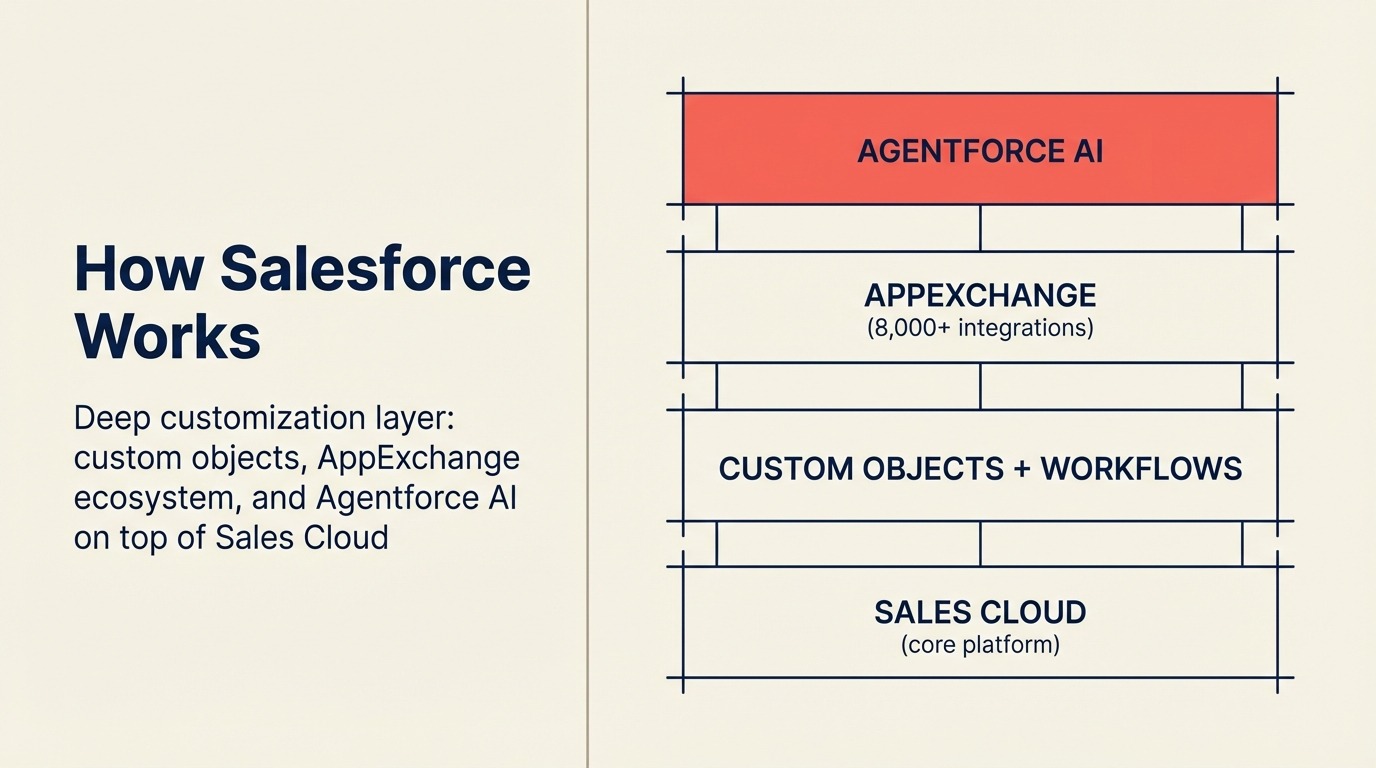
Taruhan Salesforce selalu sama: Anda bisa mengkustomisasi apa pun, terhubung ke segalanya, dan membangun apa pun yang dibutuhkan proses penjualan Anda. Di 2026, taruhan itu berjalan melalui Agentforce, lapisan agen AI yang mengotomatiskan outreach SDR, rangkuman transaksi, perkiraan pipeline, dan resolusi layanan pelanggan di seluruh platform Einstein.
Tidak ada CRM lain yang menandingi kedalaman Salesforce untuk workflow enterprise yang kompleks. Objek kustom, konfigurasi multi-org, hierarki wilayah, portal mitra, dan ekosistem AppExchange (8.000+ integrasi) memberikan tim enterprise ops dan IT sebuah langit-langit yang tidak didekati vendor lain.
Biaya dari kedalaman itu nyata: implementasi biasanya memakan waktu 3-9 bulan untuk penerapan yang bermakna, jumlah admin diperlukan untuk memeliharanya, dan total biaya kepemilikan pada 100 kursi sering mencapai $150.000-$300.000 per tahun setelah lisensi, implementasi, dan admin diperhitungkan. Studi Total Economic Impact Forrester tentang Salesforce berulang kali menyoroti kesenjangan antara biaya lisensi dan biaya penerapan sebenarnya. Jika Anda tidak yakin Salesforce cocok untuk Anda, perbandingan Rework vs Salesforce menunjukkan di mana kompleksitas itu sepadan dan di mana tidak. Atau jika Anda mengevaluasi lebih banyak pilihan, lihat alternatif Salesforce terbaik.
| Yang Anda dapatkan | Yang tidak ada |
|---|---|
| Kustomisasi terdalam dari CRM mana pun | Biaya implementasi dan kompleksitas tinggi |
| AI Agentforce untuk pipeline otomatis dan CS | Membutuhkan admin Salesforce khusus untuk pemeliharaan |
| AppExchange: 8.000+ integrasi mitra | Mahal bahkan di tingkatan starter; fitur nyata butuh Enterprise/Unlimited |
| Cloud khusus industri (Financial, Health, dll.) | Berlebihan untuk tim di bawah 100 orang |
Harga: Starter Suite $25/kursi/bulan; Pro Suite $100/kursi/bulan; Enterprise $165/kursi/bulan; Unlimited $330/kursi/bulan (ditagih tahunan)
Paling cocok untuk: Enterprise 200+ orang, penjualan multi-org yang kompleks, industri terregulasi, perusahaan yang berinvestasi dalam kustomisasi CRM mendalam
3. Rework: CRM Terpadu + Manajemen Lead + Kotak Masuk Multi-Saluran untuk Operasional Mid-Size
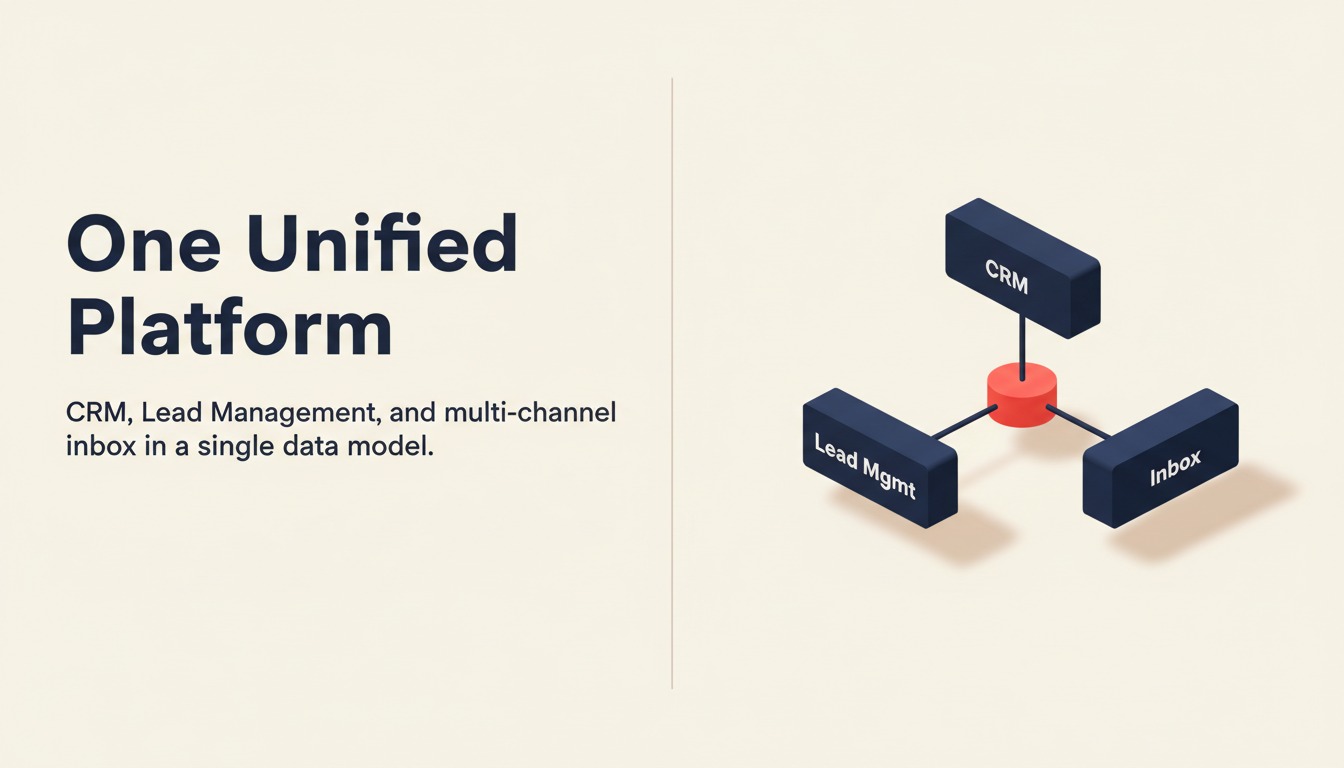
Rework dibangun untuk kesenjangan growth dan mid-market yang diabaikan sebagian besar CRM: perusahaan yang sudah melampaui pelacak pipeline sederhana namun belum siap menanggung biaya implementasi dan kompleksitas Salesforce. Filosofi produknya adalah bahwa CRM, manajemen lead, dan komunikasi multi-saluran seharusnya satu model data terpadu, bukan tiga tool yang disambungkan dengan Zapier.
Diferensiasi utamanya adalah Manajemen Lead sebagai modul bawaan kelas satu. Di mana Pipedrive memperlakukan lead sebagai fitur opsional tambahan dan HubSpot memisahkan Marketing Hub dan Sales Hub menjadi SKU terpisah, Rework menyertakan seluruh siklus lead dalam satu produk: penangkapan dari formulir, iklan, chat, dan API; pengayaan dan penilaian; distribusi round-robin dan berbasis aturan dengan aturan SLA; nurture marketing; dan pembuatan pipeline saat kualifikasi, semuanya terhubung ke rekaman kontak yang sama.
Diferensiasi kedua adalah kotak masuk terpadu. WhatsApp, Messenger, Instagram DM, TikTok, Telegram, LINE, Zalo, dan web chat semuanya masuk dalam satu timeline kontak tanpa konektor pihak ketiga. Untuk tim di industri tempat pembeli banyak menggunakan aplikasi pesan (properti, pendidikan, D2C, layanan kesehatan), fitur ini saja sudah menggantikan seluruh kategori tool terpisah.
| Yang Anda dapatkan | Yang tidak ada |
|---|---|
| CRM penuh + manajemen lead dalam satu produk | Tidak ideal untuk operator solo atau tim di bawah 10 orang |
| Kotak masuk multi-saluran native (WhatsApp, Messenger, IG DM, Zalo, web chat) | Bukan pengganti Salesforce untuk F500 |
| Routing lead round-robin, berbasis aturan, dan didukung SLA bawaan | Bukan suite otomatisasi pemasaran murni (tidak ada demand gen sekelas Marketo) |
| Workflow persetujuan dan proses lintas tim (Process Engine, dijual terpisah) | Ekosistem mitra bergaya AppExchange terbatas |
| Harga dipublikasikan hingga edisi Advanced (hanya Enterprise yang memakai penawaran harga) | Kustomisasi lebih sedikit dari Salesforce untuk objek kompleks |
Harga: Sales Engine (CRM) seharga $69/bulan ditagih tahunan, atau $80 ditagih bulanan, dengan 5 seat sales termasuk; seat tambahan datang dalam blok 5 ($21/bulan per blok pada penagihan tahunan). Revenue Engine ($159/bulan ditagih tahunan) menambahkan multi-channel inbox dan lead capture. Lihat rework.com/pricing.
Paling cocok untuk: Tim 20-500 orang yang menjalankan sales + marketing + CS pada workflow bersama, terutama di B2B SaaS, layanan profesional, properti, pendidikan, dan e-commerce
4. Pipedrive: Kesederhanaan Sales-First, UX Pipeline Terbaik
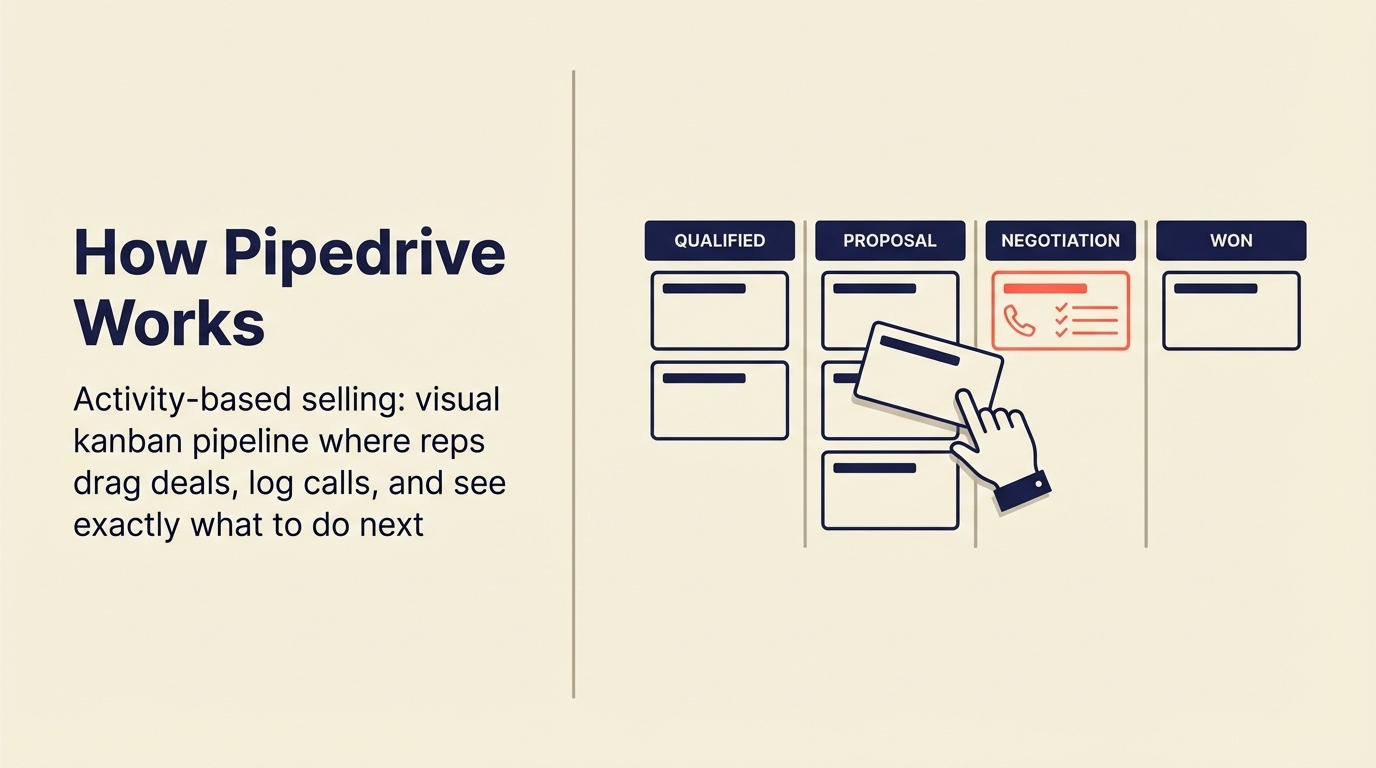
Pipedrive dibangun atas satu keyakinan: penjualan adalah tentang aktivitas, bukan administrasi. Pipeline visual (geser transaksi dari tahap ke tahap, catat panggilan, atur tugas tindak lanjut, lihat dengan tepat apa yang perlu dilakukan untuk menutup minggu ini) masih merupakan UX penjualan murni terbaik di pasar.
Fokus itu menjadikan Pipedrive CRM pertama yang menjadi default untuk tim yang berpusat pada penjualan. Setup hanya memakan waktu berjam-jam, bukan berminggu-minggu. Rep mengadopsinya tanpa bimbingan. Dan untuk tim yang kebutuhan utamanya adalah "apa transaksi saya dan apa yang harus saya lakukan selanjutnya," Pipedrive memberikan hasil tanpa beban kognitif.
Batasnya muncul di skala besar. Distribusi lead native membutuhkan solusi alternatif atau tingkatan premium. Otomatisasi pemasaran adalah fitur tambahan (Campaigns), bukan produk inti. Pelaporan solid namun tidak cukup canggih untuk RevOps di skala mid-market. Jika Anda membandingkannya dengan alternatif, lihat perbandingan Rework vs Pipedrive untuk melihat langsung di mana ia cocok dan di mana tidak. Atau jelajahi daftar alternatif Pipedrive terbaik jika Anda sudah mencapai batas Pipedrive.
| Yang Anda dapatkan | Yang tidak ada |
|---|---|
| UX pipeline visual terbaik di pasar | Modul manajemen lead native yang tipis |
| Setup cepat; adopsi rep tinggi | Otomatisasi pemasaran adalah tambahan, bukan native |
| Otomatisasi workflow di semua paket berbayar | Routing lead butuh solusi alternatif di mid-market |
| 400+ integrasi | Terbatas untuk workflow ops lintas fungsi |
Harga: Essential $14/kursi/bulan; Advanced $29/kursi/bulan; Professional $59/kursi/bulan; Power $69/kursi/bulan; Enterprise $99/kursi/bulan (ditagih tahunan)
Paling cocok untuk: Tim berbasis penjualan 5-100 orang, model SDR/AE, perusahaan yang menginginkan pipeline bersih tanpa kompleksitas
5. Zoho CRM: Paling Terjangkau di Skala Besar, Ekosistem 45+ Aplikasi
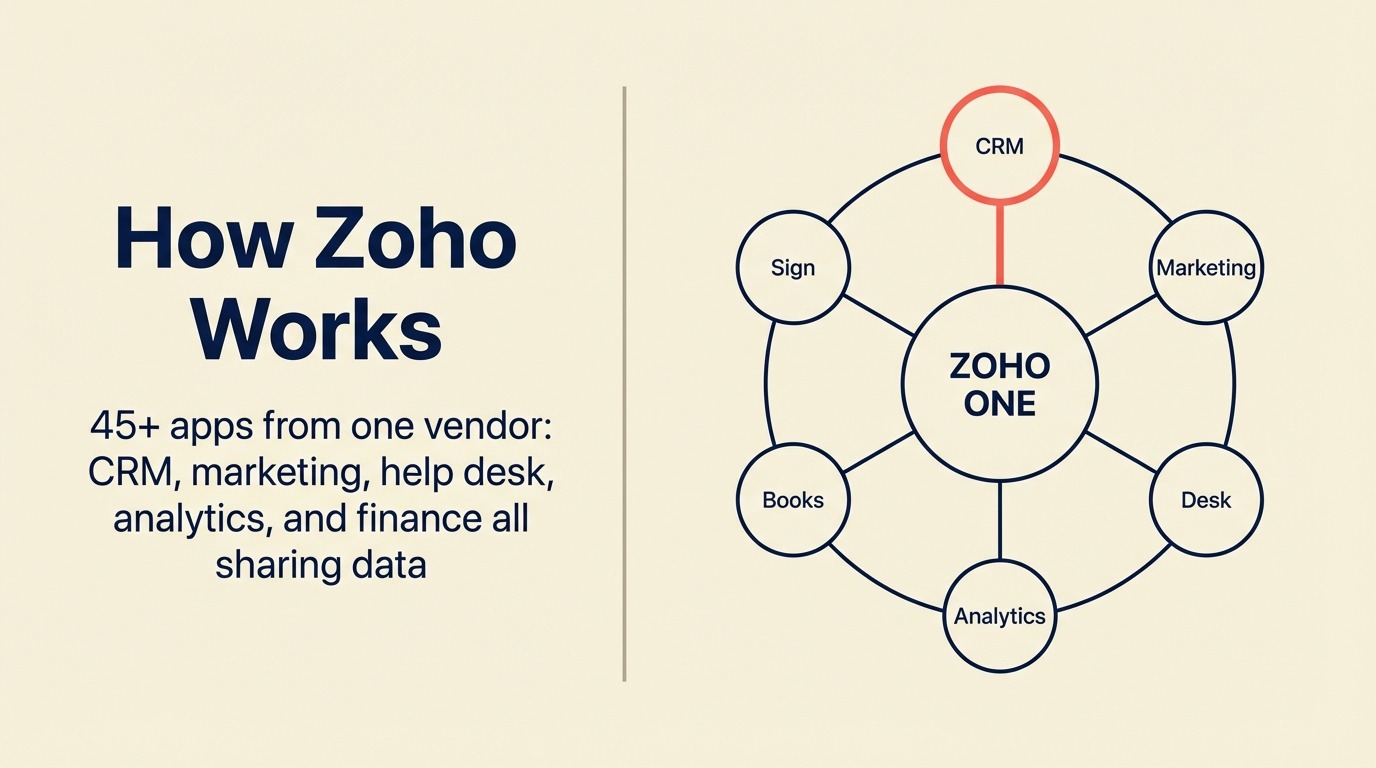
Filosofi produk Zoho adalah kelengkapan dengan nilai terjangkau. Ekosistem 45 aplikasi (dari Zoho CRM ke Zoho Books, Zoho Desk, Zoho Campaigns, Zoho Analytics, Zoho Sign) menciptakan OS bisnis lengkap untuk tim yang sadar biaya. Zia AI menangani penilaian lead, prediksi transaksi, dan analisis sentimen email di seluruh platform.
Untuk tim yang menginginkan kelengkapan seperti HubSpot dengan biaya jauh lebih rendah, Zoho CRM Plus (yang menggabungkan CRM, otomatisasi pemasaran, analitik, dan help desk) seharga $57/pengguna/bulan benar-benar kompetitif dibanding paket HubSpot yang mencapai $90-$150/kursi untuk fitur yang setara.
Kekurangannya yang jujur: modul individual bukan yang terbaik di kelasnya untuk fungsi apa pun. UI lebih kompleks dari Pipedrive. Sumber daya dukungan dan implementasi enterprise lebih tipis dari Salesforce. Tim yang membutuhkan kedalaman terbaik dalam satu area tertentu mungkin merasa kelengkapan Zoho terasa "cukup baik tapi tidak luar biasa." Jika Anda tidak yakin Zoho cocok, alternatif Zoho terbaik mencakup platform dengan posisi nilai serupa.
| Yang Anda dapatkan | Yang tidak ada |
|---|---|
| 45+ integrasi aplikasi Zoho, satu vendor | Modul individual bukan terbaik di kelasnya dalam kategori apa pun |
| Biaya terendah di skala besar vs padanan fitur | Kompleksitas UI saat mengaktifkan lebih banyak modul |
| Zia AI untuk penilaian, prediksi, sentimen | Ekosistem mitra implementasi lebih tipis |
| Manajemen wilayah, SalesSignals, Blueprint | Dukungan enterprise lebih lemah dari Salesforce |
Harga: Standard $14/kursi/bulan; Professional $23/kursi/bulan; Enterprise $40/kursi/bulan; Ultimate $52/kursi/bulan (ditagih tahunan)
Paling cocok untuk: Tim pertumbuhan yang sensitif biaya, perusahaan yang ingin tumpukan bisnis lengkap dari satu vendor, tim di Asia-Pasifik dan pasar berkembang
6. Monday Sales CRM: Gabungan Board Visual + CRM
Filosofi produk Monday adalah manajemen pekerjaan visual, dan Monday Sales CRM membawa filosofi itu ke pipeline. Setiap transaksi, kontak, dan aktivitas adalah item board yang bisa dilihat sebagai kanban, tabel, timeline, atau Gantt. Untuk tim yang berorientasi ops dan sudah menggunakan Monday untuk manajemen proyek, memperluas penggunaannya ke CRM mengurangi jumlah tool dalam tumpukan.
Kekurangannya adalah kedalaman. Monday Sales CRM cukup baik untuk kasus penggunaan CRM ringan: manajemen kontak, pelacakan transaksi, pencatatan aktivitas, otomatisasi dasar. Namun tidak dibangun untuk distribusi lead lanjutan, model penilaian kompleks, atau analitik penjualan mendalam. Tim yang membutuhkan perkiraan pipeline serius atau atribusi multi-sentuh akan menemukan batasnya. Jika kedalaman otomatisasi penting bagi tim Anda, panduan otomatisasi workflow CRM mencakup apa yang perlu dicari sebelum Anda berkomitmen.
| Yang Anda dapatkan | Yang tidak ada |
|---|---|
| UX visual familiar untuk tim yang sudah menggunakan Monday | Kedalaman CRM native yang dangkal vs CRM khusus |
| Fleksibel, tampilan beradaptasi dengan cara kerja tim Anda | Tidak ideal untuk penjualan internal kecepatan tinggi |
| Integrasi baik dengan tool proyek Monday | Modul manajemen lead terbatas |
| Otomatisasi dan integrasi di paket berbayar | Perkiraan lanjutan butuh solusi alternatif |
Harga: Basic $12/kursi/bulan; Standard $17/kursi/bulan; Pro $28/kursi/bulan; Enterprise (hubungi sales) - ditagih tahunan, min 3 kursi
Paling cocok untuk: Tim yang sudah menggunakan Monday.com untuk manajemen proyek, kasus penggunaan ops hibrida + CRM, organisasi visual-first
7. Freshsales: Freddy AI, UX Bersih, Ekosistem Freshworks
Freshsales adalah lapisan CRM Freshworks dalam suite yang juga mencakup Freshdesk (help desk), Freshchat (pesan), dan Freshmarketer (otomatisasi pemasaran). Filosofi produknya adalah UX bersih dengan AI yang terintegrasi. Freddy AI melakukan penilaian lead, wawasan transaksi, penilaian kontak prediktif, dan saran respons email secara langsung tanpa konfigurasi tambahan.
Untuk tim yang berkembang dan tidak menginginkan kompleksitas Salesforce namun ingin lebih banyak otomatisasi AI daripada yang ditawarkan Pipedrive, Freshsales adalah pilihan menengah yang kuat. Tingkatan Growth ($9/kursi/bulan) adalah salah satu titik nilai terbaik di pasar untuk CRM yang berfungsi penuh dengan telepon bawaan, urutan email, dan manajemen transaksi.
Batas yang jujur: workflow multi-tim yang kompleks dan routing lead yang canggih masih membutuhkan suite Freshworks (Freshsales + Freshmarketer + Freshchat), yang menambah biaya. Dan jika Anda tidak ada dalam ekosistem Freshworks, beberapa integrasi terasa kurang halus dibanding HubSpot. Lihat Rework vs Freshsales untuk perbandingan langsung, atau periksa alternatif Freshsales terbaik jika Anda ingin melihat apa lagi yang bersaing di titik harga ini.
| Yang Anda dapatkan | Yang tidak ada |
|---|---|
| Freddy AI bawaan (penilaian, wawasan, prediksi) | Nilai terbaik di dalam ekosistem Freshworks; lebih mahal di luar itu |
| UI bersih, cepat, adopsi rep tinggi | Routing lead kompleks masih butuh konfigurasi |
| Telepon bawaan (VoIP) dan urutan email | Integrasi kurang halus di luar tumpukan Freshworks |
| Suite Freshworks untuk cakupan GTM penuh | Kedalaman pelaporan di bawah HubSpot atau Salesforce |
Harga: Growth $9/kursi/bulan; Pro $39/kursi/bulan; Enterprise $59/kursi/bulan (ditagih tahunan)
Paling cocok untuk: Tim berkembang 10-300 orang yang mencari CRM berbantuan AI terjangkau, pengguna ekosistem Freshworks, tim yang menginginkan telepon bawaan tanpa harga Close
8. Close: Dialer Bawaan, Kecepatan Penjualan Internal
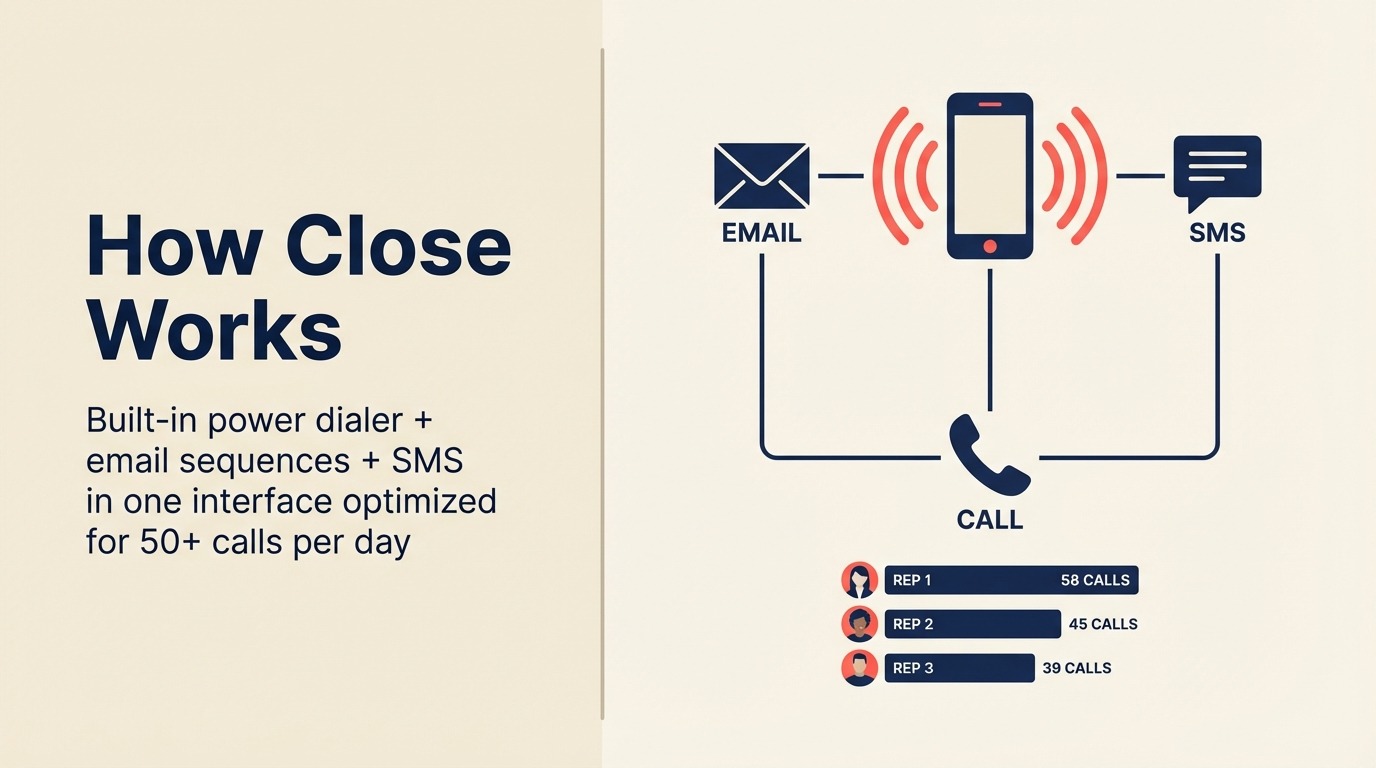
Close dibangun untuk satu model: penjualan internal kecepatan tinggi di mana rep menghabiskan waktu di telepon. Power dialer, predictive dialer, urutan email, dan SMS semuanya bawaan, tanpa integrasi yang diperlukan. Semua hal di Close dioptimalkan untuk kecepatan: berapa banyak panggilan yang bisa dilakukan tim Anda, seberapa cepat mereka menindaklanjuti, seberapa cepat mereka bisa memindahkan lead melalui siklus penjualan singkat.
Fokus tunggal itu menjadikan Close CRM terbaik yang sesungguhnya untuk tim yang melakukan 50+ panggilan outbound per hari, menjalankan model SDR, atau menjual produk ACV rendah dengan volume tinggi. Metrik aktivitas dan papan peringkat adalah yang terbaik di kelasnya untuk melatih tim penjualan internal.
Batasnya sama jelasnya: Close bukan platform CRM penuh. Fungsi marketingnya terbatas, penangkapan lead dasar, dan tidak ada kotak masuk sosial multi-saluran native. Untuk tim yang membutuhkan marketing + sales dalam satu produk, Close tidak lengkap. Jika Anda mempertimbangkan Close terhadap pilihan lain, lihat alternatif Close terbaik untuk tool yang mencakup kasus penggunaan penjualan internal serupa.
| Yang Anda dapatkan | Yang tidak ada |
|---|---|
| Dialer bawaan terbaik di pasar (power + predictive) | Tidak ada otomatisasi pemasaran native |
| SMS, urutan email, dan panggilan dari satu antarmuka | Penangkapan dan penilaian lead yang dasar |
| UX yang dioptimalkan untuk kecepatan outbound volume tinggi | Tidak dibangun untuk transaksi kompleks atau siklus panjang |
| Papan peringkat aktivitas untuk pelatihan penjualan | Kustomisasi terbatas untuk workflow non-penjualan |
Harga: Startup $49/bulan (1 pengguna); Professional $329/bulan (hingga 5 pengguna); Enterprise $749/bulan (hingga 10 pengguna) - ditagih tahunan
Paling cocok untuk: Tim penjualan internal, operasional SDR/BDR, perusahaan SaaS dengan model penjualan volume tinggi ACV rendah, tim dengan panggilan outbound berat
9. Copper: Integrasi Google Workspace Terdalam
Filosofi produk Copper adalah bahwa CRM Anda seharusnya hidup di mana tim Anda sudah bekerja, dan untuk tim di Google Workspace, itu berarti Gmail, Google Calendar, dan Google Drive. Copper otomatis mencatat email, membuat kontak dari percakapan Gmail, melampirkan file dari Drive, dan menampilkan konteks transaksi di sidebar Gmail tanpa berpindah konteks.
Untuk perusahaan manajemen akun, agensi, dan tim layanan profesional yang menjalankan relasi terutama melalui email dan tinggal di Google Workspace, Copper menghilangkan hambatan adopsi CRM terbesar: entri data manual. Rep yang membenci pencatatan aktivitas tidak perlu melakukannya. Lihat Rework vs Copper untuk perbandingan cara keduanya cocok untuk jenis tim yang berbeda.
Kekurangannya adalah kekuatan Copper juga merupakan batasnya. Di luar Google Workspace, ini hanya CRM tingkat menengah biasa. Dan kedalaman pipeline dan otomatisasinya tertinggal dari Pipedrive atau HubSpot untuk tim yang menjalankan ops penjualan terstruktur.
| Yang Anda dapatkan | Yang tidak ada |
|---|---|
| Auto-mencatat data Gmail dan Calendar ke rekaman CRM | Nilai terbatas di luar Google Workspace |
| Lampiran file Drive native pada rekaman kontak | Pipeline dan otomatisasi lebih lemah dari Pipedrive |
| Hambatan adopsi rendah untuk tim native Google | Kurang bisa dikustomisasi dari alternatif mid-market |
| UI bersih dan sederhana | Tidak dirancang untuk outbound volume tinggi atau ops kompleks |
Harga: Starter $9/kursi/bulan; Basic $23/kursi/bulan; Professional $59/kursi/bulan; Business $99/kursi/bulan (ditagih tahunan, min 3 kursi)
Paling cocok untuk: Tim Google Workspace, agensi, account manager, perusahaan layanan profesional yang menjalankan relasi melalui email
10. Attio: Model Data Fleksibel Generasi Berikutnya
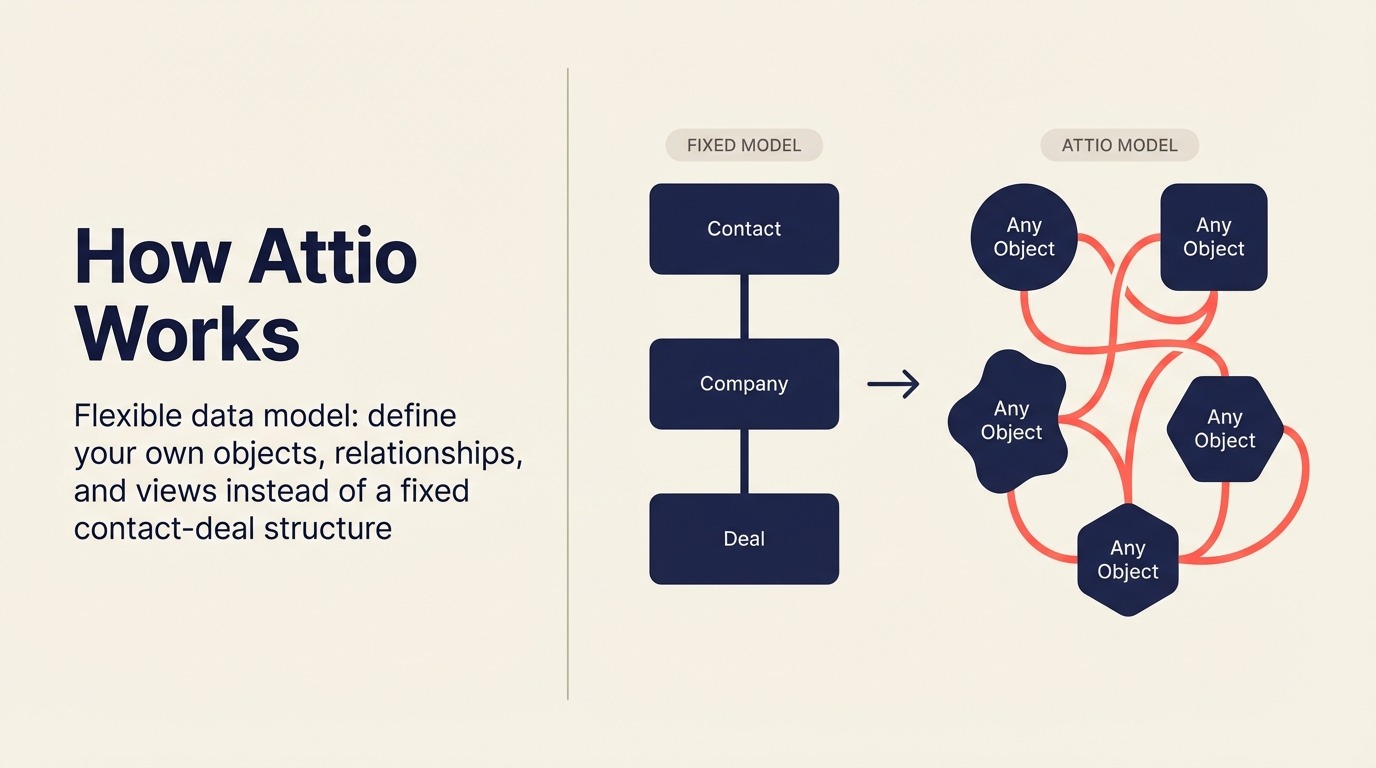
Filosofi produk Attio adalah bahwa CRM harus sefleksibel spreadsheet namun sepowerful platform enterprise. Alih-alih model data kontak-perusahaan-transaksi yang tetap, Attio memungkinkan Anda mendefinisikan objek, relasi, dan tampilan sendiri. Sebuah startup bisa memodelkan CRM-nya seperti roadmap produk; sebuah dana bisa memodelkannya seperti pelacak aliran transaksi; sebuah agensi bisa memodelkannya seperti sistem pengiriman klien.
Visi "CRM sebagai platform" layak diperhatikan serius, dan Attio adalah CRM paling modern secara teknis dalam daftar ini. Model datanya benar-benar lebih unggul dari sebagian besar pemain lama. Lapisan sinkronisasi dan pengayaannya kuat. Jika Anda sedang memikirkan dengan cermat cara menstrukturkan data sebelum memilih platform, panduan desain model data CRM layak dibaca terlebih dahulu.
Namun Attio masih berkembang. Tata kelola enterprise, otomatisasi workflow lanjutan, dan analitik penjualan mendalam belum setingkat HubSpot atau Salesforce. Tim yang membutuhkan pelaporan matang atau otomatisasi skala besar harus bersabar. Panduan alternatif Attio terbaik mencakup pilihan jika Anda mengevaluasinya terhadap pesaing generasi berikutnya.
| Yang Anda dapatkan | Yang tidak ada |
|---|---|
| Model data fleksibel generasi berikutnya, definisikan objek sendiri | Kedalaman enterprise masih berkembang |
| UI bersih, modern yang disukai developer dan ops | Otomatisasi workflow kompleks terbatas |
| Sinkronisasi dan pengayaan data yang kuat | Belum teruji di skala besar vs HubSpot atau Salesforce |
| Baik untuk pertumbuhan berbasis produk + operasional relasi | Ekosistem mitra / implementasi terbatas |
Harga: Gratis (hingga 3 kursi); Plus $29/kursi/bulan; Pro $69/kursi/bulan; Enterprise (hubungi sales) - ditagih tahunan
Paling cocok untuk: Startup dan perusahaan pertumbuhan modern, tim PLG, founder yang menginginkan fleksibilitas daripada opini yang ditentukan, tim yang sudah melampaui model data tetap HubSpot
11. Folk: CRM Relasi yang Ringan
Folk dibangun atas keyakinan bahwa kebanyakan orang tidak membutuhkan CRM; mereka membutuhkan cara yang lebih baik untuk mengelola relasi. Ini adalah tool ringan dengan desain indah yang berada di antara spreadsheet dan CRM penuh. Pengayaan kontak, tampilan pipeline sederhana, urutan email, dan catatan tim semuanya ada, namun Folk dengan sengaja tidak mencoba menjadi platform penjualan penuh.
Untuk founder, agensi, investor, dan profesional pengembangan bisnis yang mengelola jaringan relasi tanpa model penjualan formal, Folk benar-benar luar biasa. Ini yang Anda pilih ketika HubSpot terasa berlebihan namun spreadsheet sudah tidak cukup lagi.
| Yang Anda dapatkan | Yang tidak ada |
|---|---|
| UI manajemen relasi yang indah dan cepat | Tidak dibangun untuk sales ops terstruktur atau RevOps |
| Pengayaan AI dan data kontak bawaan | Kedalaman otomatisasi dan workflow terbatas |
| Onboarding sederhana dan cepat | Bukan platform yang dapat diskalakan untuk tim penjualan yang berkembang |
| Baik untuk mengelola jaringan, bukan pipeline | Tidak ada dialer native atau urutan email mendalam |
Harga: Standard $20/kursi/bulan; Premium $40/kursi/bulan; Custom (hubungi sales) - ditagih tahunan
Paling cocok untuk: Founder, agensi, investor, profesional BD, siapa pun yang mengelola relasi tanpa model penjualan formal
12. Nutshell: Bundel CRM + Email Marketing Sederhana
Taruhan Nutshell adalah bahwa usaha kecil tidak perlu membeli dan menghubungkan tool CRM dan email marketing secara terpisah. Platform ini menggabungkan manajemen pipeline, formulir lead, otomatisasi dasar, dan email marketing (Nutshell Campaigns) dalam satu produk dengan harga yang benar-benar kompetitif.
Untuk usaha kecil yang menginginkan satu vendor, onboarding mudah, dan tim dukungan berbasis AS yang solid tanpa kompleksitas enterprise, Nutshell memberikan hasil di atas harganya. Ini bukan tool paling powerful dalam daftar ini, namun termasuk yang paling mudah untuk segera digunakan.
| Yang Anda dapatkan | Yang tidak ada |
|---|---|
| CRM + email marketing dalam satu paket, satu harga | Kustomisasi terbatas untuk tim ops yang berkembang |
| Onboarding cepat dan admin mudah | Pelaporan dasar vs HubSpot atau Salesforce |
| Tim dukungan berbasis AS yang baik | Tidak dirancang untuk model penjualan kompleks |
| UI sederhana dan bersih | Tidak akan skala melewati sekitar 100 kursi dengan mulus |
Harga: Foundation $16/kursi/bulan; Pro $42/kursi/bulan; Pro+ $52/kursi/bulan; Business $67/kursi/bulan; Enterprise $79/kursi/bulan - ditagih tahunan
Paling cocok untuk: Usaha kecil yang menginginkan bundel CRM + email marketing all-in-one, tim berbasis AS yang memprioritaskan dukungan, perusahaan yang beralih dari spreadsheet untuk pertama kalinya
13. Insightly: Kombinasi CRM + Manajemen Proyek
Insightly memecahkan masalah spesifik: perusahaan yang menutup transaksi dan kemudian perlu mengeksekusinya tanpa berpindah ke tool manajemen proyek terpisah. Pipeline CRM menyerahkan langsung ke rekaman proyek dengan tugas, tonggak pencapaian, dan penugasan tim. Untuk agensi, konsultansi, dan perusahaan layanan profesional, handoff antara penutupan penjualan dan pengiriman proyek adalah kesenjangan yang merugikan klien. Lihat daftar alternatif Insightly terbaik jika Anda mencari tool dengan workflow CRM-ke-pengiriman serupa.
UX-nya sudah usang dibanding alternatif modern, dan kompleksitas antarmuka lebih tinggi dari yang seharusnya untuk kedalaman fiturnya. Namun workflow CRM-ke-pengiriman-proyek native masih benar-benar unik di pasar.
| Yang Anda dapatkan | Yang tidak ada |
|---|---|
| CRM + manajemen proyek native dalam satu produk | UI usang dan kompleks dibanding tool modern |
| Handoff transaksi ke proyek bawaan | Bukan CRM murni terbaik atau tool PM murni terbaik |
| Insightly Marketing untuk kampanye nurture | Terbatas untuk model penjualan kecepatan tinggi |
| Objek kustom dan integrasi aplikasi | Hambatan adopsi karena kompleksitas antarmuka |
Harga: Plus $29/kursi/bulan; Professional $49/kursi/bulan; Enterprise $99/kursi/bulan - ditagih tahunan
Paling cocok untuk: Agensi, konsultansi, dan perusahaan layanan profesional yang membutuhkan CRM + pengiriman proyek dalam satu tempat
14. Keap: CRM + Otomatisasi Pemasaran untuk Solopreneur
Keap (sebelumnya Infusionsoft) dibangun khusus untuk solopreneur dan usaha sangat kecil yang membutuhkan CRM + otomatisasi pemasaran dalam satu produk tanpa tim untuk mengelolanya. Urutan tindak lanjut otomatis, pemesanan janji, penagihan, dan manajemen pipeline dasar semuanya termasuk.
Batas yang jujur adalah struktur harga. Pada $249/bulan untuk 2 pengguna dan 1.500 kontak, model per-kontak tidak efisien saat daftar berkembang. Tim lebih dari 10 orang atau 5.000 kontak akan menemukan nilai yang lebih baik di tempat lain.
| Yang Anda dapatkan | Yang tidak ada |
|---|---|
| Bundel CRM penuh + email marketing + penagihan | Harga per kontak tidak efisien melewati 2.000 kontak |
| Pemesanan janji dan text marketing bawaan | Tidak dirancang untuk tim lebih dari 10 orang |
| Otomatisasi kuat untuk operator solo | UX usang dibanding alternatif modern |
| Produk matang dengan ekosistem SMB yang dalam | Mahal relatif terhadap alternatif di skala kecil |
Harga: Ignite $249/bulan (2 pengguna, 1.500 kontak); Grow $329/bulan (3 pengguna, 2.500 kontak); Scale $499/bulan (5 pengguna, 5.000 kontak) - ditagih tahunan
Paling cocok untuk: Solopreneur, pelatih, konsultan, usaha mikro yang menginginkan otomatisasi tanpa merekrut orang marketing ops
15. SugarCRM: Opsi On-Premise untuk Industri Terregulasi
Diferensiasi SugarCRM di 2026 adalah bahwa ia bisa di-self-hosted. Untuk perusahaan di industri terregulasi (kontraktor pemerintah, organisasi layanan kesehatan, perusahaan jasa keuangan dengan persyaratan residensi data), kemampuan menjalankan CRM sepenuhnya dalam infrastruktur sendiri adalah persyaratan keras, bukan sekadar nilai tambah.
Di luar kepatuhan, SugarCRM menawarkan perkiraan penjualan yang kuat, dukungan multi-mata uang, dan otomatisasi workflow yang mendalam. Namun overhead implementasi sangat signifikan, dan produk ini terasa lebih seperti perangkat lunak enterprise daripada SaaS modern.
| Yang Anda dapatkan | Yang tidak ada |
|---|---|
| Opsi penerapan on-premise untuk residensi data | Overhead implementasi tinggi |
| Kontrol kepatuhan yang kuat dan log audit | UX usang dibanding tool SaaS modern |
| Multi-mata uang, multi-bahasa, dukungan global | Ekosistem terbatas vs Salesforce AppExchange |
| Otomatisasi workflow lanjutan dan perkiraan | Bukan produk yang cepat memberikan nilai |
Harga: Essentials $49/kursi/bulan; Advanced $85/kursi/bulan; Premier $135/kursi/bulan - ditagih tahunan (harga on-premise terpisah)
Paling cocok untuk: Kontraktor pemerintah, jasa keuangan terregulasi, organisasi layanan kesehatan dengan persyaratan kedaulatan data, perusahaan yang tidak bisa menggunakan CRM berbasis cloud
Kesalahan Pembelian CRM yang Harus Dihindari
Sebagian besar implementasi CRM gagal dalam 12 bulan. Penyebabnya hampir tidak pernah perangkat lunaknya. Riset McKinsey tentang adopsi teknologi penjualan menemukan bahwa manajemen perubahan yang buruk dan adopsi yang rendah jauh lebih besar sebagai mode kegagalan daripada pilihan tool itu sendiri. Sebelum menyelami daftar di bawah ini, akan sangat membantu mengetahui di mana tim Anda berada pada model kematangan RevOps, karena itu mengubah tool mana yang bahkan layak dievaluasi. Berikut adalah kesalahan pembelian yang paling umum dan apa yang harus dilakukan sebagai gantinya.
| Kesalahan | Penampakannya | Yang Harus Dilakukan Sebagai Gantinya |
|---|---|---|
| Membeli untuk fitur yang belum Anda butuhkan | Memilih Salesforce saat 20 orang karena "kami akan berkembang ke sana" | Beli untuk tahap saat ini + 18 bulan pertumbuhan |
| Mengabaikan hambatan adopsi | Memilih tool paling powerful, bukan yang benar-benar akan digunakan rep | Libatkan rep penjualan dalam shortlist; pilot sebelum berkomitmen |
| Meremehkan biaya implementasi | Menganggarkan hanya untuk lisensi, bukan untuk setup, migrasi, dan pelatihan | Tambahkan 3x biaya lisensi tahunan sebagai anggaran implementasi untuk tool kompleks |
| Memilih tool marketing saat Anda butuh tool penjualan | HubSpot ketika masalah utama Anda adalah manajemen pipeline, bukan nurture lead | Identifikasi masalah utama Anda sebelum mengevaluasi |
| Tidak memodelkan model penjualan Anda | Memilih tool pipeline generik untuk model panggilan outbound | Petakan aktivitas penjualan harian Anda, lalu temukan tool yang dibangun untuk itu |
| Memisahkan data marketing dan penjualan | Membeli HubSpot Marketing + Salesforce Sales + tool kotak masuk terpisah | Prioritaskan platform di mana lead-to-close hidup dalam satu model data |
| Mengabaikan total biaya kepemilikan | Hanya membandingkan harga per kursi | Hitung: lisensi + implementasi + jumlah admin + integrasi |
| Terlalu sering berganti platform | Mengganti CRM setiap 18 bulan saat mencapai batas setiap tool | Pikirkan 3 tahun ke depan, pilih platform dengan ruang untuk berkembang |
Sebelum menyelesaikan shortlist Anda, ada baiknya mengerjakan daftar periksa pembeli CRM yang kami buat. Panduan ini membahas pertanyaan-pertanyaan kunci yang perlu dijawab sebelum Anda menjadwalkan demo pertama.
Kerangka Keputusan
Gunakan tabel ini sebagai filter akhir Anda. Cocokkan situasi Anda dengan tool yang tepat.
| Jika Anda membutuhkan... | Pilih... | Alasannya |
|---|---|---|
| Ekosistem marketing + sales terbaik untuk pertumbuhan inbound | HubSpot | Pendekatan flywheel; 1.500+ integrasi; tingkatan gratis yang kuat untuk memulai |
| Kustomisasi maksimal untuk organisasi enterprise yang kompleks | Salesforce | Objek kustom, AppExchange, AI Agentforce; tidak ada yang mendekati |
| CRM penuh + manajemen lead + kotak masuk multi-saluran dalam satu produk | Rework | Model data terpadu; tidak perlu menyambungkan tool |
| UX pipeline paling bersih untuk tim sales-first | Pipedrive | Penjualan berbasis aktivitas; setup tercepat; adopsi rep tertinggi |
| CRM penuh paling terjangkau di skala besar | Zoho CRM | 45+ aplikasi, Zia AI, biaya per kursi terendah vs fitur sebanding |
| Manajemen pekerjaan visual + CRM ringan untuk tim yang menggunakan Monday | Monday Sales CRM | Satu vendor untuk ops + pipeline |
| CRM berbantuan AI terjangkau dengan telepon bawaan | Freshsales | Freddy AI; nilai terbaik di tingkatan Growth |
| Dialer bawaan terbaik untuk penjualan internal | Close | Power + predictive dialer; UX yang dioptimalkan untuk kecepatan; tidak ada yang mengalahkannya untuk volume |
| CRM yang hidup di dalam Gmail / Google Workspace | Copper | Auto-catat dari Gmail; tidak ada entri manual |
| CRM modern fleksibel dengan model data kustom | Attio | Platform generasi berikutnya; ideal untuk startup modern |
| Manajemen relasi ringan, bukan CRM penuh | Folk | Terbaik untuk founder, agensi, BD; bukan platform penjualan |
| CRM + email marketing dalam satu bundel untuk tim kecil | Nutshell | All-in-one terbaik untuk usaha kecil yang tidak ingin vendor terpisah |
| CRM yang menyerahkan langsung ke pengiriman proyek | Insightly | Workflow transaksi-ke-proyek native; unik di pasar |
| Bundel CRM + otomatisasi pemasaran untuk operator solo | Keap | Dibangun untuk solopreneur; pemesanan janji + penagihan termasuk |
| CRM on-premise untuk industri terregulasi | SugarCRM | Satu-satunya CRM besar dengan opsi self-hosted |
Apa yang Harus Dilakukan Selanjutnya
Persempit daftar Anda menjadi dua tool sebelum menjadwalkan demo. Gunakan tabel kerangka di atas untuk mengeliminasi pilihan yang tidak sesuai dengan tahap, ukuran tim, atau model penjualan Anda, lalu jalankan pilot 2 minggu dengan transaksi nyata dan rep nyata. Tool yang diadopsi adalah yang menang, bukan yang memiliki fitur terbanyak di lembar spesifikasi. Dan jika tim Anda belum sepakat tentang cara mengkualifikasi transaksi, panduan kerangka kualifikasi adalah tempat yang baik untuk memulai sebelum pilot Anda.
Dan jika Anda ingin mendalami implementasi setelah memilih tool, panduan rollout dan adopsi CRM kami mencakup cara menjalankan pilot, mengukur adopsi, dan menghindari jebakan onboarding yang umum.
Jika Anda menjalankan tim 20-500 orang dengan sales, marketing, dan customer success yang menyentuh workflow bersama, dan Anda menginginkan siklus lead-to-close dalam satu model data tanpa harus menyambungkan lima tool, masukkan Rework ke dalam shortlist dua tool tersebut.

Head of Enterprise Solutions
On this page
- Tabel Perbandingan Singkat
- Cara Memilih CRM di 2026
- Kerangka: Berdasarkan Ukuran Tim
- Kerangka: Berdasarkan Model Penjualan
- Kerangka: Berdasarkan Tahap Pertumbuhan
- Matriks Kesesuaian Tahap
- Tabel Ukuran dan Persona
- 1. HubSpot CRM: Ekosistem Marketing + Sales Terbaik
- 2. Salesforce: Kedalaman Enterprise + AI Agentforce
- 3. Rework: CRM Terpadu + Manajemen Lead + Kotak Masuk Multi-Saluran untuk Operasional Mid-Size
- 4. Pipedrive: Kesederhanaan Sales-First, UX Pipeline Terbaik
- 5. Zoho CRM: Paling Terjangkau di Skala Besar, Ekosistem 45+ Aplikasi
- 6. Monday Sales CRM: Gabungan Board Visual + CRM
- 7. Freshsales: Freddy AI, UX Bersih, Ekosistem Freshworks
- 8. Close: Dialer Bawaan, Kecepatan Penjualan Internal
- 9. Copper: Integrasi Google Workspace Terdalam
- 10. Attio: Model Data Fleksibel Generasi Berikutnya
- 11. Folk: CRM Relasi yang Ringan
- 12. Nutshell: Bundel CRM + Email Marketing Sederhana
- 13. Insightly: Kombinasi CRM + Manajemen Proyek
- 14. Keap: CRM + Otomatisasi Pemasaran untuk Solopreneur
- 15. SugarCRM: Opsi On-Premise untuk Industri Terregulasi
- Kesalahan Pembelian CRM yang Harus Dihindari
- Kerangka Keputusan
- Apa yang Harus Dilakukan Selanjutnya