More in
CRM Comparisons
Rework vs Monday Sales CRM: Flexibility vs Depth in 2026
Apr 14, 2026
Rework vs Close: Modern CRMs Head to Head for Mid-Size Sales Teams in 2026
Apr 9, 2026
Rework vs Copper: Which CRM Fits a Google Workspace Team in 2026
Apr 8, 2026 · Currently reading
Rework vs Pipedrive: The SMB CRM Showdown in 2026
Apr 6, 2026
Rework vs Folk: Relationship CRMs Compared for Mid-Size Teams in 2026
Mar 31, 2026
Rework vs Salesforce: Which Fits a Growing Sales Team in 2026
Mar 30, 2026
Rework vs SugarCRM: Enterprise Flexibility vs Unified Operations in 2026
Mar 30, 2026
Rework vs Zoho CRM: What You Gain and Lose in 2026
Mar 24, 2026
Rework vs Insightly: Project-Aware CRMs Compared for Mid-Size Teams in 2026
Mar 19, 2026
Rework vs Freshsales: Which CRM Is Easier to Adopt in 2026
Mar 17, 2026
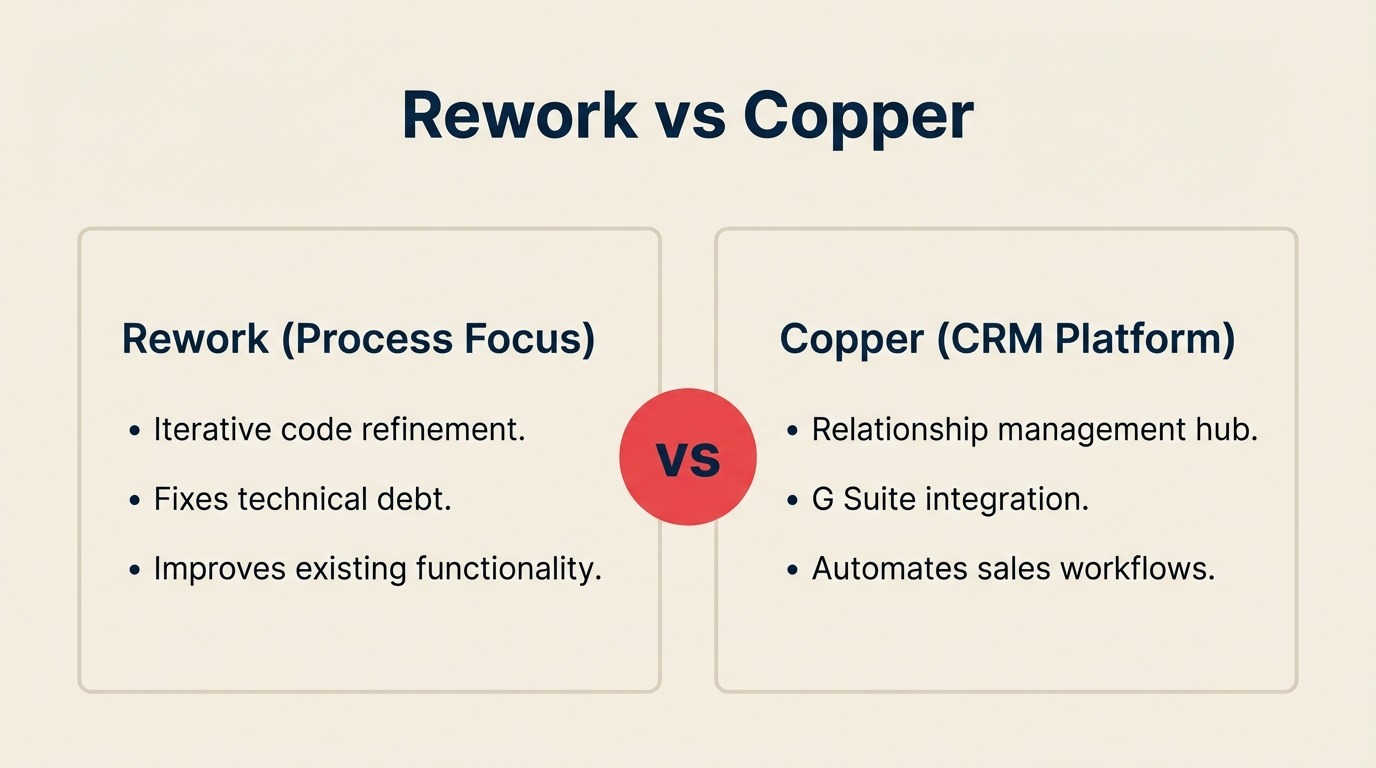
Your team lives in Google Workspace. Gmail, Calendar, Drive, Meet: everything runs through the Google stack. When it's time to add a CRM, Copper looks like the obvious call: it was built specifically for teams that don't want to leave their inbox to manage deals.
But here's the situation many mid-size ops teams run into. You're not just tracking relationship history. You're managing leads coming from multiple sources, routing them across a sales team, running marketing-to-sales handoffs, and coordinating post-sale work with customer success and operations. When your CRM only serves the sales rep in Gmail and can't talk to the rest of your org, you end up stitching together three or four tools to cover the gaps. This comparison is for teams of 20 to 300 people running sales, marketing, RevOps, and operations in overlapping workflows, who want to know whether Copper's Google-native depth is the right trade-off, or whether a broader platform handles more of what they actually need.
How Each CRM Works
Before the feature-by-feature breakdown, here's a quick visual overview of what each product is and how it's structured. Rework and Copper both embed the CRM into how your team already works, but at very different scopes. Seeing the architecture side-by-side makes the rest of this comparison easier to read.
How Rework Works
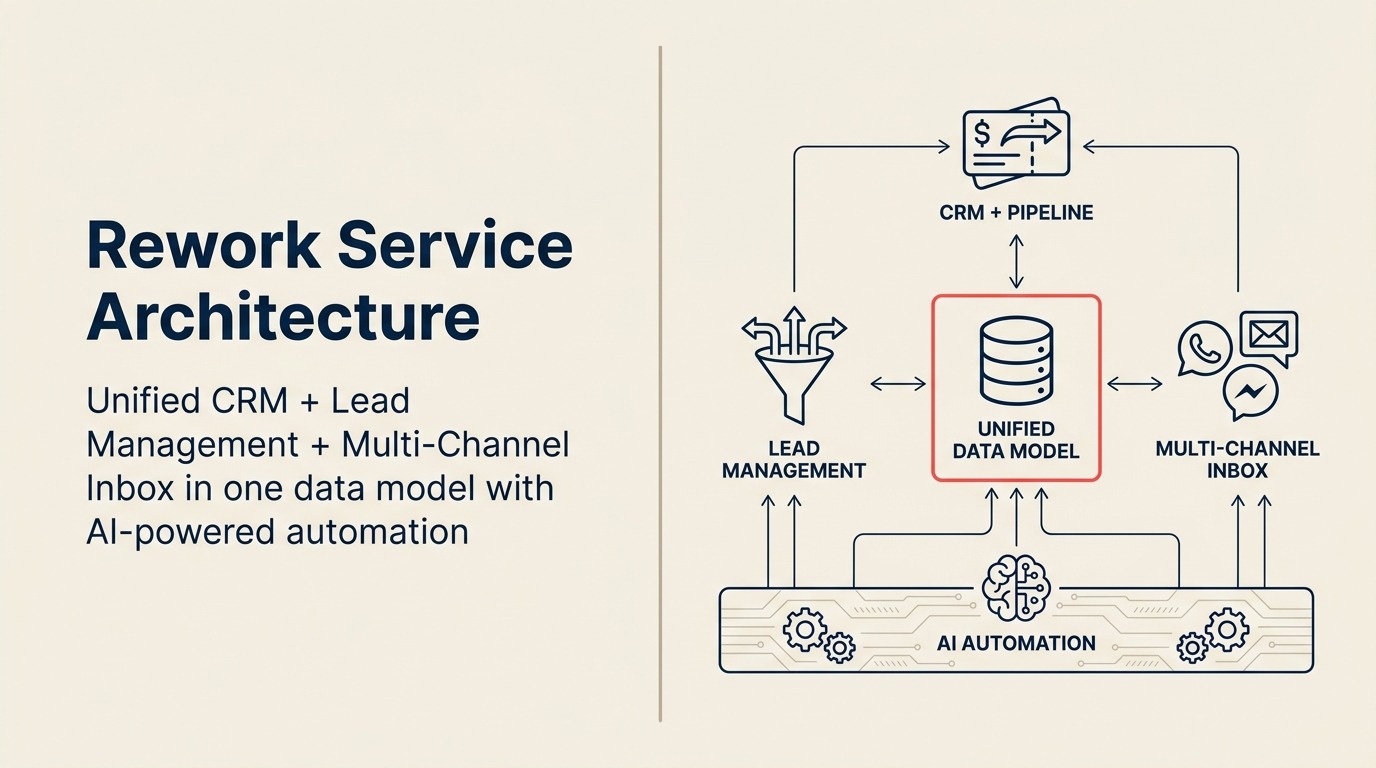
Rework is a unified CRM built for mid-size cross-functional teams. CRM pipeline, Lead Management, and multi-channel inbox (WhatsApp, Messenger, email, SMS) sit on one data model, so sales, marketing, and CS see the same contact timeline. It still syncs deeply with Gmail and Calendar, but the scope extends to lead routing, handoffs, and cross-team ops.
How Copper Works
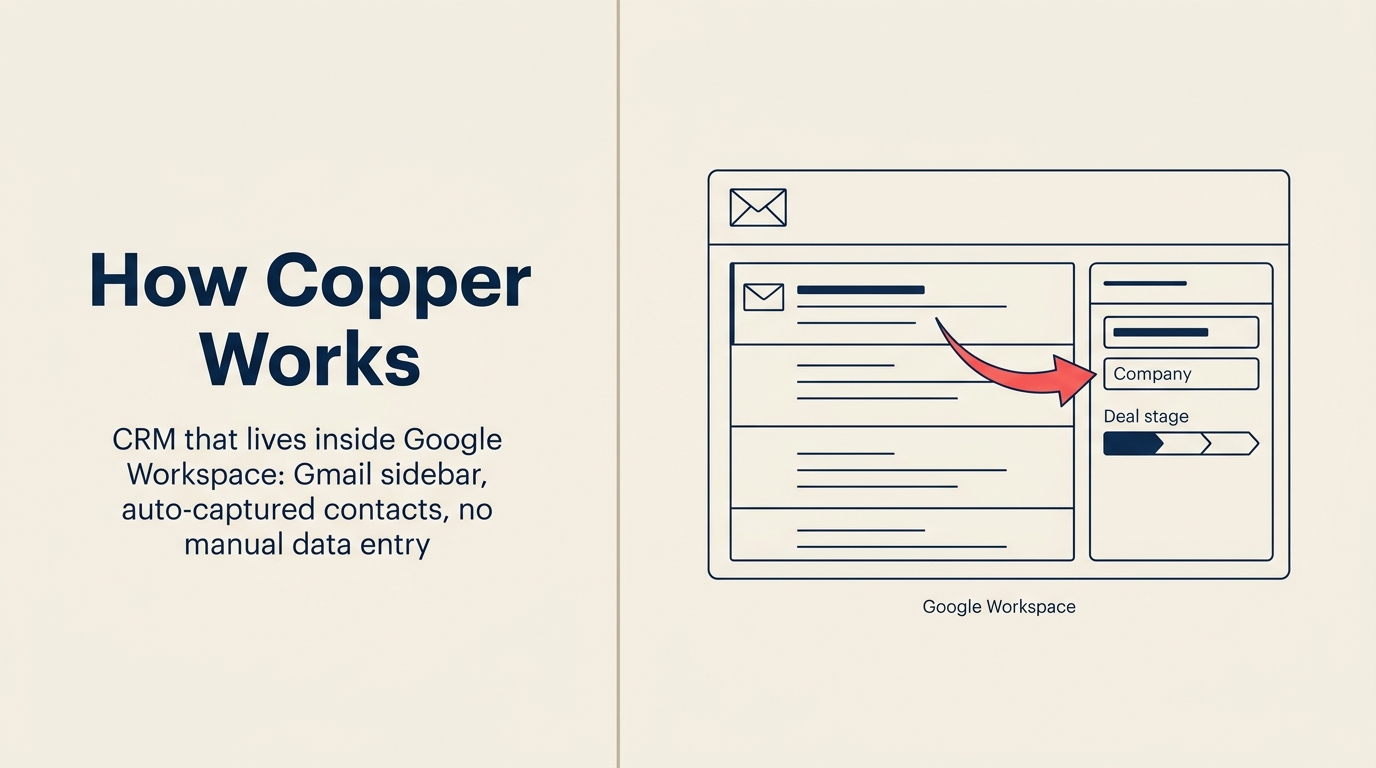
Copper is a CRM that lives inside Google Workspace. It appears in the Gmail sidebar, auto-captures contacts and deals from your inbox and Calendar, and removes the manual data-entry tax that kills adoption in other CRMs. The tradeoff is scope: Copper's strength is sales reps working in Gmail, not cross-team lead routing or multi-channel inbox across WhatsApp/Messenger.
TL;DR
| Rework | Copper | |
|---|---|---|
| Core strength | CRM + Lead Management + multi-channel inbox + cross-team ops | Deep Gmail/Calendar native integration, relationship tracking |
| Best for | Mid-size teams running cross-functional sales, marketing, and ops workflows | Google Workspace teams that want CRM without leaving Gmail |
| Lead management | First-class module: capture, score, distribute, nurture | Basic lead tracking; distribution is manual |
| Unified chat inbox | WhatsApp, Messenger, Instagram DM, web chat, email, SMS | Email only (via Gmail integration) |
| Automation | Workflow builder across lead lifecycle, pipeline, and tasks | Pipeline automations and email sequences |
| Google Workspace integration | OAuth SSO, Gmail sync, Google Calendar sync, Google Contacts | Native Gmail sidebar, Calendar embed, Google Contacts, Drive |
| Pricing | $999/yr Starter (5 users) or $1,999/yr Standard (10 users) + $12/user/mo above | ~$9/user/mo Starter; ~$29/user/mo Business (billed annually) |
| Support | Email + chat + phone on all plans | Email support; phone on Business and above |
| Company size fit | 20-500 employees, cross-functional teams | 5-200 employees, sales-focused or relationship-tracking teams |
| Setup speed | 1-3 days for basic CRM; 1-2 weeks for full Lead Management + chat, led by a team with hands-on experience onboarding mid-size sales, marketing, and ops departments end-to-end | Under a day for a functional Gmail-native pipeline; building full lead management + chat is self-serve only, Copper has no in-house team experienced with mid-size cross-department rollouts |
| Implementation time | 1-3 weeks | 1-3 days for sales teams |
Who Each Tool Is Built For
Copper's founding premise was simple: most CRMs feel like a second job because you have to leave your workflow to log data. Copper fixes that by living inside Gmail. You see contact history, deal stage, and next steps in a sidebar without switching tabs. For sales teams that run almost entirely through email and calendar, this removes real friction.
Rework's premise is different: the whole ops team (sales, marketing, RevOps, CS, and operations) needs to share one source of truth. The CRM isn't just a sales tool; it's the connective tissue between lead capture, pipeline, customer onboarding, and ongoing workflows.
| Rework | Copper | |
|---|---|---|
| Company size | 20-500 employees | 5-200 employees |
| Team maturity | Past spreadsheets, running defined processes | Early to mid-stage, relationship-driven selling |
| Primary use case | Full GTM stack across teams | Relationship management and pipeline for sales reps |
| Ideal buyer | COO, Head of RevOps, Founder-Operator scaling a GTM team | Founder, Sales Manager, Account Manager at a Google-native org |
| Google Workspace role | Integrated (SSO + Calendar + Gmail sync) | Central, CRM lives inside Gmail sidebar |
| Non-sales team utility | High, Marketing, CS, Ops all have dedicated workflows | Low, primarily built for sales and account management |
Team fit matrix:
| Team | Rework | Copper |
|---|---|---|
| Sales | Full pipeline, quota tracking, territory routing, activity logging | Strong, pipeline, email tracking, relationship history |
| Marketing | Lead capture forms, scoring, nurture workflows, attribution | Minimal, no native marketing automation |
| RevOps | Unified data model, SLA tracking, custom reporting | Limited, reporting is basic; no RevOps-specific features |
| Customer Success | Contact timeline, chat history, handoff from sales | Partial, contact records, but no CS-specific workflows |
| Operations | Process templates, cross-team task orchestration, approval chains | Not designed for this use case |
Google Workspace Integration Depth
Copper's biggest differentiator is how native it is to Google. This isn't a bolt-on integration. Copper was architected around Google's ecosystem from the start.
Inside Gmail, Copper's Chrome extension adds a sidebar that surfaces the contact's CRM record, deal history, open tasks, and next actions without leaving your inbox. You can log an email to a deal, create a task, or update a pipeline stage directly from Gmail. Google Calendar events sync to Copper contact and deal records automatically. Google Contacts sync bidirectionally. Google Drive files can be attached to records. If your sales process is mostly email-and-call, you can go days without opening Copper's native UI.
Rework also integrates with Google Workspace via OAuth-based SSO, Gmail sync for activity logging, Google Calendar sync for meetings tied to contact records, and Google Contacts import. It doesn't embed a sidebar into Gmail the way Copper does, but email sent and received syncs to the contact timeline, and calendar meetings show up on the CRM record.
| Integration feature | Rework | Copper |
|---|---|---|
| OAuth SSO via Google | Yes | Yes |
| Gmail sidebar (Chrome extension) | No | Yes, native, real-time |
| Gmail email logging to CRM | Yes (sync) | Yes (native, automatic) |
| Google Calendar sync to records | Yes | Yes, native, two-way |
| Google Contacts sync | Import | Yes, bidirectional |
| Google Drive file attachment | No | Yes |
| Google Meet activity logging | No | Via Calendar sync |
If your team's CRM workflow is almost entirely in Gmail, Copper's native experience has a friction advantage that's real. No other CRM does Gmail integration at this level. That's not marketing spin, it's architecture. But the question is whether that advantage is the most important thing for your team, or whether it's one of several things you need.
Core CRM Feature Comparison
Both tools cover the standard CRM foundation: contact and company records, deal pipeline with stages, activity logging, basic reporting, and email integration. The gap opens up when you look at what's built around those foundations.
| Feature | Rework | Copper |
|---|---|---|
| Contact & company records | Yes | Yes |
| Deal pipeline | Yes, multi-pipeline | Yes, pipeline customization |
| Activity logging (email, call, meeting) | Yes | Yes (auto from Gmail/Calendar) |
| Custom fields | Yes | Yes |
| Tags and segmentation | Yes | Yes |
| Bulk actions | Yes | Yes |
| Email sequences | Yes | Yes (drip campaigns on Business tier) |
| Multi-pipeline support | Yes | Yes (Business tier) |
| Reporting & dashboards | Yes, customizable | Basic on Starter; better on Business |
| API access | Yes | Yes |
| Mobile app | Yes | Yes (iOS, Android) |
The headline difference: Copper auto-logs activity from Gmail and Calendar, which reduces manual data entry for sales reps. Rework requires explicit sync but gives you a broader set of inputs, including multi-channel messages, web chat, and inbound forms that Copper doesn't handle.
Lead Management Deep Dive
This is where the comparison becomes uneven. Lead management as a dedicated function (capturing leads from multiple sources, scoring them, distributing them by territory or round-robin, running marketing nurture, and handing off to sales) is a first-class module in Rework. In Copper, leads exist as a record type but the workflow around them is sparse.
| Capability | Rework | Copper |
|---|---|---|
| Lead record type | Yes, distinct from contacts/deals | Yes, separate from people/companies |
| Lead capture (forms, web) | Yes, native forms, landing pages | Via Zapier or third-party |
| Lead capture (ads) | Yes, Facebook/Google Ads integration | Via Zapier |
| Lead capture (chat/WhatsApp) | Yes, native multi-channel | No native chat capture |
| Lead scoring | Yes, rule-based scoring | No native scoring |
| Lead distribution: round-robin | Yes, built-in | No native rule |
| Lead distribution: territory | Yes, built-in | No native rule |
| Lead distribution: SLA routing | Yes, built-in | No native rule |
| Marketing nurture sequences | Yes, workflow-based | No (email sequences are sales-focused) |
| Marketing-to-sales handoff | Yes, automated handoff with context | Manual |
| Attribution back to pipeline | Yes | Limited |
If lead distribution is part of your workflow and you have multiple reps, territories, or SLA requirements, Copper requires workarounds. Zapier can patch some of this, but you're adding another dependency and maintenance layer. Rework treats lead distribution as infrastructure, not an add-on.
Unified Chat Channels
Copper is built around email. That's both its strength and its constraint. If your leads and customers reach you on WhatsApp, Instagram DM, Messenger, or live chat, Copper doesn't have a native answer.
| Channel | Rework | Copper |
|---|---|---|
| Yes, Gmail sync + native email | Yes, native Gmail integration | |
| Yes, native inbox | No | |
| Facebook Messenger | Yes, native inbox | No |
| Instagram DM | Yes, native inbox | No |
| Live web chat | Yes, native | No |
| SMS | Yes, native | No |
| All channels in one contact timeline | Yes | Email only |
Rework's unified inbox pulls all of these channels into one timeline on the contact record. A rep can see a WhatsApp conversation from last week, the email thread from this week, and the live chat session from this morning, all on the same record without switching tools.
For teams selling or supporting via WhatsApp or social DMs (common in e-commerce, professional services, and agencies), this gap is significant. For B2B software teams whose pipeline is 100% email and Zoom, Copper's depth in Gmail may be all you need.
Automation, Rules, and Integrations
| Rework | Copper | |
|---|---|---|
| Workflow automation builder | Yes, multi-step, cross-object | Yes, pipeline automations (deal stage triggers) |
| Lead routing rules | Yes, round-robin, territory, SLA | No native routing |
| Email sequences | Yes | Yes (Business tier) |
| Task creation from triggers | Yes | Yes |
| Cross-team workflow automation | Yes, spans sales, marketing, CS, ops | No, automation is pipeline-scoped |
| Zapier/Make integration | Yes | Yes |
| Native Google Workspace apps | Yes (Calendar, Contacts, Drive via sync) | Yes, native (sidebar, auto-log) |
| Slack integration | Yes | Yes |
| HubSpot / marketing tools | Via Zapier | Via Zapier |
| Open API | Yes | Yes |
Copper's automation is scoped to the pipeline: when a deal moves to a stage, trigger an action. That's useful for sales reps. Rework's automation engine spans the full lifecycle, from lead capture rules through pipeline through post-close workflows, and can involve multiple teams. If your workflows cross from marketing to sales to CS, Rework's automation covers the whole chain.
Pricing at 25, 50, and 100 Seats
Copper publishes pricing at copper.com/pricing. As of publication, three tiers: Starter, Business, and a higher tier. Rework pricing sourced from rework.com/pricing.
Rework Sales Ops has two packages:
- Starter, $999/year for up to 5 users
- Standard, $1,999/year with 10 users included, plus $12/user/month for each additional user
See rework.com/pricing for current details.
| Copper Starter | Copper Business | Rework Sales Ops | |
|---|---|---|---|
| Per seat/month (annual) | ~$9/seat | ~$29/seat | $999/yr (5 users) or $1,999/yr (10 users) |
| 5 seats/year | ~$540/yr | ~$1,740/yr | $999/yr (Starter) |
| 10 seats/year | ~$1,080/yr | ~$3,480/yr | $1,999/yr (Standard base) |
| 25 seats/year | ~$2,700/yr | ~$8,700/yr | $4,159/yr |
| 50 seats/year | ~$5,400/yr | ~$17,400/yr | $7,759/yr |
| 100 seats/year | ~$10,800/yr | ~$34,800/yr | $14,959/yr |
| Lead management module | Basic | Included | Included |
| Email sequences | No | Yes | Yes |
| Multi-pipeline | No | Yes | Yes |
| Reporting | Basic | Better | Custom |
| Multi-channel inbox | No | No | Yes |
| Cross-team ops workflows | No | No | Yes |
Copper's Starter tier is genuinely affordable for small sales teams. If your team is 5-15 people and you just need pipeline tracking in Gmail, Starter covers the basics at a low cost. The Business tier adds email sequences and better reporting but still doesn't address lead distribution or multi-channel comms.
Rework's package pricing slots between Copper Starter and Business at 25-50 seats, but includes capabilities (unified chat, lead routing, cross-team workflows) that neither Copper tier offers. Budget alone is not a reason to choose Copper over Rework. The honest comparison is about Google Workspace depth versus operational breadth.
Implementation and Time-to-Value
| Dimension | Rework | Copper |
|---|---|---|
| Basic CRM setup | 1-3 days, led by team experienced with the full lead lifecycle | Under a day, Chrome extension installs, Gmail connects, done |
| Team onboarding (reps) | 3-5 days for full product, included | 1 day; workflow stays in Gmail |
| Lead management configuration | 3-7 days with onboarding team walking through scoring, routing, forms | Not available, lead distribution requires Zapier workarounds |
| Chat inbox connection | 1-2 hours per channel, led by team with mid-size multi-department onboarding experience | Not available, email only |
| Full implementation (CRM + lead mgmt + chat) | 1-2 weeks, led by team with mid-size multi-department onboarding experience | Not achievable within Copper, the full stack doesn't exist; Copper is self-serve only with no partner ecosystem |
| Data migration from prior CRM | CSV import + API, migration support on all plans | Low, imports from Salesforce, HubSpot, CSV |
| Admin overhead post-launch | Moderate, more moving parts | Low for basic pipeline |
| Support model | Email + chat + phone on all plans | Email + docs; live support on Business |
Copper's setup advantage is genuine for sales-only Gmail teams. The Chrome extension installs in minutes, connects to your Google account, and a sales rep can be logging deals before lunch. That speed is real and worth acknowledging. But Copper has no in-house team experienced with mid-size cross-department rollouts, and there is no implementation path for the full stack because Copper doesn't offer lead routing, multi-channel chat, or cross-team workflows at all. Teams that outgrow email-only CRM typically end up adding Zapier, a marketing automation tool, and a separate inbox tool around Copper. Rework's edge is institutional experience: the team has onboarded full Sales, Marketing, RevOps, and CS departments at mid-size companies and applies that hard-earned knowledge of what actually breaks during a multi-team rollout to every new customer. The full stack ships in one product, so the 1-2 week implementation replaces that entire workaround stack.
When Copper Is the Right Call
Be honest about this. Copper is genuinely the right CRM for specific situations.
Your sales process is relationship-driven and almost entirely email. If your team's primary activity is email outreach, follow-up sequences, and calendar-based meetings, and the pipeline is relatively simple, Copper's Gmail integration removes more friction than any other CRM. Sales reps log more because logging costs them nothing.
You have a small team and want zero implementation overhead. A 5-15 person team that doesn't want to configure automation rules, lead distribution, or multi-team workflows can be in Copper and productive in a day. That speed-to-value matters.
Your org is deeply Google-native and you want to stay there. If the executive decision is "everything in the Google ecosystem, no context switching," Copper is the only CRM that genuinely delivers on that premise. Drive, Calendar, Gmail, all connected without workarounds.
Budget is a primary constraint at small team sizes. Copper Starter at ~$9/seat/month is one of the lower-cost options in the CRM market. For a team under 20 people that just needs contact records and a pipeline, the cost-to-value ratio is strong.
When Rework Is the Right Call
Your leads come from multiple sources and need routing. If you're running paid ads, web chat, WhatsApp, and inbound forms simultaneously (and those leads need to be scored and distributed to the right rep by territory or round-robin), Rework handles this without Zapier layers. Copper doesn't have the infrastructure for this.
Multiple teams share the CRM. Marketing, sales, RevOps, CS, and operations each have workflows that touch customer data. Rework is built for this. Copper is built for sales reps. Giving marketing or CS access to Copper doesn't give them the tools they need.
Your customers and leads communicate on WhatsApp or social channels. If any meaningful percentage of your inbound comes through WhatsApp, Messenger, or Instagram DM, Copper has no answer. Rework's unified inbox ties all of those channels to the contact record.
You want to reduce the number of tools your team manages. Teams running Copper often end up adding a separate lead capture tool, a marketing automation platform, a chat tool, and a workflow system around it. Rework consolidates that scope. The implementation is longer, but the total tool count goes down.
You're scaling from 30 to 150 people over the next 18 months. At 30 people Copper can work fine. At 150 people with defined territories, SLA requirements, and multiple teams sharing customer data, Copper starts showing gaps. Rework is sized for that growth curve.
Decision Framework
| Pick Copper if... | Pick Rework if... |
|---|---|
| Your sales process is email-first and relationship-driven | Your team needs lead capture, scoring, and automated distribution |
| You want near-zero implementation time and your team is small | Multiple teams, sales, marketing, CS, ops, need to share workflows |
| Your org is fully committed to the Google Workspace ecosystem | Your leads come in through WhatsApp, Messenger, Instagram DM, or live chat |
| Budget is a primary constraint at under 20 seats | You're replacing multiple disconnected tools with one platform |
| You don't need lead distribution, multi-channel comms, or cross-team ops | You're scaling past 50 people and need routing rules and SLA automation |
| Your CRM use case is pipeline tracking for one team | You need attribution from first touch through closed-won and beyond |
For mid-size teams running cross-functional operations, where sales, marketing, and ops share customer data and workflows, Rework covers more ground. For Google-native sales teams that want the lightest possible tool with the deepest Gmail integration, Copper is the honest answer.
What to Do Next
If you're comparing both in an active evaluation, run a 2-week pilot with the team that will use the tool most. For Copper: install the Chrome extension, connect it to Gmail, and have two or three reps log their deals for two weeks. See how much manual work disappears. For Rework: request a demo focused on your specific workflow (lead capture source, team structure, channels you use) and ask them to show you the end-to-end lead-to-close flow with your data model.
The question isn't which CRM has more features. It's which one matches how your team actually works. If that's Gmail-first relationship selling, Copper is hard to beat. If that's multi-channel, multi-team operations with lead distribution at the center, that's Rework's ground.
If your evaluation includes other mid-market CRMs, Rework vs Pipedrive covers a similar decision for teams considering pipeline-first tools. Before the pilot, use the CRM buyer's checklist to confirm which capabilities are truly required vs. nice to have. For teams whose leads flow from multiple channels and sources, lead routing automation explains how distribution rules work in practice and what to evaluate in any platform.

Principal Product Marketing Strategist
On this page
- How Each CRM Works
- How Rework Works
- How Copper Works
- TL;DR
- Who Each Tool Is Built For
- Google Workspace Integration Depth
- Core CRM Feature Comparison
- Lead Management Deep Dive
- Unified Chat Channels
- Automation, Rules, and Integrations
- Pricing at 25, 50, and 100 Seats
- Implementation and Time-to-Value
- When Copper Is the Right Call
- When Rework Is the Right Call
- Decision Framework
- What to Do Next