More in
Playbook del Proceso de Ventas
El Traspaso de SDR a AE: Cómo Documentarlo para que Funcione de Verdad
abr. 18, 2026
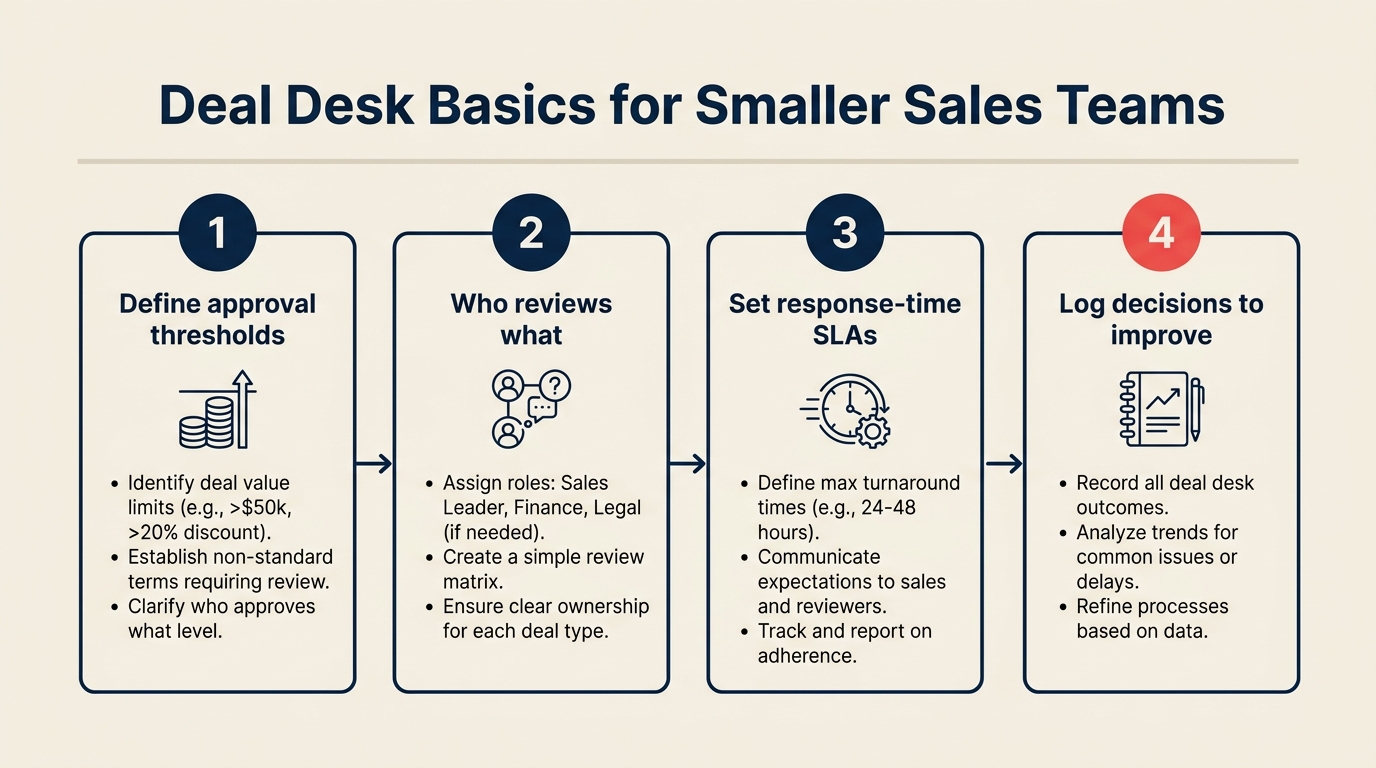
Conceptos Básicos del Deal Desk: Cómo los Equipos de Ventas Pequeños Pueden Aprobar y Cerrar Más Rápido
abr. 18, 2026 · Currently reading
Commit, Best Case, Pipeline: Cómo Definir los Términos de Forecast para que Todo el Equipo los Use Igual
abr. 18, 2026
Análisis de Win/Loss sin Sesgos: un Proceso Repetible para Equipos de Ventas
abr. 18, 2026
Construir un Proceso de Ventas un Tipo de Deal a la Vez
abr. 18, 2026
Multi-Threading en Deals sin Incomodar a su Champion
abr. 18, 2026
El Estancamiento en la Mitad del Pipeline: Cómo Diagnosticar y Resolver Deals Bloqueados
abr. 18, 2026
Planes de Acción Mutua: Cuándo Ayudan y Cuándo Perjudican
abr. 18, 2026
Cadencia Operativa de Ventas: desde el Stand-Up Diario hasta el QBR Trimestral
abr. 18, 2026
Cadencia de Forecast: Semanal, Mensual o Continua — Qué Funciona y Cuándo
abr. 6, 2026
Deal Desk Básico: Cómo los Equipos de Ventas Más Pequeños Pueden Aprobar y Cerrar Más Rápido
Turn this article into takeaways for your work.


Each assistant summarizes the article only for you and suggests best practices for your work.
"Deal desk" suena a algo que solo necesitan las empresas con 500 representantes. ¿Un departamento entero para gestionar aprobaciones de precios? ¿Un comité de revisión formal para cada cotización personalizada? Eso es territorio empresarial.
Pero la realidad es esta: todo equipo de ventas, incluso uno de 10 personas, se enfrenta a deals no estándar. Un prospecto quiere un 40% de descuento sobre la tarifa estándar. Otro necesita un calendario de pagos personalizado. Un tercero solicita términos contractuales que el departamento legal nunca ha revisado. Sin un proceso, cada una de esas situaciones se convierte en una crisis: el representante envía un mensaje al VP por Slack, el VP le escribe al CEO, alguien busca una excepción anterior como precedente, y pasan tres días mientras el prospecto espera.
Un deal desk no necesita ser un departamento. Necesita ser un proceso documentado, un responsable designado y un conjunto de umbrales claros. Así se construye uno que sea lo suficientemente ágil para un equipo pequeño pero lo bastante estructurado para reducir realmente el tiempo de aprobación. También se conecta directamente con la forma en que usted define las categorías de forecast: un commit sin un proceso de deal desk detrás no es más que el optimismo de un representante.
Qué Es Realmente un Deal Desk
Un deal desk es el proceso y las personas responsables de revisar y aprobar los deals no estándar antes de que se comprometan con un prospecto.
Gartner define los deal desks como una capacidad interfuncional que coordina precios, legal, finanzas y ventas para acelerar el deal velocity mientras gestiona el riesgo. Incluso en equipos pequeños, la función central es la misma.
No estándar significa cualquier cosa que se desvíe de sus precios publicados, términos estándar o estructura contractual habitual. Eso incluye:
- Descuentos por encima del umbral aprobado para el representante
- Compromisos plurianuales que requieren revisión financiera
- Calendarios de pago personalizados (neto 90, por hitos, etc.)
- Términos legales que no están en su MSA estándar
- Precios agrupados que no existen en su rate card
Los deals estándar (aquellos que se ajustan a sus precios y plantillas contractuales publicadas) se aprueban automáticamente. El representante cotiza, el prospecto acepta y nadie necesita involucrar a un gerente. El deal desk solo se activa para las excepciones.
Lo que un deal desk reemplaza: la cadena de aprobación informal que actualmente pasa por mensajes directos de Slack, hilos de correo electrónico con cuatro personas en copia y el paseo ocasional al escritorio del CEO. Todo equipo ya tiene un deal desk. La mayoría simplemente no tiene uno documentado ni consistente.
Paso 1: Defina Qué Necesita Revisión del Desk
Lo más útil que puede hacer antes de construir cualquier otra parte del proceso es escribir exactamente qué deals requieren revisión y cuáles no.
Comience con los umbrales de descuento. Su deal desk dedicará la mayor parte del tiempo a las excepciones de precios. Defina:
| Nivel de descuento | ¿Requiere aprobación? |
|---|---|
| 0-10% | El representante aprueba automáticamente |
| 11-20% | Aprueba el gerente de ventas |
| 21-30% | Aprueba el VP de Ventas |
| 31%+ | VP de Ventas + CEO/CFO |
Luego defina los otros factores desencadenantes. Situaciones que no son de descuento pero que requieren revisión:
- Calendarios de pago superiores a neto 30
- Deals plurianuales por encima de $X en TCV
- Términos legales personalizados (cualquier cambio en su MSA estándar)
- Deals que involucran revisiones de seguridad, acuerdos de procesamiento de datos o certificaciones de cumplimiento
- Cualquier deal donde el representante se haya comprometido verbalmente a algo que no está en la plantilla estándar
Documente todo esto en un único documento de referencia y compártalo con cada representante. El objetivo es que cualquier representante pueda determinar por sí mismo si su deal necesita revisión del desk sin tener que preguntarle a un gerente. Si tienen que preguntar, sus umbrales no son lo suficientemente claros. Este es el mismo principio detrás de construir un proceso de ventas deal por deal type: los criterios explícitos superan al juicio informal en todo momento.
Paso 2: Asigne un Responsable del Deal Desk
No un comité. Una sola persona.
En un equipo de ventas de 10 a 30 personas, el responsable del deal desk es generalmente el Director de Sales Operations, un gerente senior de ventas o el VP de Ventas si esos roles no existen. El responsable es la persona que recibe los envíos, gestiona el proceso de aprobación y comunica las decisiones a los representantes.
Lo que hace el responsable:
- Revisa los envíos para verificar que estén completos antes de enrutarlos a los aprobadores
- Es dueño del SLA de respuesta en 24 horas
- Escala al nivel de aprobación adecuado según el tamaño y el riesgo del deal
- Documenta el resultado y cualquier condición de aprobación
- Identifica las excepciones recurrentes que deberían convertirse en política estándar
La ruta de escalación es independiente del responsable. El responsable gestiona el proceso. Los aprobadores toman las decisiones. Defina quién aprueba en cada nivel antes de que llegue el primer envío.
24 horas es el SLA objetivo. No «nos pondremos en contacto antes de fin de semana». Un deal desk que tarda tres días en aprobar un descuento pierde el beneficio de existir. La investigación de Forrester sobre la fricción en el ciclo de ventas B2B muestra que los retrasos internos en las aprobaciones son una de las razones más citadas por las que los compradores se desvinculan o aplazan su cronograma. Esto refleja el SLA de traspaso de SDR a AE: el momentum del deal es frágil, y cada hora de retraso tiene un costo. El representante todavía tiene que gestionar a un prospecto ansioso y un deal paralizado. Si no puede comprometerse con 24 horas, averigüe el porqué antes de implementar esto.
Paso 3: Construya el Formulario de Envío del Deal
El formulario de envío del deal es lo que el representante completa cuando necesita revisión del desk. Existe para dar a los aprobadores todo lo que necesitan para tomar una decisión sin una cadena de correos de ida y vuelta.
Ocho campos. Ni más ni menos para empezar:
Campo 1: Nombre del deal y enlace al CRM La oportunidad específica, enlazada directamente para que los aprobadores puedan ver el historial del deal.
Campo 2: Qué se está solicitando La petición específica en lenguaje claro: «32% de descuento sobre la tarifa anual estándar» o «términos de pago personalizados: 50% al firmar, 50% a los 90 días».
Campo 3: Tamaño del deal (ARR/TCV) El valor en dólares del deal con los términos solicitados.
Campo 4: Fecha de cierre La fecha de cierre comprometida o esperada por el representante.
Campo 5: Por qué la solicitud no es estándar La justificación de negocio que ha dado el prospecto o que ofrece el representante: presión competitiva, ciclo presupuestario, importancia estratégica de la cuenta. No «porque lo pidieron». La razón real.
Campo 6: Qué ocurre si no aprobamos Evaluación honesta: ¿el deal morirá, se irá a un competidor, reducirá su alcance o se retrasará? Esto obliga al representante a pensar en las apuestas reales y ayuda a los aprobadores a sopesar el riesgo.
Campo 7: Contexto relevante Conversaciones anteriores con ejecutivos, excepciones previas concedidas a esta cuenta, cualquier señal de cumplimiento o legal.
Campo 8: Respuesta solicitada antes del La fecha en que el representante necesita una respuesta para mantener el deal en curso.
El formulario puede residir en un Google Form compartido, una página de Notion o un campo dedicado en su CRM. El formato no importa. Lo que importa es que cada envío esté completo antes de enviarse a un aprobador.
Paso 4: Niveles de Aprobación
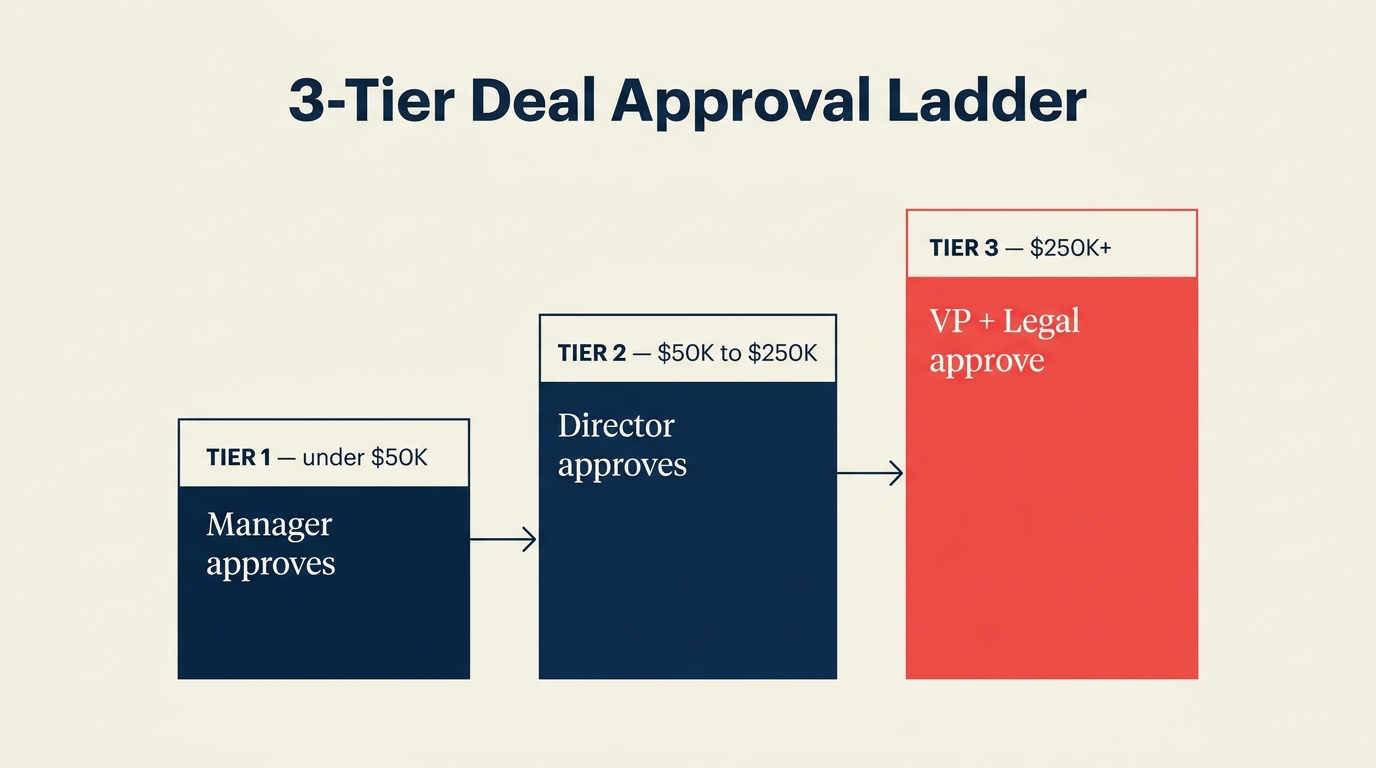
Tres niveles cubren la mayoría de las situaciones. Resista la tentación de crear más.
Nivel 1: Gerente de Ventas
- Descuentos en el rango del 11-20%
- Extensiones estándar (neto 45-60)
- Ajustes de alcance menores dentro de un contrato estándar
Nivel 2: VP de Ventas
- Descuentos en el rango del 21-30%
- Deals plurianuales por debajo de $100K TCV (ajuste el umbral a su negocio)
- Calendarios de pago no estándar
- Cualquier deal con una marca de cuenta estratégica
Nivel 3: CEO o CFO
- Descuentos superiores al 30%
- Deals plurianuales por encima de $100K TCV
- Términos legales personalizados (revisados junto con el asesor legal)
- Cualquier deal con riesgo financiero o de cumplimiento material
Defina los umbrales por escrito antes de lanzar el proceso. Publíquelos donde cada representante pueda verlos. La primera vez que un representante se entere de que su deal requiere la aprobación del CEO no debe ser en el momento en que necesita una respuesta en 48 horas.
Paso 5: Precios Estándar vs. No Estándar
Uno de los resultados más valiosos de construir un deal desk es que lo obliga a mantener una rate card explícita: un documento que define lo que los representantes pueden cotizar sin ninguna aprobación. La investigación del MIT Sloan Management Review sobre estrategia de precios señala que las organizaciones con niveles de precios documentados y gobernanza de descuentos superan consistentemente a aquellas que dependen del juicio ad hoc del representante.
Si su rate card no existe por escrito, los representantes inventan su propia interpretación del «precio estándar» y acaba con cotizaciones inconsistentes entre cuentas. Eso significa que su deal desk estará más ocupado de lo necesario, gestionando solicitudes que deberían haberse resuelto de forma autónoma.
Su rate card debe definir:
- Precios base por nivel de producto y número de licencias
- Multiplicador estándar de anual vs. mensual
- Descuentos estándar para plurianuales (p. ej., 10% para 2 años, 15% para 3 años)
- Niveles de descuento por volumen (si corresponde)
- Qué no es negociable
Actualice la rate card al menos trimestralmente. Asegúrese de que cada representante tenga la versión actual. Un deal desk que procesa excepciones a una rate card desactualizada hace más trabajo del necesario.
Paso 6: Documentación Post-Aprobación
Una vez que un deal es aprobado, tres cosas deben ocurrir antes de que pase a la fase de contrato:
Actualización del CRM: la aprobación se registra en el registro del deal con los términos aprobados, el aprobador y la fecha. No solo «aprobado por el VP». Términos específicos: «32% de descuento aprobado para contrato anual. No se autorizan más concesiones».
Activación de la generación del contrato: quién inicia el contrato, usando qué plantilla, incorporando qué términos aprobados. El responsable del deal desk normalmente activa esto, no el representante.
Comunicación al cliente: ¿quién le dice al prospecto que el deal está aprobado? Normalmente el representante, pero el momento y el lenguaje deben acordarse de antemano. Los representantes a veces comunican la aprobación antes de que el contrato esté listo, lo que crea problemas de gestión de expectativas.
Si la aprobación viene con condiciones (p. ej., «aprobado al 28%, no al 32%»), estas deben comunicarse claramente al representante antes de que vuelva con el prospecto. Nada daña el momentum del deal como un representante que le dice a un prospecto «podemos hacer eso» y luego tiene que retractarse.
Errores Comunes
Un análisis de McKinsey sobre la excelencia comercial B2B encontró que las empresas con marcos claros de gobernanza de precios cierran deals un 10-15% más rápido que las que no los tienen, principalmente porque la fricción interna disminuye.
Aprobación por comité. Si cada deal requiere que tres personas opinen antes de que se tome una decisión, su SLA de 24 horas se convertirá en un SLA de 72 horas. Elija un aprobador por nivel. Los demás pueden ser informados, no consultados.
Excepciones no documentadas que se convierten en precedente. La frase más peligrosa en las negociaciones de deals es «lo hicimos para [Empresa X]». Cada excepción que apruebe sin documentar se convierte en una palanca que el siguiente representante usa para justificar la misma excepción. Registre cada aprobación con sus condiciones en el CRM. El responsable del deal desk debe revisar las excepciones recurrentes trimestralmente y codificarlas en la rate card o retirarlas explícitamente. Su modelo de datos del CRM debe incluir campos para el nivel de descuento, el nivel de aprobación y las condiciones para hacer posible esta revisión.
Representantes que cotizan términos no estándar verbalmente antes de la aprobación. Cuando un representante dice «creo que podemos hacer eso» en una llamada de descubrimiento antes de pasarlo por el deal desk, ya ha perdido el control de la negociación. El prospecto se ancla a ese número. Capacite a los representantes para que digan «déjame verificar eso y te respondo antes de mañana» en su lugar. Es más lento en el momento y más rápido en general.
Plantillas del Deal Desk
Formulario de Envío del Deal
ENVÍO AL DEAL DESK
Enviado por: [Nombre del Rep] | Fecha: [Fecha]
Enlace al CRM: [URL]

1. Nombre del deal:
2. Qué se solicita (términos específicos):
3. Tamaño del deal (ARR):
4. Fecha de cierre esperada:
5. Justificación de negocio:
6. Riesgo si no se aprueba:
7. Contexto relevante (conversaciones previas, historial de la cuenta):
8. Respuesta necesaria antes del:
Matriz de Niveles de Aprobación
| Situación | Aprobador |
|---|---|
| Descuento 11-20% | Gerente de Ventas |
| Descuento 21-30% | VP de Ventas |
| Descuento 31%+ | VP de Ventas + CEO/CFO |
| Términos de pago personalizados | VP de Ventas |
| Plurianual por debajo de $100K TCV | VP de Ventas |
| Plurianual por encima de $100K TCV | CEO/CFO |
| Términos legales personalizados | VP de Ventas + Legal |
Qué Hacer a Continuación
La forma más rápida de fijar correctamente los umbrales de su deal desk es trabajar hacia atrás a partir de datos reales, no hacia adelante desde la teoría.
Extraiga los deals cerrados del trimestre pasado. Etiquete cada uno como:
- Estándar (sin excepciones, cerrado con precios de la rate card)
- Excepción menor (descuento inferior al 20%, gestionado por un solo gerente)
- Excepción mayor (requirió la participación del VP o del CEO)
- Términos personalizados (cambios en la estructura legal o de pago)
Analice los deals en la categoría «excepción mayor». ¿Cuántos fueron directamente al CEO? ¿Cuánto tardaron en cerrarse después de que el representante pidió la aprobación por primera vez? ¿Cuál es el patrón de por qué escalaron tan alto?
Establezca su umbral de Nivel 2/Nivel 3 en función de dónde se agruparon la mayoría de las aprobaciones a nivel de CEO. Si el 80% de las aprobaciones del CEO fueron en deals por encima de $75K ARR, su umbral probablemente debería ser $75K, no $100K.
Construya el proceso en torno a su flujo real de deals, no a un ideal que aún no ha probado. Puede ajustar los umbrales después de tres meses de datos. El mismo enfoque retrospectivo funciona para el análisis de win/loss: use el historial real de deals para calibrar su proceso, no suposiciones.
Más Información

Head of Enterprise Solutions
On this page
- Qué Es Realmente un Deal Desk
- Paso 1: Defina Qué Necesita Revisión del Desk
- Paso 2: Asigne un Responsable del Deal Desk
- Paso 3: Construya el Formulario de Envío del Deal
- Paso 4: Niveles de Aprobación
- Paso 5: Precios Estándar vs. No Estándar
- Paso 6: Documentación Post-Aprobación
- Errores Comunes
- Plantillas del Deal Desk
- Qué Hacer a Continuación