More in
CRM Comparisons
Rework vs Monday Sales CRM: Flexibility vs Depth in 2026
Apr 14, 2026
Rework vs Close: Modern CRMs Head to Head for Mid-Size Sales Teams in 2026
Apr 9, 2026
Rework vs Copper: Which CRM Fits a Google Workspace Team in 2026
Apr 8, 2026
Rework vs Pipedrive: The SMB CRM Showdown in 2026
Apr 6, 2026
Rework vs Folk: Relationship CRMs Compared for Mid-Size Teams in 2026
Mar 31, 2026
Rework vs Salesforce: Which Fits a Growing Sales Team in 2026
Mar 30, 2026
Rework vs SugarCRM: Enterprise Flexibility vs Unified Operations in 2026
Mar 30, 2026
Rework vs Zoho CRM: What You Gain and Lose in 2026
Mar 24, 2026
Rework vs Insightly: Project-Aware CRMs Compared for Mid-Size Teams in 2026
Mar 19, 2026
Rework vs Freshsales: Which CRM Is Easier to Adopt in 2026
Mar 17, 2026
Rework vs Keap: Sales and Marketing Automation for Mid-Size Teams in 2026
If you're running a small business, coaching practice, or solo consulting operation and you've been doing your research on CRM + marketing automation, Keap's name has almost certainly come up. It's been around since 2001 (originally as Infusionsoft) and it has a real, loyal user base of service businesses, coaches, and consultants who rely on it for combining their CRM pipeline with email marketing sequences, payment processing, and client follow-up automation. For that use case, it's genuinely good.
But if you're running a team of 20 to 150 people where sales, marketing, customer success, and operations are all touching shared revenue workflows, and you need leads from WhatsApp, Messenger, and web chat to land in the same place as email leads with routing rules and handoff logic that works across departments, Keap starts to show its limits. This comparison is for the team that's outgrown a solo-operator tool and is trying to figure out whether Rework or Keap fits where they're headed next.
How Each CRM Works
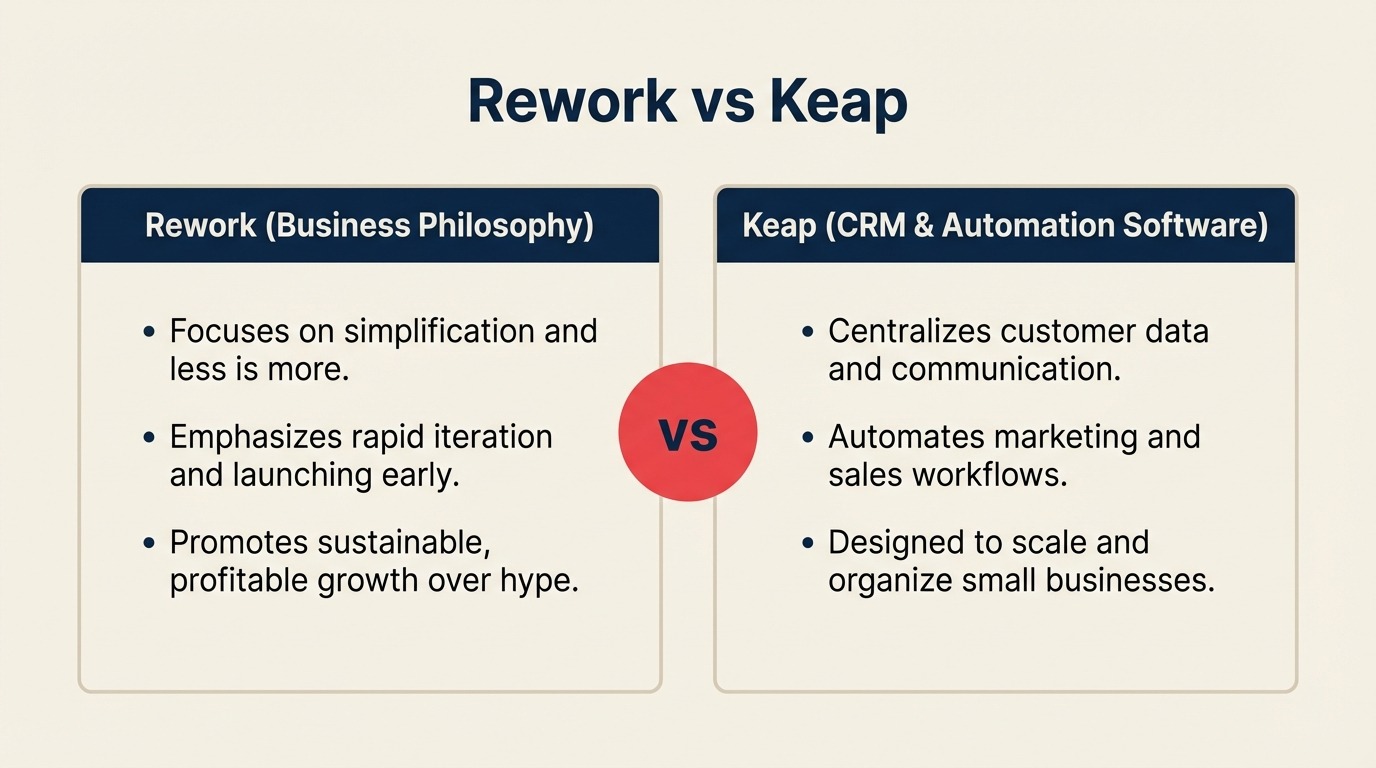
Before the feature-by-feature breakdown, here's a quick visual overview of what each product is and how it's structured. Rework and Keap both combine CRM with automation, but at completely different team scales, seeing the architecture side-by-side makes the rest of this comparison easier to read.
How Rework Works
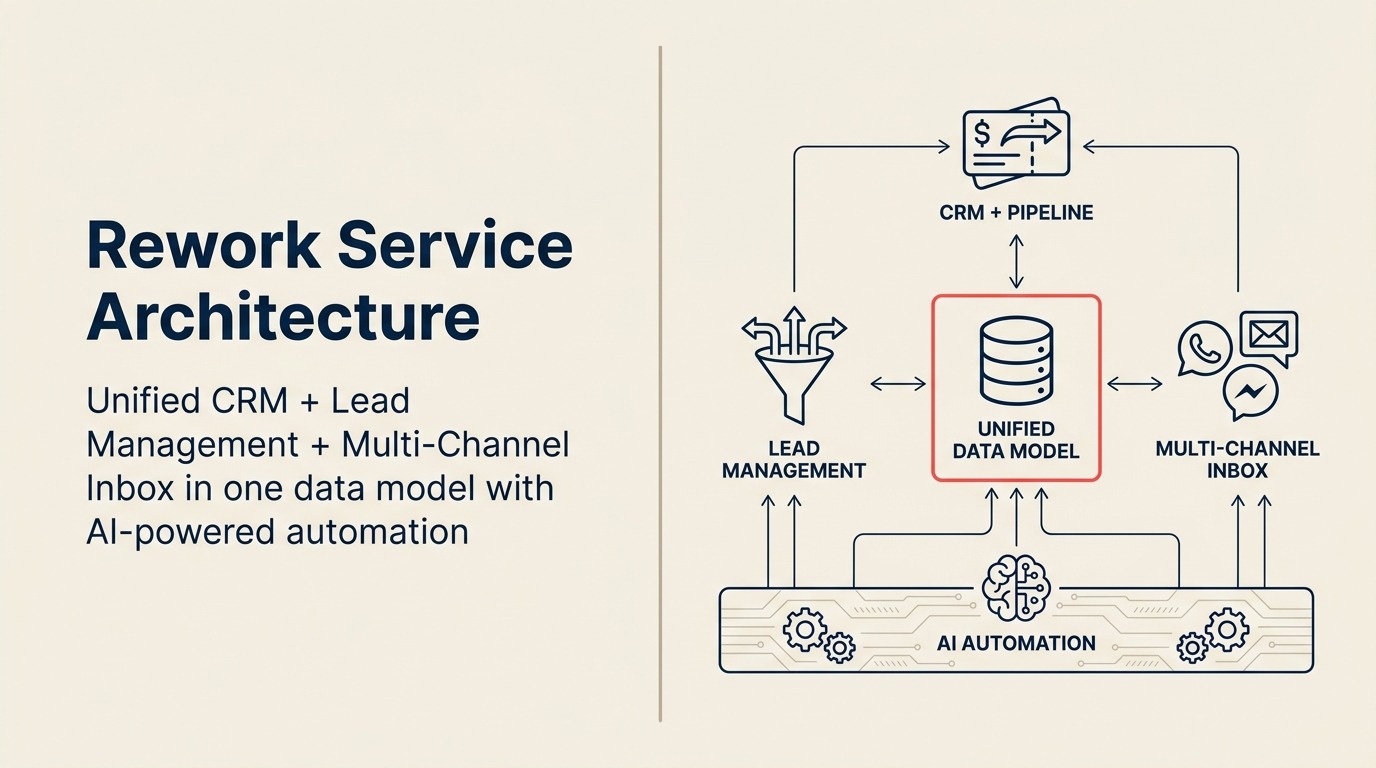
Rework is a unified CRM built for mid-size cross-functional teams (20-500 employees). CRM pipeline, Lead Management, and multi-channel inbox (WhatsApp, Messenger, email, SMS) sit on one data model, so sales, marketing, and CS see the same contact timeline. It's scoped to cross-team revenue operations, routing, handoffs, SLAs, not solo-operator email sequencing.
How Keap Works
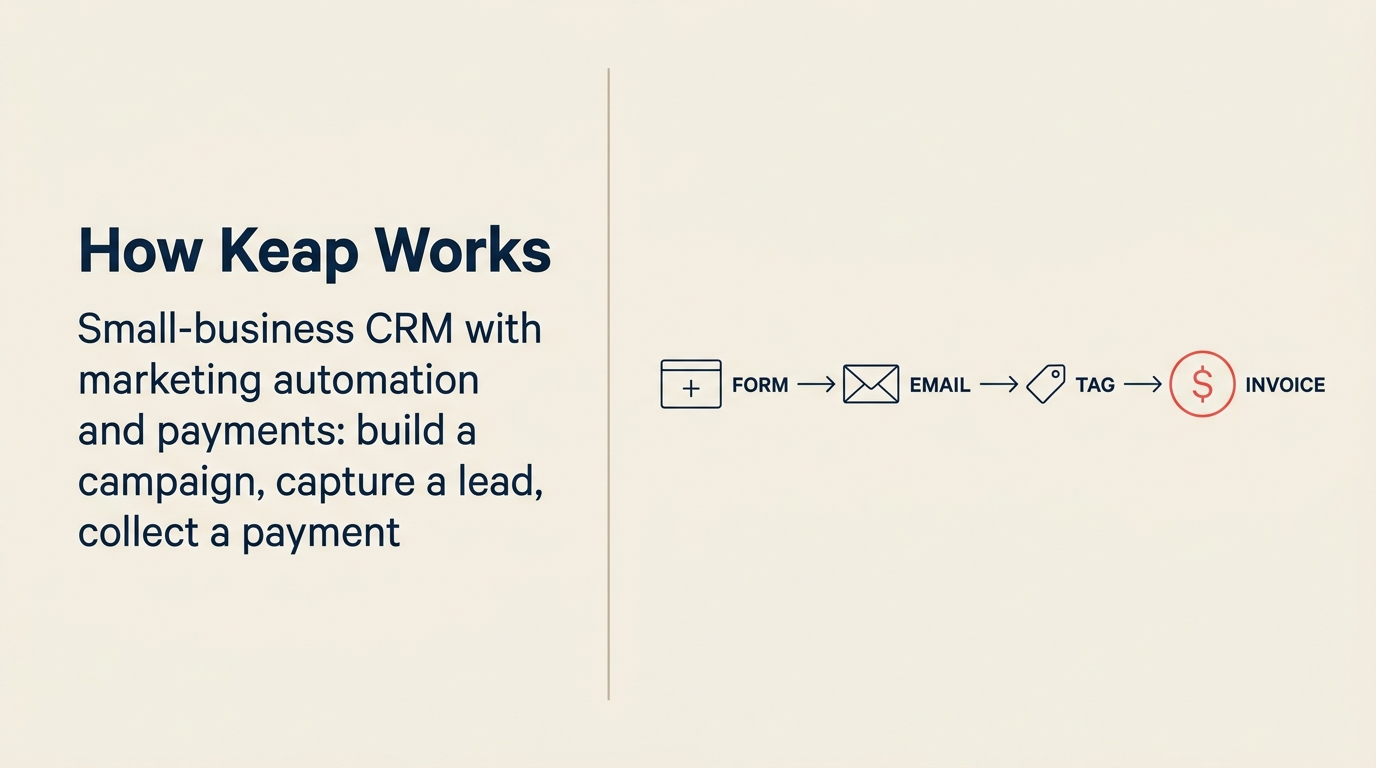
Keap is a small-business CRM with marketing automation and built-in payments. The signature UX is the campaign builder: drop a form, add a sequence, tag the contact, send an invoice, all in one canvas. It's a strong fit for solopreneurs, coaches, and service businesses running the whole business themselves. The tradeoff at 20+ seats: no rule-based lead routing across reps, no unified chat across WhatsApp/Messenger/Instagram DM, and limited cross-team workflow logic.
TL;DR
| Factor | Rework | Keap |
|---|---|---|
| Best for | Mid-size cross-functional teams (20-500 employees) needing CRM + Lead Management + unified chat in one product | Solo operators, coaches, consultants, and small service businesses (1-15 people) needing CRM + marketing automation + payment in one tool |
| Pricing | $999/yr Starter (5 users) or $1,999/yr Standard (10 users) + $12/user/mo above | $299/mo flat (up to 2 users) or $399/mo flat (up to 3 users), billed annually |
| Support | Email + chat + phone on all plans | Email + chat; phone on higher plans |
| Marketing automation | Built-in nurture sequences, lead scoring, campaign attribution, tied to CRM pipeline | One of the strongest in the SMB category: email + SMS automation, landing pages, appointments, payments |
| Unified chat inbox | WhatsApp, Messenger, Instagram DM, web chat, email, SMS, native in one contact timeline | No native social/messaging inbox; email and SMS automation only |
| Cross-team workflows | Yes, sales, marketing, CS, ops sharing one data model | Designed for single-operator or very small team use; cross-department workflows not a design goal |
| Lead distribution | Round-robin, territory, SLA-based routing built in on every plan | Manual assignment; no native lead routing rules |
| Pipeline + CRM | Full visual pipeline with multi-team ownership | Pipeline included; best suited for individual reps or small sales teams |
| Setup speed | 1-3 days for basic CRM; 1-2 weeks for full Lead Management + chat, led by a team with hands-on experience onboarding mid-size sales, marketing, and ops departments end-to-end | 2-5 days for a functional automation-heavy solo setup; Keap-certified consultants (~$3,000-$15,000) can build complex campaign sequences but cannot replicate cross-team onboarding infrastructure |
| Ideal buyer | COO, Head of RevOps, Founder running cross-team ops | Solo consultant, coach, small agency owner, service business operator |
Who Each Tool Is Built For
Target customer profile
| Dimension | Rework | Keap |
|---|---|---|
| Company size | 20-500 employees | 1-15 people (sweet spot: 1-5) |
| Revenue range | $2M-$100M ARR | $100K-$5M revenue |
| Team maturity | Past spreadsheets; sales + marketing + ops sharing workflows | Solo or small team moving off spreadsheets or basic email tools |
| Org shape | Cross-functional, multiple departments touching shared pipelines and contacts | Operator-run, one person or a small admin team managing the full business |
| Primary pain | Disconnected tools, leads falling through handoffs, no single ops source of truth | Manual follow-up, inconsistent client communication, no automation on lead nurture |
| Decision maker | COO, Head of Revenue, RevOps lead, founder-operator at growing company | Founder, solo business owner, service business operator, coach or consultant |
Team fit matrix
| Team | Rework | Keap |
|---|---|---|
| Sales (reps + managers) | Full pipeline, quota tracking, forecasting, territory routing, activity logging | Pipeline with task reminders and follow-up automation, well-suited for 1-3 reps |
| Marketing | Lead capture, scoring, nurture, campaign attribution, marketing-to-sales handoff | Strong email + SMS marketing automation, landing pages, broadcasts, and sequences |
| RevOps | Unified data model across sales + marketing + CS; cross-team SLA reporting | Not a RevOps tool, reporting is operational, not revenue analytics |
| Customer Success | Unified contact timeline from all channels; handoff from sales; health tracking hooks | Post-sale follow-up automation and appointment scheduling |
| Operations | Cross-team workflows, approval chains, process templates | Workflow automation for individual operator processes (payment triggers, onboarding sequences) |
| Finance / Billing | Not a billing tool natively | Native invoicing, quotes, and payment processing, a real differentiator for service businesses |
Core CRM Capability Comparison
Both tools have a contact database and a deal pipeline. But the design philosophies are quite different.
Keap's CRM is built around the idea that one person (or a small team) manages the entire relationship from first inquiry through payment. The pipeline, the automation sequences, the appointment booking, the invoices, and the follow-up tasks all sit in the same product. For a business coach or a boutique agency, that consolidation is the whole product value proposition.
Rework's CRM is designed for companies where different teams own different stages of the customer journey. Marketing captures and scores the lead. Sales converts it. Customer success retains it. RevOps reports across all three. The pipeline is one part of a broader cross-team data model that includes lead management, unified chat, and process workflows.
| CRM Feature | Rework | Keap |
|---|---|---|
| Visual deal pipeline | Yes, multi-pipeline | Yes, with task-based follow-up reminders |
| Contact & company records | Full, with unified chat + email history across channels | Full contact record with tag-based segmentation |
| Activity logging | Automated + manual | Automated for email/SMS; manual for calls and meetings |
| Email sync (two-way) | Yes | Yes, Gmail and Outlook integration |
| Email sequences | Yes, included in all plans | Yes, core product feature, well-executed |
| SMS automation | Yes, unified inbox | Yes, native SMS sequences, additional per-message cost |
| Custom fields | Yes | Yes |
| Appointment scheduling | Via integrations | Native, Keap Appointments built in |
| Invoicing and payments | Not native | Yes, native Keap Checkout and invoicing |
| Landing pages | Via integrations | Native builder included |
| Mobile app | Yes | Yes |
Lead Management Deep Dive
This is where the gap becomes clear for teams above 10 people. Keap handles lead capture and initial follow-up automation well. You can set up a landing page, attach a form, trigger an email sequence when someone opts in, and get a notification to follow up manually when they reply. That workflow is solid for a solo operator managing 20-50 leads a week.
What Keap doesn't have is the infrastructure for routing and distributing leads across a sales team. There's no round-robin assignment, no territory-based routing, no SLA escalation if a lead goes uncontacted for too long, and no marketing-to-sales handoff logic that works across multiple reps. For a team of one or two salespeople, none of that matters. For a 25-person team generating 200 leads a week from multiple channels, it's the operational backbone that prevents dropped leads.
Rework treats lead management as a first-class module. A lead from a Facebook ad, a WhatsApp message, or a web form lands in the same system, gets scored by behavior and fit criteria, gets assigned to the right rep by territory or rotation, and enters a nurture sequence if it's not ready for a sales call. The marketing team sees the full lead funnel. The sales team sees a pre-qualified, pre-assigned queue. RevOps sees attribution from source through to closed deal.
| Lead Management Capability | Rework | Keap |
|---|---|---|
| Lead capture: web forms | Yes, native, embeddable | Yes, native, with custom styling |
| Lead capture: landing pages | Via integrations | Yes, native builder |
| Lead capture: Facebook/Google Ads | Yes, native integration | Via Zapier or 3rd-party |
| Lead capture: chat / conversational | Yes, unified chat inbox feeds leads directly | No native chat capture |
| Lead scoring | Yes, rule-based and behavioral | Basic tag-based segmentation (not score-based) |
| Lead distribution: round-robin | Yes, built in on all plans | Not available natively |
| Lead distribution: territory routing | Yes, built in | Not available natively |
| Lead distribution: SLA escalation | Yes, built in | Not available natively |
| Marketing nurture sequences | Yes, built in, tied to lead record | Yes, strong; one of Keap's core strengths |
| Marketing-to-sales handoff | Native, same product, same data model | Manual or task-based alert |
| Attribution back to pipeline | Yes, lead source tracked through to deal | Partial, source tags carry through; pipeline attribution is basic |
Unified Chat Channels
Keap is an email-and-SMS-first product. That's not a criticism. For many service businesses, email sequences and SMS follow-up cover the majority of client communication, and the automation for those two channels is genuinely strong.
But if your business generates leads from WhatsApp, Facebook Messenger, or Instagram DM, Keap has no native capability for it. For a lot of mid-size companies in e-commerce, education, real estate, coaching, and local services, those channels drive significant inbound volume. Those conversations live in separate apps, not in the contact record.
Rework's unified inbox pulls all of these into a single view tied to the contact record. A prospect who messages on Instagram, then fills out a web form, then sends an email shows up as one contact with one complete timeline. The rep picks up the conversation without having to piece together context from multiple tools.
| Channel | Rework | Keap |
|---|---|---|
| Native, unified inbox, tied to contact record | Not available | |
| Facebook Messenger | Native, unified inbox | Not available |
| Instagram DM | Native, unified inbox | Not available |
| Live web chat | Native, feeds directly to CRM | Not available |
| Email (two-way sync) | Native | Native, strong automation |
| SMS | Native, unified inbox | Native, strong automation; per-message cost |
| Appointment booking | Via integrations | Native, Keap Appointments |
Marketing Automation Comparison
Keap's marketing automation is genuinely one of its strongest assets, and it's worth being honest about that here. The visual campaign builder has been refined over 20+ years. You can build multi-step email + SMS sequences triggered by contact behavior, form submissions, tag changes, pipeline stage moves, and appointment bookings. It's not the most modern interface, but the logic it supports is deep for the SMB category, and the templates for common service business workflows (lead magnet delivery, consultation booking, post-sale onboarding, re-engagement campaigns) are practical and ready to use.
Rework's marketing automation is built for the handoff between marketing and sales. Nurture sequences, lead scoring workflows, and pipeline stage automation are all included. But Rework isn't trying to replace Keap's broadcast email toolset. The emphasis is on the operational layer (routing, distribution, cross-team visibility) rather than the campaign design layer.
| Marketing Automation Feature | Rework | Keap |
|---|---|---|
| Visual campaign builder | Yes, workflow-based | Yes, mature, behavior-triggered campaign builder |
| Email marketing broadcasts | Yes | Yes, full broadcast + segmentation |
| SMS sequences | Yes, included | Yes, native, per-message cost |
| Behavior-triggered automation | Yes | Yes, one of Keap's core strengths |
| Landing page builder | Via integrations | Yes, native |
| Appointment booking integration | Via integrations | Yes, native Keap Appointments |
| Invoicing / quote triggers | Not native | Yes, payment + invoice triggers built in |
| Tag-based segmentation | Yes | Yes, tag-heavy system |
| Lead scoring | Rule-based + behavioral | Basic tag-based logic only |
| A/B testing for emails | Via integrations | Yes, available in Pro tier |
| Campaign analytics | Yes | Yes, open rate, click, conversion reporting |
Pricing at 25, 50, and 100 Seats
Keap's pricing model is fundamentally different from per-seat SaaS tools. It's priced by contact count and capped by user count, not by seat. That makes direct comparison at 25/50/100 seats awkward, because Keap isn't designed for those team sizes.
Keap pricing sourced from keap.com/pricing. Rework pricing sourced from rework.com.
Keap plans (flat monthly pricing, billed annually)
| Plan | Price | Users | Contacts | Key features |
|---|---|---|---|---|
| Keap Pro | $299/mo ($3,588/yr) | Up to 2 | 1,500 | CRM, pipeline, email + SMS automation, landing pages, appointments, payments |
| Keap Max | $399/mo ($4,788/yr) | Up to 3 | 2,500 | All Pro features + A/B testing, advanced reporting, lead scoring, subscription management |
| Max Classic | Contact sales | Unlimited users | Custom | Full automation suite; legacy Infusionsoft product |
Additional contacts: charged in increments above plan limits. Additional users: charged per extra seat.
Rework pricing
Rework Sales Ops has two packages:
- Starter, $999/year for up to 5 users
- Standard, $1,999/year with 10 users included, plus $12/user/month for each additional user
See rework.com/pricing for current details. Both packages include the full CRM, sequences, automation, custom reporting, and unified multi-channel inbox.
Total annual cost comparison at real team sizes
| Team size | Keap Max Classic (est.) | Rework Sales Ops |
|---|---|---|
| 5 users | ~$6,000-$8,000/yr (est.) | $999/yr (Starter) |
| 10 seats | ~$8,000-$12,000/yr (est.) | $1,999/yr (Standard base) |
| 25 seats | Contact sales | $4,159/yr |
| 50 seats | Contact sales | $7,759/yr |
| 100 seats | Contact sales | $14,959/yr |
The pricing gap here tells part of the story. Keap Pro and Max are priced for very small teams. For teams under 5 users who need strong email + SMS automation and don't need lead routing or unified chat, Keap's flat-rate pricing can be a bargain. At 25+ seats, Keap's pricing enters "contact sales" territory for their Max Classic tier, while Rework's package pricing is transparent and significantly lower.
Implementation and Time-to-Value
| Dimension | Rework | Keap |
|---|---|---|
| Basic CRM setup | 1-3 days, led by team experienced with the full lead lifecycle | 1-2 days; strong template library for service businesses |
| Team onboarding (reps) | 3-5 days for full product, included | 1-3 days; primarily single-operator or very small team |
| Lead management configuration | 3-7 days with onboarding team walking through scoring, routing, forms | Not applicable, no native lead distribution or routing |
| Chat inbox connection | 1-2 hours per channel, led by team with mid-size multi-department onboarding experience | Not available, email and SMS only |
| Full implementation (CRM + lead mgmt + chat) | 1-2 weeks, led by team with mid-size multi-department onboarding experience | Not achievable within Keap, the full stack doesn't exist; Keap-certified consultants (~$3,000-$15,000) can build complex campaign sequences but not lead routing or multi-channel chat |
| Data migration from prior CRM | CSV import + API, migration support on all plans | CSV import; migration support available as paid service |
| Admin overhead post-launch | Moderate, cross-team configuration | Moderate to high, campaigns require ongoing maintenance |
| Support model | Email + chat + phone on all plans | Chat + phone on paid plans; paid onboarding packages available |
Keap is honest about what it's built for: a solo operator or a small service team that needs email + SMS automation and basic pipeline. Setup is fast for that use case, and the campaign template library covers common service business patterns well. Keap-certified consultants can build sophisticated automation sequences, but they're working within a product that has no lead routing, no multi-channel inbox, and no multi-team architecture. For a team that has grown past the solo-operator model, that isn't a configuration problem, it's a structural one. Rework's edge is institutional experience: the team has onboarded full Sales, Marketing, RevOps, and CS departments at mid-size companies and applies that hard-earned knowledge of what actually breaks during a multi-team rollout to every new customer. The full stack ships in one product, designed from the ground up for cross-team operations rather than single-operator automation.
When Keap Is the Right Call
Be honest with yourself about whether these scenarios match your operation:
You're a solo operator or a team of 1-5 people running a service business. Keap was literally built for this use case. A consultant, coach, agency owner, or service business with a small client base and a need for consistent automated follow-up will get more out of Keap's feature depth than they would out of Rework, which adds cross-team complexity that isn't needed at that scale.
Marketing automation is your primary need and your team is small. Keap's email + SMS campaign builder, landing pages, appointment booking, and payment processing in one product is a genuine value proposition for businesses where one person wears marketing, sales, and account management hats. That consolidation reduces the tool stack and the monthly bill.
You run a coaching, consulting, or professional services practice. Keap's templates and automation workflows are specifically designed for the repeating patterns of service businesses: lead magnet → consultation booking → proposal send → onboarding sequence → referral request. That vertical depth is hard to replicate from scratch in a general-purpose CRM.
You need invoicing and payment automation tied to the CRM. Keap's native quote, invoice, and payment processing is a real differentiator if billing is part of the client lifecycle you need to automate. Most CRMs, including Rework, push that to integrations.
When Rework Is the Right Call
Your team has grown past 10-15 people and multiple departments share responsibility for revenue. When marketing, sales, customer success, and operations are all touching the same leads and contacts, Keap's single-operator model starts to create friction. Rework's cross-team data model means all four departments see the same contact record and work in the same workflow system.
Your leads come from WhatsApp, Messenger, Instagram DM, or web chat. If any of those channels drive meaningful inbound volume, you need them in the same place as your email leads, linked to the same contact record. Rework's unified inbox handles this natively. Keap has no equivalent.
You need lead routing across a sales team. Round-robin assignment, territory routing, and SLA-based escalation rules don't exist in Keap. For a team generating more leads than one person can handle manually, Rework's distribution logic prevents the spreadsheet workarounds and missed follow-ups that scale organizations typically fall back on.
Marketing and sales handoffs are causing dropped leads. If your marketing team is generating leads that fall into a gap when they reach the sales team, the root problem is usually that marketing and sales are in different tools with no shared data model. Rework puts both teams on the same lead object with the same contact timeline. Keap's handoff is a task notification, not a shared operational system.
You're a 30-150 person company where RevOps needs reporting across the full funnel. Keap reports well on campaign metrics. Rework reports across the full lead lifecycle from capture through closed deal, and that cross-functional view is what RevOps teams actually need.
Decision Framework
| Pick Keap if... | Pick Rework if... |
|---|---|
| Your team is under 10 people and one person manages sales + marketing | Your team is 20-500 and sales + marketing share workflows across departments |
| Your primary need is email + SMS marketing automation for a service business | You need lead distribution (round-robin, territory, SLA) across multiple reps |
| You run a coaching, consulting, or professional services practice | Leads come from WhatsApp, Messenger, Instagram DM, or web chat and need to land in one contact timeline |
| You need invoicing and payment automation built into the CRM | Marketing and sales need a shared data model, not two tools connected by a task alert |
| You want a mature campaign builder with 20+ years of SMB-specific templates | RevOps needs reporting that spans lead source → pipeline → closed deal in one product |
| Your average deal involves appointment booking and a proposal/invoice step | You're scaling past 20 seats and need predictable per-seat pricing without contact limits |
What to Do Next
If you're currently using Keap and feeling friction as your team grows (more reps, more channels, leads falling through handoffs), the clearest diagnostic is to count how many manual steps exist between a lead arriving and a rep making contact. If that number is higher than two, and if any of those steps involve logging into a different tool or copying data between systems, the pain point is structural, not a configuration problem.
If you're evaluating both tools fresh, the decision usually comes down to team size and channel mix. Under 10 people running a service business with strong email + SMS needs? Keap is worth a serious look. At 20+ people with multiple departments and social/messaging channels in the lead mix? Book a Rework demo and come with a list of your current lead sources and your current handoff process. The gap will be apparent within the first walkthrough.
For mid-size teams considering other CRM options alongside Rework, Rework vs Freshsales covers a similar comparison for teams that want AI-assisted selling alongside full lead management. Before scoping any CRM implementation, lead nurturing programs is useful reading for understanding what the nurture layer actually needs to do once leads are captured. And if you're mapping out the full marketing-to-sales handoff before signing a contract, what is lead management explains where CRM ends and lead management begins.

Principal Product Marketing Strategist
On this page
- How Each CRM Works
- How Rework Works
- How Keap Works
- TL;DR
- Who Each Tool Is Built For
- Target customer profile
- Team fit matrix
- Core CRM Capability Comparison
- Lead Management Deep Dive
- Unified Chat Channels
- Marketing Automation Comparison
- Pricing at 25, 50, and 100 Seats
- Keap plans (flat monthly pricing, billed annually)
- Rework pricing
- Total annual cost comparison at real team sizes
- Implementation and Time-to-Value
- When Keap Is the Right Call
- When Rework Is the Right Call
- Decision Framework
- What to Do Next