AI Meeting Notes and Summaries
Turn this article into takeaways for your work.


Each assistant summarizes the article only for you and suggests best practices for your work.
The average professional spends 35 hours per month in meetings. But here's the problem: most of those decisions, commitments, and insights disappear the moment the meeting ends. Someone takes notes, but they're incomplete. Action items get mentioned but not tracked. Strategic discussions happen but aren't documented. And a week later, teams argue about what was actually decided.
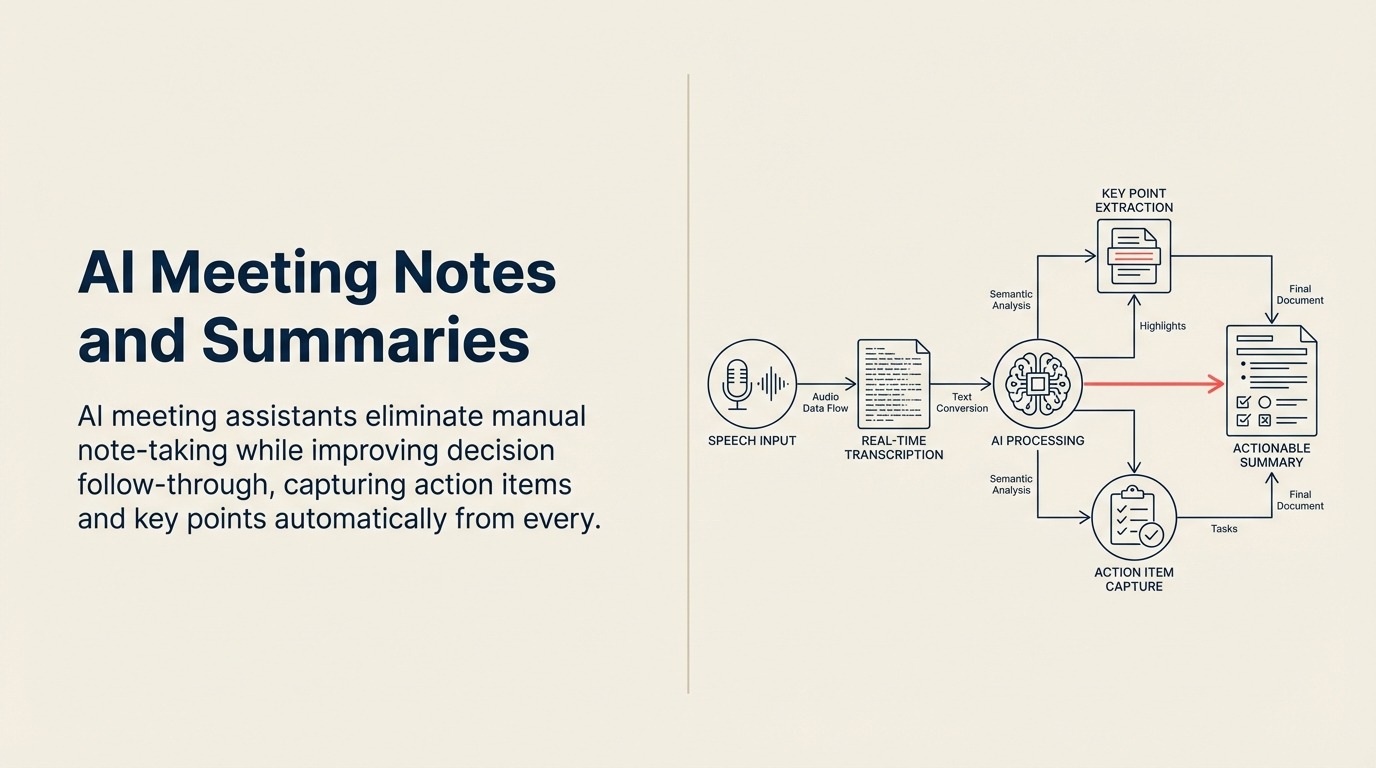
AI meeting assistants have solved this problem. These tools join your meetings, transcribe everything in real-time, identify action items automatically, and generate summaries that capture key decisions without anyone lifting a pen. The result isn't just time saved. It's dramatically better follow-through on what actually gets discussed. When integrated with AI task management tools, meeting action items flow seamlessly into prioritized work queues.
AI Meeting Assistant Capabilities
AI meeting notes drive a direct productivity gain by automatically transcribing every meeting, extracting action items, and generating summaries, which recaptures roughly 5 hours per week per person and lifts action-item follow-through 40-60%. Instead of one person half-listening while they type, the whole team stays present in the discussion and still walks away with an accurate, searchable record of what was decided.

Modern AI meeting tools go far beyond simple transcription. They understand context, identify speakers, extract commitments, and organize information in ways that make it immediately useful.
Real-time transcription captures every word spoken with 90-95% accuracy, even with accents and industry terminology. You can search your entire meeting history for specific topics, finding exactly when something was discussed.
Speaker identification labels who said what, making transcripts readable and attributable. This matters when you need to know who committed to a deliverable or disagreed with a decision.
Action item extraction is where AI adds real value. Instead of manually parsing transcripts, the AI identifies commitments, deadlines, and follow-ups automatically. "I'll send that proposal by Friday" becomes a tracked action item assigned to the right person.
Summary generation condenses hour-long meetings into digestible overviews. Key topics, decisions, and next steps get highlighted so people can catch up quickly or refresh their memory before the next meeting. Quality summaries require clear prompts and structure, following prompt engineering best practices for consistent results.
Searchable meeting archives turn conversations into institutional knowledge. When someone asks "When did we decide to change vendors?" you can search meeting transcripts and find the exact discussion.
Leading AI Meeting Tools
Here is a quick comparison of the most-used tools by entry price and standout strength, so you can shortlist before reading the detail below:
| Tool | Starting price | Standout strength |
|---|---|---|
| Otter.ai Business | $16.99 / user / mo | Speaker ID, summary slides, Salesforce logging |
| Fathom | Free, teams $19 / user / mo | Instant summaries, one-click sharing |
| Fireflies.ai | $10 / user / mo | Deep CRM and project-tool integrations |
| Teams / Zoom native | Included in paid plans | Zero new tool to adopt |
| Tactiq / Avoma / Grain | Varies | Browser capture, revenue intelligence, clip sharing |
Pricing aside, the real decision is integration depth: a tool that pushes action items into the systems your team already lives in will beat a more accurate transcriber that strands its output.
Otter.ai Business has become the standard for many teams. Their real-time transcription works across Zoom, Google Meet, and Microsoft Teams. The AI identifies speakers automatically and generates summary slides that highlight key points.
The chat feature lets participants add comments and questions during meetings, creating threaded discussions alongside the transcript. Integration with Salesforce automatically logs sales calls and extracts key points to CRM records.
Pricing starts at $16.99 per user per month for teams, with unlimited transcription and 6,000 minutes of AI summaries.
Fathom focuses on making meetings immediately actionable. Their AI generates summaries within seconds of meetings ending, formatted to highlight action items, decisions, and key topics. One-click copying to Slack, email, or project management tools makes distribution effortless.
The platform integrates with seven video conferencing tools and automatically syncs notes to your CRM. It's free for individual use, with team plans at $19 per user per month.
Fireflies.ai excels at integration depth. Notes sync automatically to Slack channels, CRM systems, and project management platforms. The conversation intelligence features track talk time, sentiment, and topics discussed over time, helping teams improve meeting effectiveness.
The search and filtering capabilities are excellent. You can find specific topics, questions, or action items across all meetings. Pricing is $10 per user per month for Pro features.
Microsoft Teams and Zoom native AI features are improving rapidly. Teams Premium includes AI-generated meeting recaps, chapters that break recordings into topics, and personalized timeline markers. Zoom's AI Companion generates meeting summaries and action items without extra cost for paid accounts.
The advantage is zero friction: no new tool to adopt. The limitation is less sophisticated AI compared to specialized tools.
Tactiq, Avoma, and Grain each bring unique strengths. Tactiq works as a Chrome extension with strong customization for summary formats. Avoma focuses on revenue teams with conversation intelligence designed for sales. Grain offers excellent clip creation for sharing specific meeting moments.
Use Cases by Meeting Type
Different meeting types benefit in different ways from AI assistance.

Sales calls need comprehensive capture because every detail matters for deal progression. AI extracts customer requirements, concerns, competitor mentions, and next steps. Sales reps can focus on listening and building rapport instead of frantically typing notes.
Post-call, AI summaries auto-populate CRM fields, create follow-up tasks, and identify opportunities mentioned during conversation. What used to take 15-20 minutes of manual work happens automatically.
Product meetings generate decisions about features, priorities, and technical approaches. AI captures what got decided, who owns what, and when things are due. When someone asks "Why did we build it that way?" six months later, you have the exact discussion documented.
Executive meetings involve strategic decisions that need clear documentation. AI summaries provide accountability (everyone knows what was decided and what they committed to). Sharing summaries with stakeholders who couldn't attend keeps everyone aligned.
Customer meetings capture requirements, feedback, and concerns that inform product development. Instead of relying on one person's interpretation, product teams can review transcripts and hear customers in their own words.
Team standups benefit less from full transcription but still gain value from action item tracking. Quick async reviews of standup summaries work better than requiring everyone to attend live.
The AI Meeting Workflow
The best results come from integrating AI into your meeting workflow, not just bolting it on.

Pre-meeting: Agenda preparation
Share meeting agendas in advance and connect them to your AI assistant. Some tools can pull agenda topics into their summary format, making it easy to track which items got covered.
During: Real-time capture
The AI joins automatically when meetings start. Participants can focus on discussion instead of note-taking. Some teams use the live transcript to paste links, documents, or data that comes up in conversation, creating a richer record.
For important points, you can highlight or bookmark moments during the meeting, ensuring they appear prominently in summaries.
Post-meeting: Summary distribution
Configure templates that match your team's needs. Sales teams might want summaries formatted with customer name, deal size, next steps, and concerns. Product teams might want decisions, open questions, and action items.
Automatically send summaries to relevant Slack channels, email groups, or shared docs. The key is making information accessible without requiring people to actively seek it out.
Follow-up: Action item tracking
Connect AI-extracted action items to your project management system. Asana, Jira, Monday.com, and other platforms can automatically create tasks from meeting commitments.
This closes the loop. Discussions turn into documented action items that get tracked to completion.
Integration with Collaboration Tools
The value multiplies when meeting AI connects with other systems.
CRM updates from sales calls: Fireflies and Avoma automatically log call summaries to Salesforce, HubSpot, or Pipedrive records. Key points populate deal notes, custom fields update based on conversation content, and follow-up tasks create automatically.
Project management task creation: Extract action items and send them directly to Asana, Jira, ClickUp, or Linear. Include context from the meeting discussion so people understand why the task matters.
Document generation: Turn meeting decisions into documented processes, specs, or project plans. Instead of someone manually writing up what got decided, AI generates first drafts that just need review. For technical meetings, these capabilities complement AI documentation tools to maintain comprehensive project documentation.
Privacy and Consent Considerations
Recording meetings involves legal and ethical considerations you can't ignore.
Recording policies: Many jurisdictions require all-party consent for recording. Even where it's legally allowed, it's good practice to announce recordings and give participants the option to object.
Configure your AI assistant to announce its presence when joining meetings. Most tools can send automatic notifications to all participants.
Data storage and access: Understand where transcripts are stored, who has access, and how long they're retained. For sensitive discussions, you may need tools with specific compliance certifications.
Meeting AI tools typically offer SOC 2, GDPR compliance, and enterprise data controls. Review security documentation for meetings involving confidential information.
External participants: Be extra careful when external customers, partners, or candidates are on calls. Some companies require explicit consent before recording external meetings, even if internal recordings are standard.
Measuring Meeting ROI
AI meeting tools deliver measurable productivity gains.

Time recapture from note-taking: If someone spends 20 minutes per meeting taking notes, and they're in 15 meetings per week, that's 5 hours recaptured. At a $100,000 salary, that's roughly $2,500 per month in value from time reallocation.
For a team of 10 people in similar meeting loads, you're looking at $25,000 per month or $300,000 per year in recaptured time.
Action item completion rates: Teams report 40-60% improvement in action item follow-through when commitments get automatically tracked from meetings. The accountability of documented commitments drives completion.
Information retention improvement: When meeting content is searchable and summarized, people reference it. Instead of asking "What did we decide about X?" they search transcripts and find answers. This reduces repeat discussions and speeds up execution.
Onboarding acceleration: New team members can review past meeting transcripts to understand context, decisions, and team dynamics. What used to take months of osmosis happens in weeks of deliberate review.
The soft benefits matter too: reduced meeting stress, better focus during discussions, and confidence that important points won't slip through cracks.
Getting Your Team to Actually Use It
The best AI meeting tool doesn't help if your team won't use it. Here's what works for adoption:
Start with a pilot group that sees clear value (often sales or customer success teams who have the most meeting load). Let them become advocates before rolling out company-wide.
Make it opt-out instead of opt-in. Configure the AI to join all meetings automatically unless explicitly removed. Friction kills adoption. Make the default experience include AI assistance.
Share early wins publicly. When AI catches an important commitment someone forgot, or when a summary resolves confusion about what got decided, highlight it. Social proof drives behavior change.
Connect summaries to existing workflows. If your team already has a Slack channel for customer feedback, automatically post customer meeting summaries there. Meet people where they already work. Successful implementations follow structured AI workflow automation principles to ensure AI-captured insights drive action.
The goal isn't just capturing meeting content. It's turning conversations into documented decisions and tracked commitments. That's what transforms meeting time from a necessary evil into actual productive work.
Frequently Asked Questions
How much time do AI meeting notes actually save?
If someone spends 20 minutes taking notes across 15 meetings a week, that's about 5 hours recaptured per person. For a 10-person team on a $100,000 average salary, that reallocation is worth roughly $300,000 per year, before counting the gain from better follow-through.
How accurate is AI meeting transcription?
Leading tools transcribe at 90-95% accuracy, including with accents and industry terminology. Speaker identification labels who said what, so transcripts stay readable and attributable. Accuracy improves further when you upload an agenda or glossary of product terms in advance.
Do AI meeting tools improve action-item follow-through?
Yes. Teams report 40-60% improvement in action-item completion when commitments are auto-extracted and pushed into a project tool. Connecting them to your AI task management tools closes the loop from discussion to tracked work.
Is recording meetings legal?
Many jurisdictions require all-party consent, so configure the assistant to announce itself when it joins and give participants a chance to object. For external calls with customers or candidates, get explicit consent first. Review each tool's SOC 2 and GDPR posture for confidential discussions.
How do AI meeting notes fit a broader productivity stack?
They work best as one node in a connected workflow, feeding summaries into Slack, your CRM, and project tools rather than living in isolation. Pair them with AI workflow automation and AI documentation tools so captured decisions turn into action and durable records.

Customer Success Operations Manager